
AnimeOcean - Anime Streaming Script
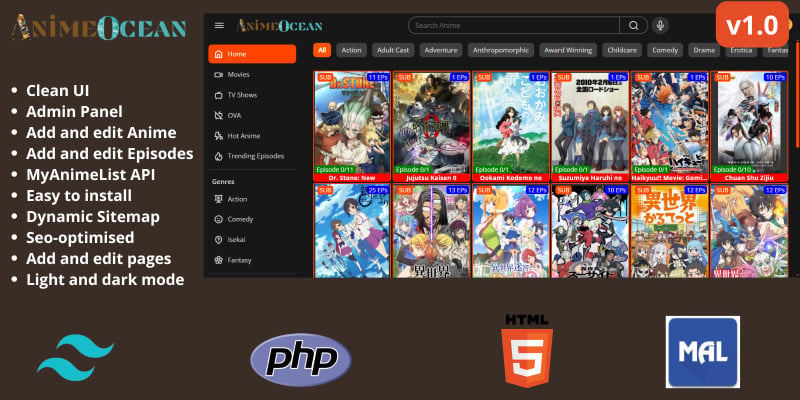
Description
AnimeOcean is a comprehensive anime tracking and community platform that leverages the MyAnimeList API to provide rich anime information, user interactions, and management capabilities. This script uses PHP, HTML and CSS plus JavaScript for the front end and tailwind CSS for the anime dashboard.
This project uses the MySQL database to store site data from the MyAnimeList API. The admin can then later add episodes manually with embed and download links.
With this Anime listing and streaming script, the admin can add new anime details and specify if the episodes to be added later are "SUB" or "DUB". To add anime, the admin will only need to get the anime ID from MyAnimeList.net and then submit the anime details which he/she will save to the database. You can edit anime details once created, as well as add and edit the episodes for anime already saved to the database.
This script comes with a system to dynamically generate a sitemap which you will see the sitemap index URL from the dashboard.
Notes
- This script doesn't provide the option to upload anime videos to your hosting directly
- Adding episode embed URLs will need to be done by uploading the anime episode video to any video hosting platform of your choice (Dailymotion, Rumble, Youtube, OK.ru, etc) and then adding the embed/download link from the dashboard.
- Adding download URL for an episode is optional
Demo
- Homepage: https://anime.237coders.site/
- Admin account: admin@email.com – admin1234
- Login page: https://anime.237coders.site/l...
Fix the little bug with Japanese characters
We noticed a little bug with the encoding of Japanese characters during saving of anime data. Here is how to fix it.
1- Locate the admin/add-anime.php file and at the very top after the <?php tag, add
header('Content-Type: text/html; charset=UTF-8');
2- Next, locate this line of code $this->connection = new mysqli($this->host, $this->username, $this->password, $this->database); and after it add
$this->connection->set_charset("utf8mb4");
Do the same with the admin/edit-anime.php file
Changelog
Version 1.0.2
- Add option for creating custom theme and uploading the theme css from admin dashboard
- Now commes with 6 prebuilt custom CSS themes to chose from
- Added Custom coment system
Version 1.0.1
- Add option for adevertisement
Version 1.0
- Initial release
Features
- Clean and simply Youtube-like UI
- Light and dark mode
- Ajax live search for anime based on the title, English alternative title or Japanese alternative title.
- Automatic sitemap
- MySQL database
- Anime and episode details pages with related anime and episodes
- Anime can add multiple download URLs and embed URLs for each episode
- Like and dislike for Amime
- User registration, login with password reset option
- Change site settings from the dashboard
- Shortcode system for SEO metadata to dynamically get the site name, anime title, episode title, etc
- Share buttons and anime and episode view count
Requirements
To install and run this script, you will need to have a domain name or subdomain. Below are the key requirements:
Server Requirements
- PHP 8.2 or higher
- MySQL 5.1 or higher
- Apache/Nginx Web Server
- Minimum 256MB RAM
Key required PHP extensions
- mysqli - MySQL database interactions
- pdo - Database abstraction layer
- curl - HTTP request handling
- json - JSON encoding/decoding
- mbstring - Multibyte string handling
- openssl - Cryptographic operations
- gd - Image processing
- zip - ZIP file handling
- xml - XML parsing
- intl - Internationalization support
- filter - Data filtering and validation
- session - Session management
- ctype - Character type checking
Instructions
Read the documentation included on how to install this script.
| Author | 237Coders |
|---|---|
| Category | Scripts & Code / PHP Scripts / Multimedia / Video |
| Price | $20 |
| Extended License | $60 |
| Likes | 7 |
| First Release | Dec 17, 2024 |
| Last Update | Nov 12, 2025 |
| Files included | .php, .css, JavaScript .js |
| Software version | PHP 8.2, PHP 8.3 |
Categories
Tags
External listing. code.market does not sell this product and does not process payment for it. Pricing, payment, delivery, licensing, refunds, and support are handled by the third-party merchant on its own website. We may earn an affiliate commission from a referral. Details.