
Almarfeld Stow - Self Storage HTML Template
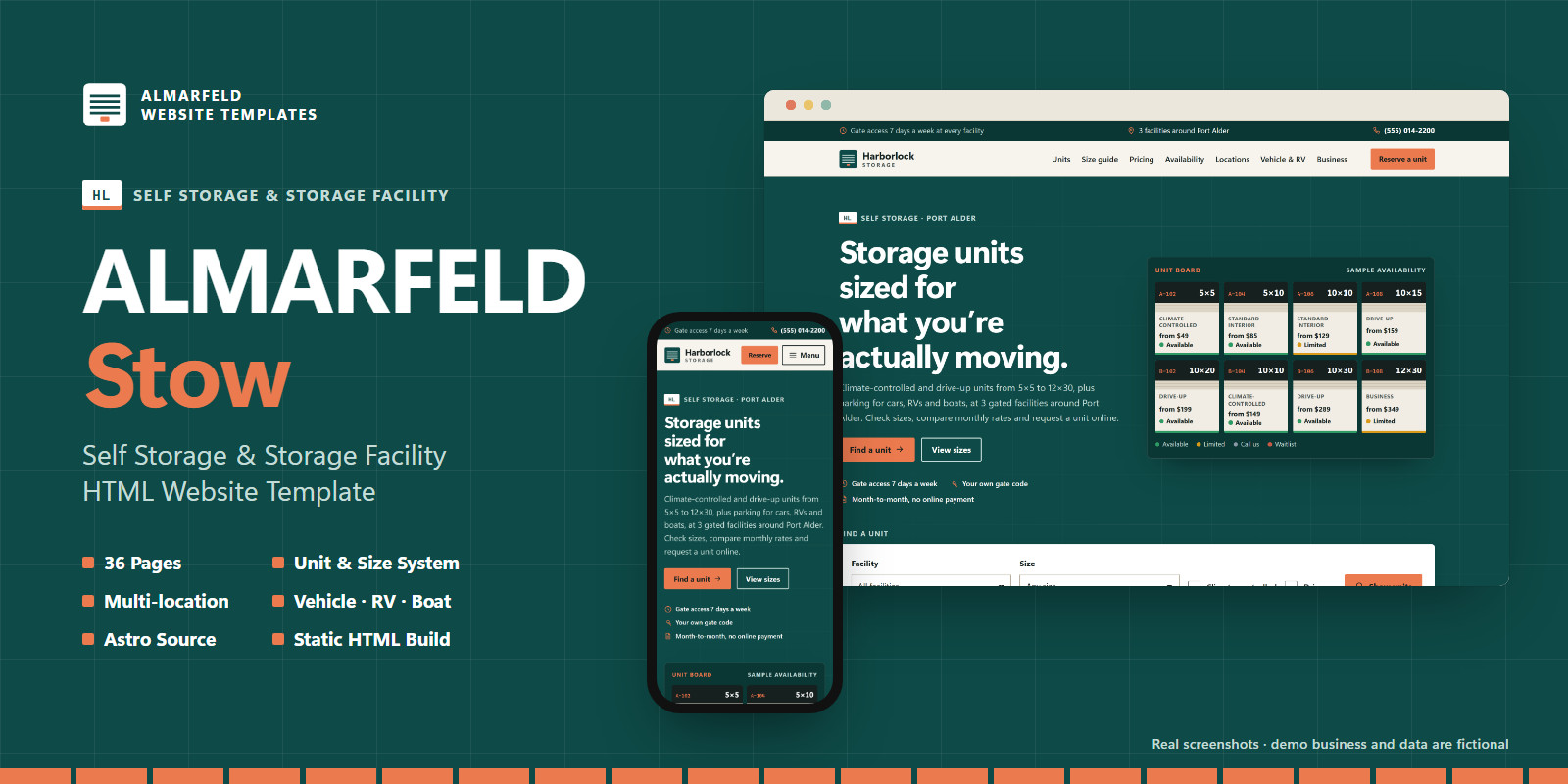
Description
Self Storage & Storage Facility HTML Website Template
ALMARFELD Stow is a website template built specifically for self-storage operators: single sites, multi-location storage companies, climate-controlled storage, vehicle, RV and boat storage, business storage, and the agencies that build sites for them. It is not a generic business template with storage text pasted in. The pages, data and components follow the way storage units are actually chosen and rented.
You get the full Astro source and a ready-to-upload static HTML build. No backend, database, CMS or framework runtime is required.
What's included
36 generated pages: home, about, storage units, 8 unit pages, visual size guide, pricing, availability, reserve, climate-controlled, vehicle, RV, boat and business storage, features & security, locations, 3 facility pages, guides, 4 guide articles, FAQ, customer stories, contact, privacy, rental terms and a custom 404.
Storage-unit data system. Each unit type is one entry in a data file: dimensions, floor area, climate control, drive-up, floor, vehicle use, door type, and a price and availability status for every facility that offers it. Unit pages, the unit list, pricing tables, the availability matrix, the homepage unit board and the request form are all generated from that data.
Visual size guide. Original top-down floor plans of 5×5, 5×10, 10×10, 10×15 and 10×20 units, all drawn to the same scale with example layouts. Includes a quick "What are you storing?" estimator, room comparisons and "typically fits" lists worded as typical, not guaranteed.
Availability demonstration. A filterable matrix of unit types and parking spaces by facility with four statuses: Available, Limited availability, Call for availability, Waitlist. The statuses are static sample data that you edit in the data files (or generate at build time from your own system). The template does not connect to a live inventory system, and the demo says so.
Multi-location support. Add or remove facilities in one file. Each facility gets its own page with office hours, gate access hours, a schematic site plan, the units and parking it offers, features, directions and areas served. Filters, availability columns, form options, the footer and structured data follow automatically.
Storage types that sell units: climate-controlled storage, drive-up units, business storage (loading bay, parcel acceptance, staff access codes), and separate vehicle, RV and boat storage pages with parking bays sold by length and editable example rules.
Pricing configuration. Monthly prices per unit and facility, a "from" price calculated automatically, admin fee, deposit, billing terms, optional extras and a protection/insurance note, all in data files. Currency formatting is configurable.
Request form, not a booking engine. A "Reserve / request availability" form with facility, unit, move-in date, duration, climate preference and conditional vehicle fields. Links from unit, facility and availability pages preselect the unit and facility, and a summary shows the sample status and rate for the selection. In demo mode nothing is sent and the confirmation says no unit was reserved. You can switch the form to Formspree, Netlify Forms or your own endpoint. A submission is then a request to the office: the template does not reserve inventory or take payments.
Built for buyers to edit: business details, navigation and form settings in one config file; content in clearly commented data files; colours, type, spacing and radii as CSS custom properties. Facility names, counts, bay lengths and similar values in page copy are derived from the data. A data checker (npm run check) flags contradictions such as a drive-up unit listed at a facility without drive-up storage. ata
ata
Technology
- Astro 7, static output; the
dist/build is plain HTML, CSS and a few KB of vanilla JavaScript - No React/Vue, no Tailwind/Bootstrap/jQuery, no external requests, system fonts
- Every page works without JavaScript (filters and the demo form need it)
SEO and structured data
Unique titles and descriptions, canonical URLs, Open Graph and Twitter tags, sitemap, robots.txt, breadcrumbs, and JSON-LD: SelfStorage (a schema.org LocalBusiness type) for each facility with address, hours and amenities, plus Organization, WebSite, Service with Offer pricing, Article, FAQPage and BreadcrumbList. No fake review or rating markup.
Accessibility and quality
Skip link, landmarks, one H1 per page, visible focus, accessible mobile menu, native accordions and filter panel, labelled forms with an error summary, reduced-motion support. Tested at 320–1440 px in Chromium, Firefox and WebKit with axe-core (0 violations in our tests) and Lighthouse (100 in all four categories on the pages we tested, on localhost).
Documentation
Getting started (static upload or Astro source), customization, content guide (units, sizes, availability, pricing, facilities, vehicles), forms, deployment (Netlify, Cloudflare, Vercel, GitHub Pages, cPanel), project structure, licensing and assets.
Demo content
The demo business Harborlock Storage is fictional, and so are its facilities, addresses, phone numbers, prices, availability, hours and customer stories. Illustrations, icons and the logo are original to this template. No stock photos are included.
Features
- 36 static pages generated from data files
- Storage-unit data system: sizes, types, prices and status per facility
- Visual size guide with to-scale floor plans and size estimator
- Static sample availability matrix with facility and type filters
- Multi-location: one page per facility with office and gate hours
- Climate-controlled, drive-up and business storage pages
- Vehicle, RV and boat storage pages with bays sold by length
- Pricing tables, admin fee, extras and billing terms in data
- Request-availability form with unit and facility preselection
- Demo, Formspree/endpoint and Netlify Forms modes (no booking engine)
- Collapsible accessible unit filters on mobile
- Full Astro 7 source plus ready-to-upload static HTML build
- SelfStorage, Service, FAQPage and BreadcrumbList structured data
- Sitemap, robots.txt, canonical URLs, Open Graph and Twitter tags
- Accessible: skip link, focus styles, mobile menu, labelled forms
- No external requests, no frameworks, system fonts
- Data consistency checker and dist verification scripts
- Detailed buyer documentation
Requirements
To use the ready-made website (dist/):
- Any web host that serves static files (shared hosting, cPanel, Netlify, Cloudflare, Vercel, GitHub Pages…)
- No PHP, database or Node.js needed
- The site must be served from the domain root (or a subdomain), not a subfolder
To customise the source (source/):
- Node.js 22.18 or newer and npm 10+
- A code editor
- Basic familiarity with editing TypeScript data files and running npm commands
For real form submissions (optional):
- A form service such as Formspree, or Netlify Forms, or your own endpoint
- Online reservations, payments or live inventory need your own backend or storage-management software; they are not included
Browsers: current versions of Chrome, Edge, Firefox and Safari. Tested in Chromium, Firefox and WebKit.
Instructions
Upload the static site (no Node.js):
- Unzip the package.
- Upload the contents of
dist/to your web host's root folder (for examplepublic_html/). - The demo is live with the fictional Harborlock Storage content.
Customise the source:
- Install Node.js 22.18+.
- In
source/, runnpm ci, thennpm run devand open http://localhost:4321. - Edit
src/config/site.ts(business name, URL, phone, email, form mode) and the data files insrc/data/(facilities, units, prices, availability, features, FAQ). - Change colours in
src/styles/tokens.css. - Run
npm run qa(data checks, type check, build, verification) and upload the newdist/.
Full guides are in documentation/: getting started, customization, content guide, forms, deployment, project structure, licensing and assets.
The form ships in demo mode and sends nothing. To receive requests, set form.mode to endpoint (Formspree or your own URL) or netlify in src/config/site.ts. A submission is a request, not a reservation.
| Author | almarfeld |
|---|---|
| Category | Themes / HTML / Business |
| Price | $39 |
| Extended License | $117 |
| First Release | Oct 19, 2026 |
| Last Update | Oct 19, 2026 |
| Files included | .css, .html, .ts, .json, .svg, .md, package.json, .xml, JavaScript .js |
Categories
Tags
External listing. code.market does not sell this product and does not process payment for it. Pricing, payment, delivery, licensing, refunds, and support are handled by the third-party merchant on its own website. We may earn an affiliate commission from a referral. Details.
Products of the Week.
Submit🥇

Actionbook
It works inside the user's own browser with the accounts already signed in. The user describes the result they need, and the agent reads, clicks and types through the pages, then delivers a dashboard or report where each data links back to its source.
Other · 713 views · 9 clicksOther · Week 44 · 713 views · 9 clicks
🥈

Free social media tools for creators & solofounders
295 free tools for growing your social media: write, plan, grow on local AI models, 100% free forever, No sign-up required, No trial. Write, check and measure posts on LinkedIn, Instagram, TikTok, X, YouTube, Reddit, Product Hunt and more: a free social media scheduler for 17 networks, engagement rate calculators, character counters, best time to post, hook generators and follower growth calculators. No login anywhere, no API or credit usage.
683 views · 6 clicksWeek 44 · 683 views · 6 clicks
🥉

STOP GUESSING WHAT TO POST
AI that learns your brand voice and builds a month of consistent, on-brand social content: carousels, posts and hooks that sound like you, not like everyone else's AI.
SaaS · 1,929 views · 21 clicksSaaS · Week 44 · 1,929 views · 21 clicks
#4

Hand-Placed Backlinks $9.99 per link. Flat rate.
Buy hand-placed forum, Q-A and directory backlinks. Flat $9.99 per link, no subscriptions — you only pay for approved listings.
Website · 1,881 views · 17 clicksWebsite · Week 44 · 1,881 views · 17 clicks
#5

Conversational Backlinks for Busy Founders
Place Backlink Relevant Conversation for your domain across Forums and Conversations
39,339 views · 211 clicksWeek 44 · 39,339 views · 211 clicks
#6

Free Invoice Generator - PDF Invoices in Your Browser, No Sign-Up
A free invoice maker for freelancers and small businesses: fill in the invoice, check the live preview, and download a PDF that looks exactly like it. Any currency, tax per item, three templates, no sign-up, and nothing leaves your device.
621 views · 11 clicksWeek 44 · 621 views · 11 clicks
#7

Merge PDF Files Free - Combine PDFs in Your Browser, No Upload
A free PDF merger for office workers, students, and freelancers: combine PDFs and images into one file in the browser, reorder files and pages, pick page ranges, keep bookmarks, and open password-protected PDFs. Nothing is uploaded, no sign-up, no watermark.
563 views · 4 clicksWeek 44 · 563 views · 4 clicks