
AI PDF Scanner And OCR Editor Android App
Description
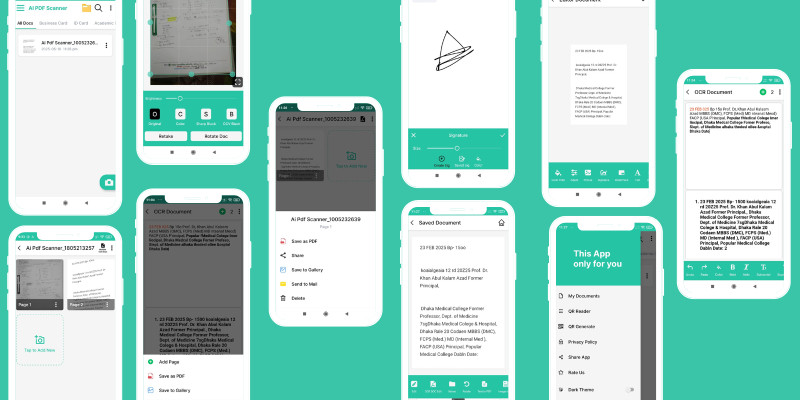
AI PDF Scanner & OCR Editor is a powerful and fully native Android application built to scan, extract, edit, and manage documents efficiently using advanced OCR technology.
The app uses Google ML Kit OCR to accurately recognize text from images, handwritten notes, invoices, books, and official documents. Extracted text can be edited instantly with customizable fonts, sizes, colors, and formatting options before saving.
Users can export documents as high-quality PDFs or images (PNG) and combine multiple scans into a single multi-page PDF. Built-in image enhancement tools help improve scan quality with cropping, brightness, contrast, and color filters.
The app also includes a document organizer to manage scanned files, along with watermark and digital signature support for document protection. Additional tools such as QR code scanner and generator make the app a complete document solution.
AI PDF Scanner & OCR Editor is designed with a modern Material UI, supports dark mode, and focuses on privacy. No account or signup is required, and all processing is done locally on the device.
This project is ideal for developers looking to publish a professional document scanning and OCR app or customize it further for commercial use.
Features
AI-powered OCR using Google ML Kit
Extract editable text from images and documents
Rich text editing with font, size, color, and style options
Save documents as PDF or PNG image
Multi-page PDF creation
Image enhancement tools (crop, brightness, contrast, filters)
Document organizer (rename, delete, manage files)
Watermark and digital signature support
QR code scanner and QR code generator
Dark mode support
Offline text editing and PDF generation
No signup or login required
Modern Material Design UI
100% native Android app (Java)
Requirements
Android Studio Arctic Fox or higher
Java JDK 11 or above
Gradle (included with Android Studio)
Android device or emulator for testing
Instructions
Extract the downloaded ZIP file.
Open the project in Android Studio.
Wait for Gradle sync to complete.
Change the package name and app name if required.
Update app resources such as icons and colors.
Build APK or AAB and run on a device.
Customize features as needed.
| Author | arpon2020 |
|---|---|
| Category | App Templates / Android / Applications / Miscellaneous |
| Price | $40 |
| Extended License | $120 |
| First Release | Feb 8, 2026 |
| Last Update | Feb 8, 2026 |
| Files included | .apk, .java, .xml |
| Operating systems | Android 8.0, Android 9.0, Android 10.0, Android 11.0, Android 12.0 |
Categories
Tags
External listing. code.market does not sell this product and does not process payment for it. Pricing, payment, delivery, licensing, refunds, and support are handled by the third-party merchant on its own website. We may earn an affiliate commission from a referral. Details.
Products of the Week.
Submit🥇

STOP GUESSING WHAT TO POST
AI that learns your brand voice and builds a month of consistent, on-brand social content: carousels, posts and hooks that sound like you, not like everyone else's AI.
SaaS · 4,284 views · 38 clicksSaaS · Week 45 · 4,284 views · 38 clicks
🥈

Conversational Backlinks for Busy Founders
Place Backlink Relevant Conversation for your domain across Forums and Conversations
Website · 41,994 views · 223 clicksWebsite · Week 45 · 41,994 views · 223 clicks
🥉

upvote.club
Free Social Media Engagement that Helps Boost Your Content. Upvote Club supports 19 social networks with 100+ engagement actions in one dashboard. Add links to your posts and get free engagement from real users.
SaaS · 40,036 views · 117 clicksSaaS · Week 45 · 40,036 views · 117 clicks
#4

Substack Posting API
Onboard your Agent to Substack. Write Publish on Substack via API
SaaS · 59,046 views · 198 clicksSaaS · Week 45 · 59,046 views · 198 clicks
#5

Seenshot App
Free, Fast, MacOS Screenshot app. Make Screenshot cmd+shift+2 and send it via link
Desktop App · 28,418 views · 122 clicksDesktop App · Week 45 · 28,418 views · 122 clicks
#6

Hand-Placed Backlinks $9.99 per link. Flat rate.
Buy hand-placed forum, Q-A and directory backlinks. Flat $9.99 per link, no subscriptions — you only pay for approved listings.
Website · 4,254 views · 19 clicksWebsite · Week 45 · 4,254 views · 19 clicks
#7

Free Invoice Generator - PDF Invoices in Your Browser, No Sign-Up
A free invoice maker for freelancers and small businesses: fill in the invoice, check the live preview, and download a PDF that looks exactly like it. Any currency, tax per item, three templates, no sign-up, and nothing leaves your device.
2,932 views · 17 clicksWeek 45 · 2,932 views · 17 clicks
#8

Merge PDF Files Free - Combine PDFs in Your Browser, No Upload
A free PDF merger for office workers, students, and freelancers: combine PDFs and images into one file in the browser, reorder files and pages, pick page ranges, keep bookmarks, and open password-protected PDFs. Nothing is uploaded, no sign-up, no watermark.
2,708 views · 13 clicksWeek 45 · 2,708 views · 13 clicks