
AI Habit Flow | Flutter Habit Tracker UI Kit
Description
AI Habit Flow | Flutter Habit Tracker UI Kit
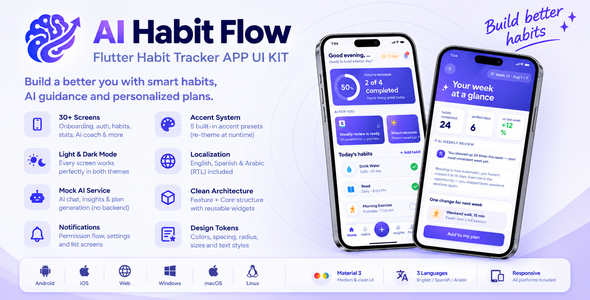
AI Habit Flow is a complete, ready-to-use habit tracking & AI coach Flutter application UI kit with 30+ polished screens. Onboard users with an AI-generated habit plan, track daily habits, chat with an AI coach, review streaks and weekly momentum, manage reminders and profile settings — all from one clean, modern Material 3 interface.
Built with the latest Flutter and a clean feature-first Provider architecture, AI Habit Flow ships with rich offline demo data so you can preview every screen instantly — no Firebase or backend required. It is designed as a professional UI/UX starter kit that you can quickly rebrand and connect to your own backend or AI API.
Optional: the AI service already supports a real endpoint via --dart-define=AI_API_BASE_URL — point it at your own API without touching the UI.
Important – Please Read Before Purchase
This template ships with offline demo data that lives in memory while the app runs — no Firebase or backend is required to preview it. AI Habit Flow is a front-end UI template / starter kit: you connect your own backend to make the data permanent. Records you add or edit while the app runs are kept in memory only. AI coach replies come from a built-in MockAiService (with an optional real-endpoint hook) so the full experience works without any API keys.
AI & Third-Party API Usage Notice
AI-powered features may require third-party API services. Buyers are responsible for obtaining and configuring their own API credentials and for any usage fees, API charges, subscriptions, or other costs incurred through third-party services. AI and API usage costs are not included with this UI Kit.
Note: out of the box, the app runs on the bundled MockAiService (simulated responses, zero network calls, zero cost). If you connect a real AI backend (e.g. an OpenAI-compatible endpoint via --dart-define=AI_API_BASE_URL), you must supply your own API key and any usage costs are billed by that provider directly to you.
Key Highlights
- Flutter (Dart SDK ^3.13) — built and tested with the latest stable release.
- Android, iOS & Desktop — single codebase; Windows release build verified.
- Feature-First Provider Architecture — self-contained modules, clean
lib/corelayer, scalable & easy to customize. - Offline Demo Data — run and explore the full app without any server setup.
- Material 3 UI — light & dark themes, 5 runtime accent presets, bundled Plus Jakarta Sans font (OFL).
- Localization + RTL — English, Spanish and Arabic included, ARB-based with full right-to-left support.
- Null-Safe Code — the entire project is written with null safety enabled;
flutter analyzepasses with zero warnings.
Key Features
- Smart Dashboard — daily progress ring, “AI for you” picks, today’s habits and weekly momentum chart.
- AI Onboarding — interest & goal selection, animated plan generation and a ready-made AI habit plan.
- AI Coach — chat-style coach with suggestion chips, quick actions and habit recommendations screens.
- Habit Management — habit list, add-habit flow (suggestions, targets, reminders), detail screen and full history.
- Statistics — AI insights, streak milestones with celebratory UI and weekly review screens with custom charts.
- Notifications — local habit-reminder notifications (
flutter_local_notifications+timezone) with a runtime permission flow, list and settings screens. - Profile & Settings — edit profile, AI settings, appearance (theme + accent presets), data & privacy, help center and legal screens.
- Theming at Runtime — light/dark mode, 5 accent color presets and switchable text scale, all derived from a single source file.
- Auth Flow — login, registration, 4-digit OTP and password reset (demo-ready, front-end validated).
- Reusable Components — buttons, fields, dialogs, bottom sheets, empty/loading/error states and bottom navigation as shared widgets.
- Cross-Platform — Android, iOS, Windows, macOS, Linux and web from a single codebase.
- Fully Responsive — adapts smoothly across phones and tablets of different screen sizes.
Easy Customization
AI Habit Flow is built to be rebranded quickly. Colors, text styles, spacing and strings are centralized so you can make it yours in minutes.
- Change App Name — update Android, iOS and in-app branding from one constants file.
- Change Package / Bundle ID — set your own unique identifier.
- Change App Icon — replace the bundled launcher icons.
- Colors & Theme — re-theme the entire app from
lib/core/constants/app_colors.dartand the accent presets inaccent_config.dart. No hardcoded colors in screens. - Fonts — swap the bundled Plus Jakarta Sans TTFs and update one pubspec block.
- Add a Language — copy a template .arb file, translate, run
flutter gen-l10n. RTL support is already wired. - Mock Content — all demo habits, insights and notifications live in
lib/data/mock/— edit one folder to change the demo. - Well-Organized Code — predictable feature-first modules, small focused widgets and named routes that are easy to extend.
Requirements
| Tool | Version | Purpose |
|---|---|---|
| Flutter SDK | 3.38+ (stable) | Mobile framework |
| Dart SDK | 3.13+ | Programming language |
| Android Studio | Latest | IDE & Android tooling |
| Android SDK | API 24+ | Compile & target SDK |
| Xcode | 15+ | iOS development (macOS only) |
| VS Code | Latest | Alternative code editor |
Download Demo APK
Want to try AI Habit Flow before you buy? Download the demo APK and test every screen on your own Android device.
Download link: Download AI Habit Flow Demo APK
The demo runs entirely on offline data — no login server or backend required.
Quick Start
- Download & Extract — after purchasing, download the ZIP file from CodeCanyon and extract it.
- Open in IDE — open the project folder in Android Studio or VS Code.
- Install Dependencies — run
flutter pub get. - Run the App — run
flutter run.
A step-by-step buyer guide (an offline HTML documentation site in the documentation/ folder) is included in the package.
Demo Login & Test Data
The app runs on offline demo data, so you can explore every screen without a backend.
- Email: any text is accepted on the login screen (example:
demo@aihabitflow.app). - Password: any value with at least 6 characters (registration also requires confirmation + Terms acceptance).
- OTP code: enter any 4 digits to continue the demo verification.
Login, registration, OTP and password reset are front-end demo flows — no real server validates them and no SMS/email is sent. Connect your own authentication API for production use.
Data & Backend
- All demo content loads from local Dart files, so you can run and explore the full app without any server setup.
- No Firebase or API keys are required to run the template.
- Records you add or edit are kept in memory only and reset when the app restarts.
- Connect your own API or a local database (e.g. Hive, Isar, SQLite) to make changes permanent.
- AI features go through a clean
AiServiceabstraction — swap the mock for your own API (or set--dart-define=AI_API_BASE_URL) without touching the UI.
Demo-Ready Features & UI Placeholders
To keep the template lightweight and flexible, the following are intentionally provided as UI placeholders (they display a confirmation message or run on mock data) so you can wire them to your own logic:
- Social (Google / Apple) sign-in buttons on the login screen.
- AI coach replies & insights — generated by the bundled
MockAiService; wire your own AI API for production. - Authentication (login, registration, OTP, password reset) — validated on the front end only; no SMS/email is sent.
- Notifications — real local reminders via
flutter_local_notifications; push notifications are not included.
Built With
- provider — state management
- flutter_localizations + intl — ARB-based localization (EN / ES / AR)
- flutter_local_notifications + timezone — local habit reminders
- url_launcher — external links
- Bundled Plus Jakarta Sans font — custom typography included in the package (OFL license included)
Frequently Asked Questions
Does this template require Firebase?
No. This template uses only offline demo data. Firebase is not required.
Can I use this for commercial projects?
Yes. After purchasing from CodeCanyon, you can use it according to the Envato license.
How do I connect a real backend?
Replace the mock data in lib/data/mock/ with API service classes using packages like http or dio, then update the controllers to call your endpoints. The AI features already have an AiService abstraction with an optional real-endpoint hook.
Is the code null-safe?
Yes. The entire project is written with null safety enabled, and flutter analyze passes with zero warnings.
Which state management is used?
Provider. The project uses a clean, feature-first architecture with ChangeNotifier controllers, named routes and a shared component library.
Does the app save my data permanently?
Not in the demo. All records live in memory and reset when the app restarts. Connect an API or a local database to persist data.
Do the Google / Apple sign-in buttons work?
They are provided as UI placeholders on the login screen, so you can plug in your preferred package (e.g. google_sign_in, sign_in_with_apple) or your own backend.
Does the OTP screen send a real SMS?
No. It is a demo flow — enter any 4 digits to continue. Wire your SMS/email provider or Firebase Phone Auth for production.
Does it support Windows / macOS / Linux desktop?
Yes. The Windows release build is verified, and desktop/web targets are included in the project. The primary focus of the design is mobile.
AI Assistance Disclosure
Some parts of this item were created or assisted using AI-powered development and content creation tools. AI assistance may have been used during source code development, documentation, content preparation, and/or graphic asset creation.
All included files and features have been reviewed, tested, and integrated by the author before submission.
Support
Need help? Reach out via the CodeCanyon item comments or:
- Email: help@softmax.site
- WhatsApp: +880 1580-358565
Typical response time: within 24–48 business hours.
Support covers bug fixes and usage questions for the delivered code. Custom feature development and third-party integration are outside the scope of item support.
Please include your Envato purchase code and a clear description of the issue (with screenshots and error logs when possible).
Changelog
v1.0.0 – Initial release
- 30+ screens: splash, onboarding (AI plan generation), authentication, dashboard, habits, AI coach, statistics, notifications, profile & settings
- Material 3 light & dark themes, 5 runtime accent presets, switchable text scale
- Localization: English, Spanish, Arabic with full RTL support
- Mock data layer +
AiServiceabstraction withMockAiService - Local habit-reminder notifications with runtime permission flow
- Reusable shared component library (buttons, fields, dialogs, states)
| Author | soft-max |
|---|---|
| Price | $29 |
| Sales | 0 |
| Rating | 0 (0) |
| Published | Oct 5, 2026 |
| Last Update | Oct 5, 2026 |
| Compatible Software | Flutter 3.x |
| Demo Url | https://pub-3720559b5f4244e58a390c2a9cc369c0.r2.dev/App/Ai_Habit_Flow.apk |
| Mobile Files Included | Dart, YAML, JavaScript JSON, .kotlin, .plist, .swift |
Categories
Tags
External listing. code.market does not sell this product and does not process payment for it. Pricing, payment, delivery, licensing, refunds, and support are handled by the third-party merchant on its own website. We may earn an affiliate commission from a referral. Details.
Products of the Week.
Submit🥇

Perceptle
Perceptle is a daily browser-based game that challenges you to test your sensory intuition through five quick estimation and rhythm-based rounds.
Other · 1 views · 0 clicksOther · Week 47 · 1 views · 0 clicks
🥈

Free LinkedIn Likes From Real
Get free LinkedIn likes on your posts from real members who react by hand. No
SaaS · 124 views · 2 clicksSaaS · Week 47 · 124 views · 2 clicks
🥉

STOP GUESSING WHAT TO POST
AI that learns your brand voice and builds a month of consistent, on-brand social content: carousels, posts and hooks that sound like you, not like everyone else's AI.
SaaS · 7,686 views · 71 clicksSaaS · Week 47 · 7,686 views · 71 clicks
#4

aaas.market
407 reliable micro tools for solo founders, marketers and creators. They work in your browser
SaaS · 122 views · 0 clicksSaaS · Week 47 · 122 views · 0 clicks