AetherCapture - WordPress Elementor Theme
Description
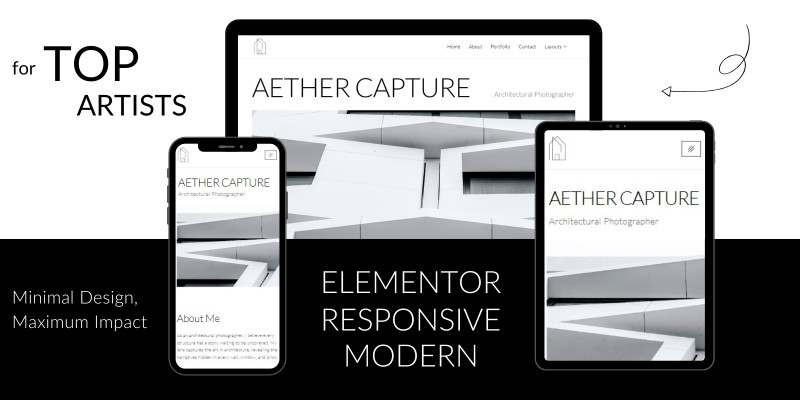
AetherCapture is a minimalist black-and-white Elementor template kit designed for architectural photographers and other visual artists to showcase their work in a clean, professional layout.
Whether you're looking to present your portfolio in a sleek and modern way or provide clients with a beautiful visual experience, AetherCapture offers flexibility and polished design options.
This template kit includes 3 hero types: a classic minimal hero, a slider, and a flip banner to suit different presentation needs. It also features two gallery styles—a modern masonry layout and a filterable gallery—perfect for displaying projects with ease. A pure, black-and-white design ensures your work remains the focus, while a built-in testimonial carousel adds credibility to your services. This kit is fully customizable and offers everything you need to build a professional website effortlessly. Perfect for creatives seeking a simple, modern portfolio.
Features
• 3 Hero types: Classic minimal, Slider, and Flip Banner
• 2 gallery layouts: Modern Masonry and Filterable Gallery
• Testimonial carousel
l• Fully responsive and customizable
• Clean, black-and-white minimalist design, following the latest design trends
Requirements
• Theme: Hello Elementor • Elementor (Free version) • Royal Addons • Essential Addons for Elementor • ElementsKit Lite • JEG Elementor Kit
Instructions
Once you have downloaded the aethercapture package, follow these steps to unzip and use its contents:
Unzip the Package:
Locate the downloaded aethercapture-package.zip folder. Right-click on the folder and select Extract All. This will create a new folder called aethercapture-package.
Inside the aethercapture-package folder, you will find:
aethercapture-elementor-kit.zip: This is the main template kit file. Documentation.pdf: This file contains important information on how to use the kit. 3 saved Templates: These are in .json format and include alternative layout options.
Import the Elementor Kit:
Open your WordPress dashboard and navigate to Elementor/Tools/ Import/Export kit tab. Click on Start Import button, and upload the aethercapture-elementor-kit.zip file from the aethercapture-package folder.
Import Saved Templates:
To use the saved templates, you will need to import each template individually: Go to Templates > Saved Templates in your WordPress dashboard. Click on Import Template. Select one of the .json files from the saved templates in the aethercapture-package folder. Repeat this step for each saved template you want to use.
Use the Templates:
After importing, you can find the templates in the Saved Templates section of Elementor. To use any imported template, open a page with Elementor, click on the folder icon in the Elementor editor, and select your desired template from the My Templates tab.
For additional details and tips on customizing the template kit, refer to the Documentation.pdf included in the package.
For additional details and tips on customizing the template kit, refer to the Documentation.pdf included in the package.
!IMPORTANT : To ensure optimal design and element display on your website, regularly check that each widget and plugin is updated to the latest version. For example, if the Font Awesome plugin is not upgraded, icons may display incorrectly. Regular updates are key to maintaining a user-friendly site.
Happy designing!
| Author | uiburnsstudio |
|---|---|
| Category | Themes / WordPress / Minimal |
| Price | $15 |
| Extended License | $45 |
| Likes | 3 |
| First Release | Oct 2, 2024 |
| Last Update | Oct 2, 2024 |
| Supported cms | WordPress 5.0, WordPress 5.8, WordPress 5.9, WordPress 6.0, WordPress 6.1, WordPress 6.2, WordPress 6.3, WordPress 6.4, WordPress 6.5 |
Categories
Tags
External listing. code.market does not sell this product and does not process payment for it. Pricing, payment, delivery, licensing, refunds, and support are handled by the third-party merchant on its own website. We may earn an affiliate commission from a referral. Details.
Products of the Week.
Submit🥇

Perceptle
Perceptle is a daily browser-based game that challenges you to test your sensory intuition through five quick estimation and rhythm-based rounds.
Other · 1,489 views · 9 clicksOther · Week 47 · 1,489 views · 9 clicks
🥈

Free LinkedIn Likes From Real
Get free LinkedIn likes on your posts from real members who react by hand. No
SaaS · 1,632 views · 10 clicksSaaS · Week 47 · 1,632 views · 10 clicks
🥉

STOP GUESSING WHAT TO POST
AI that learns your brand voice and builds a month of consistent, on-brand social content: carousels, posts and hooks that sound like you, not like everyone else's AI.
SaaS · 9,176 views · 75 clicksSaaS · Week 47 · 9,176 views · 75 clicks
#4

aaas.market
407 reliable micro tools for solo founders, marketers and creators. They work in your browser
SaaS · 1,597 views · 5 clicksSaaS · Week 47 · 1,597 views · 5 clicks