
AdvanceTutor | iOS App AI Language Learning With Admin Panel
Description
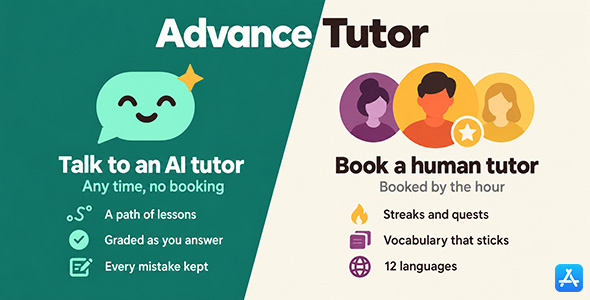
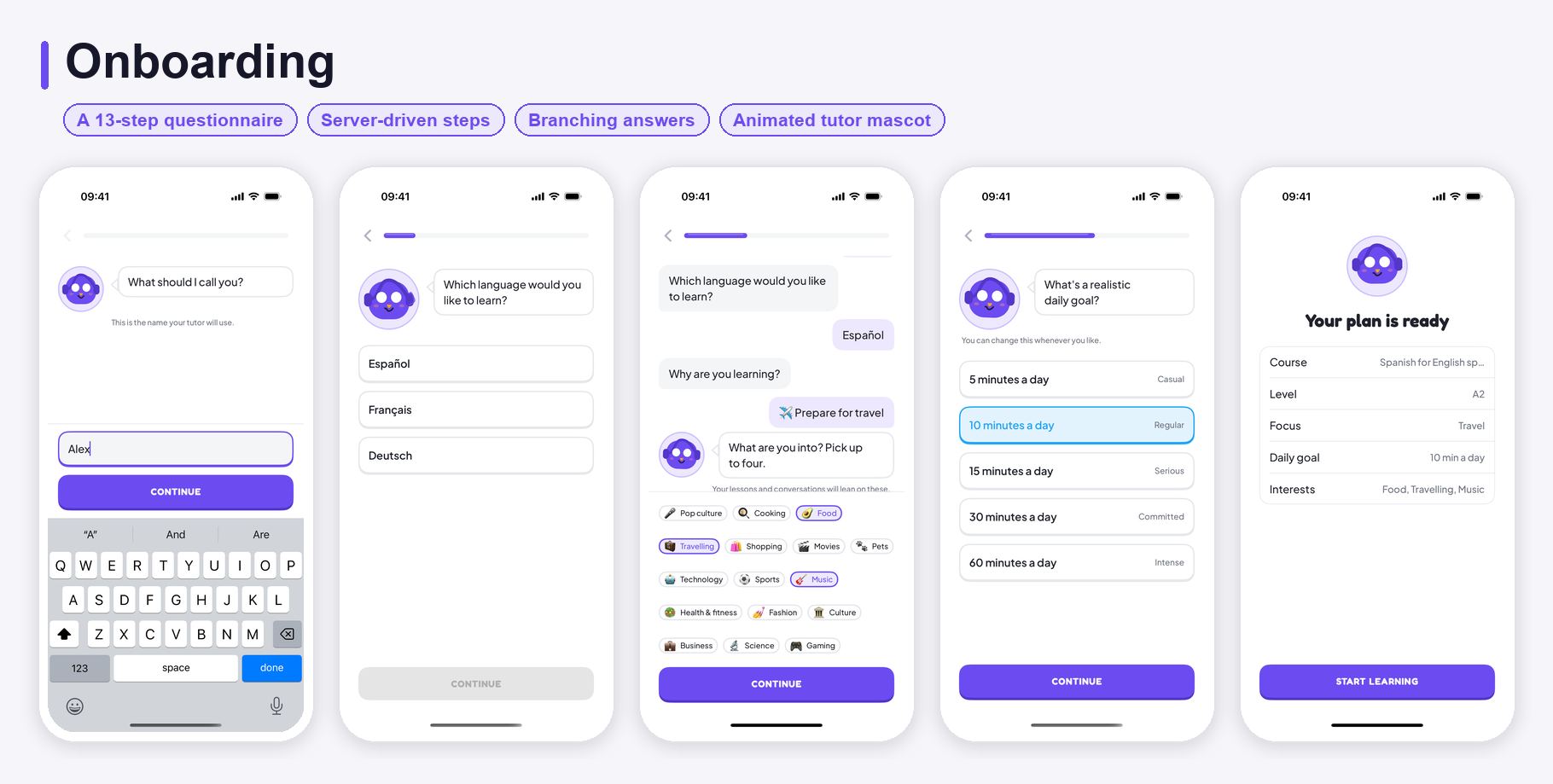
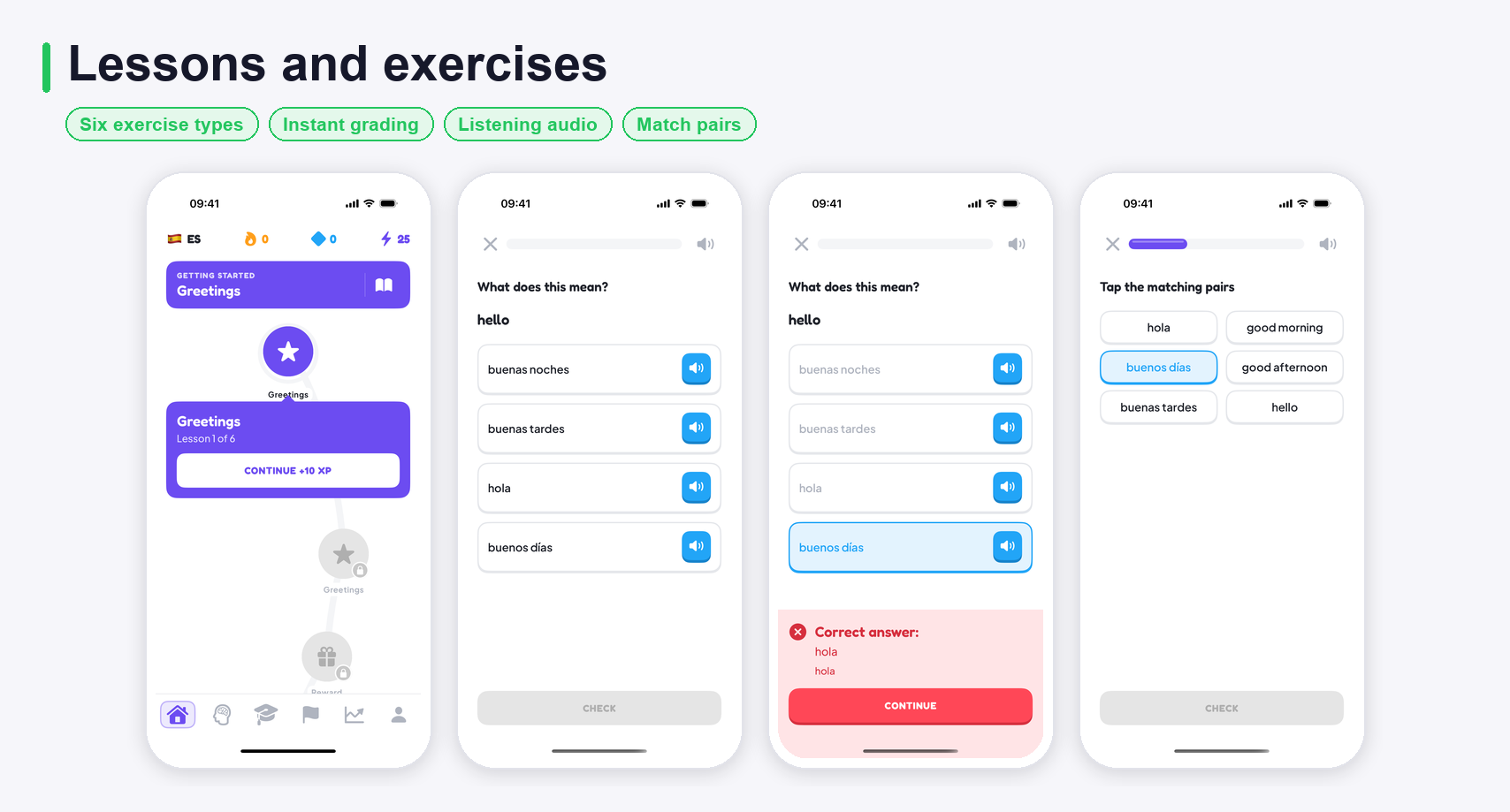
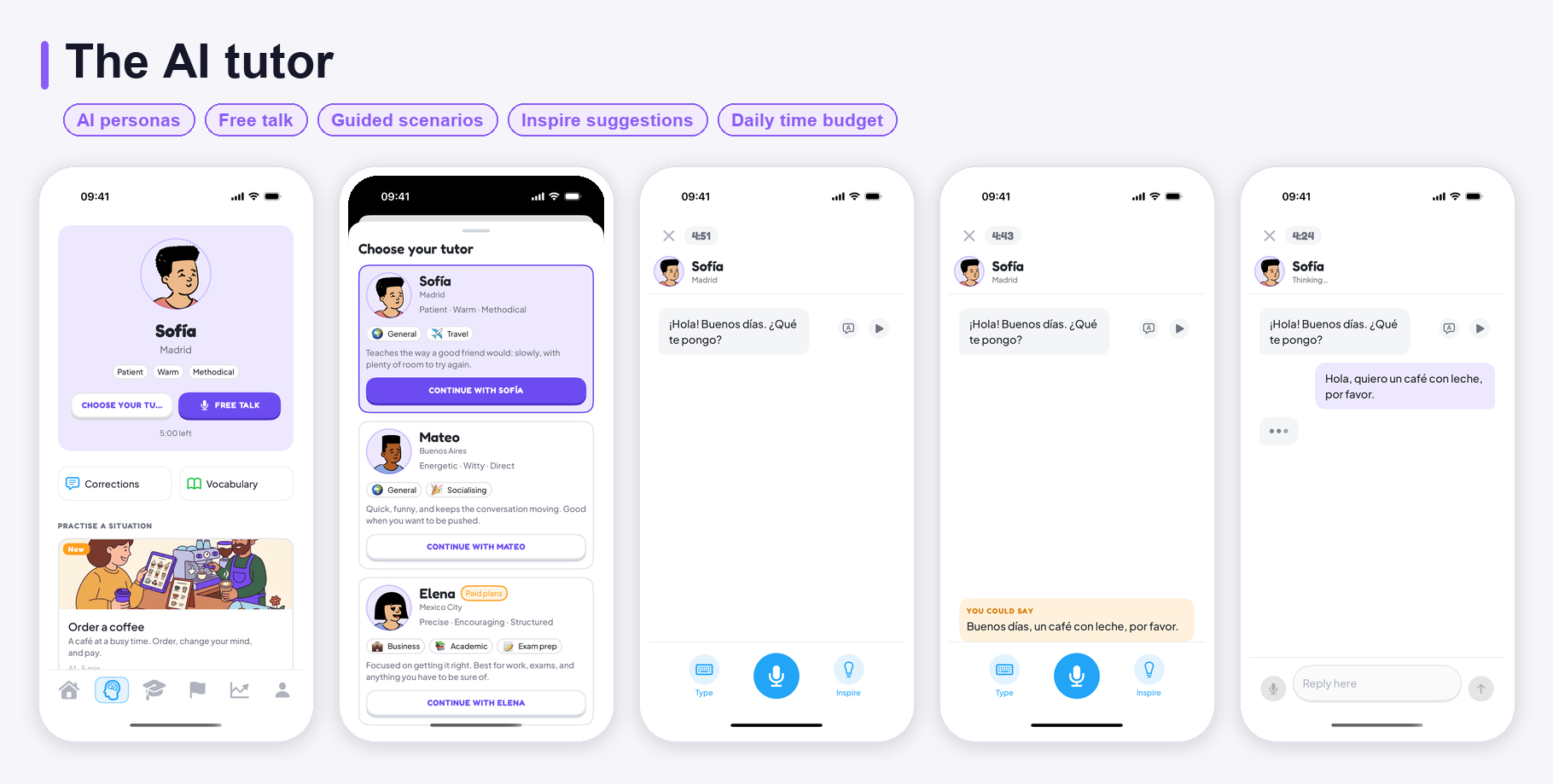
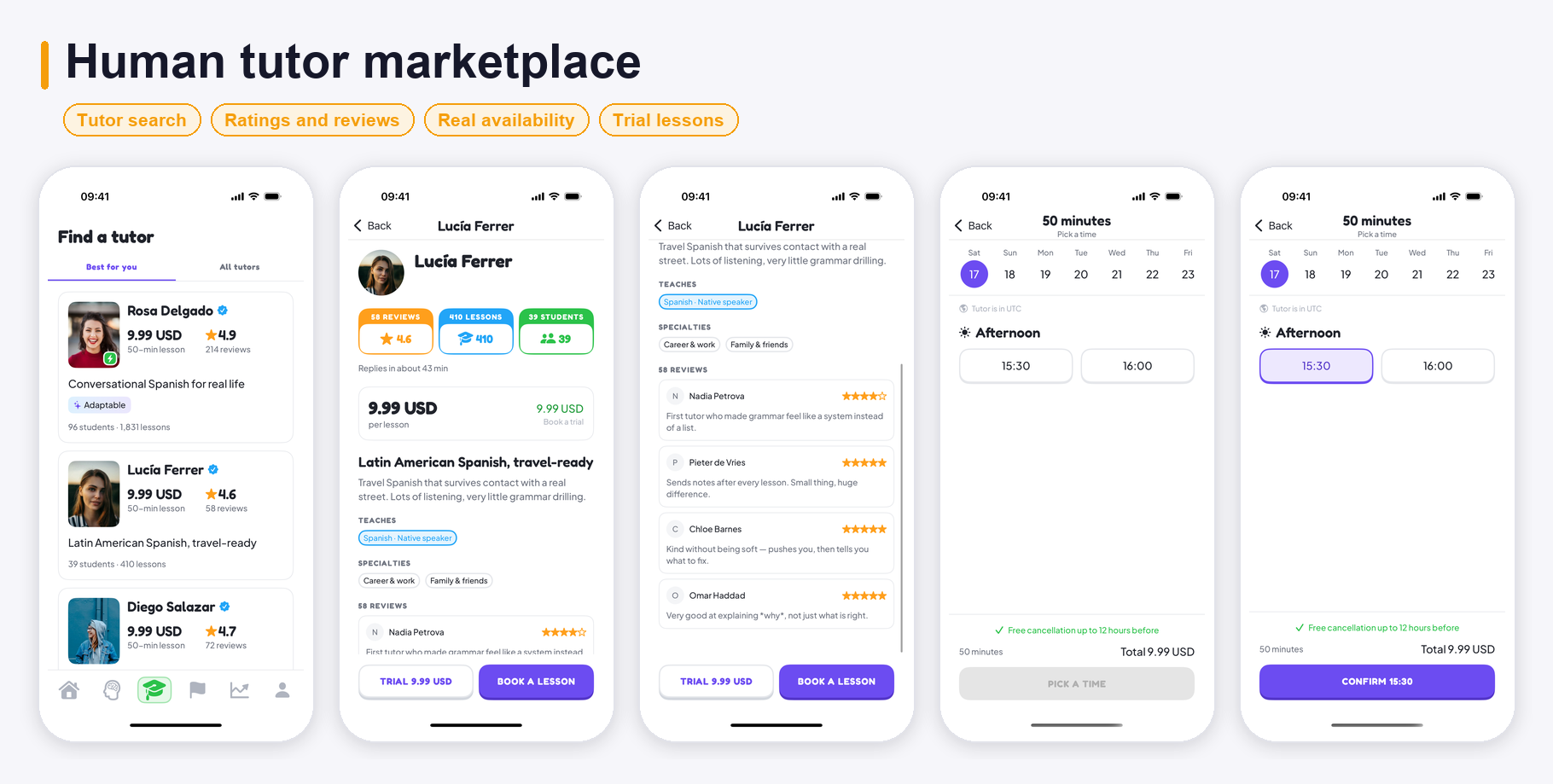
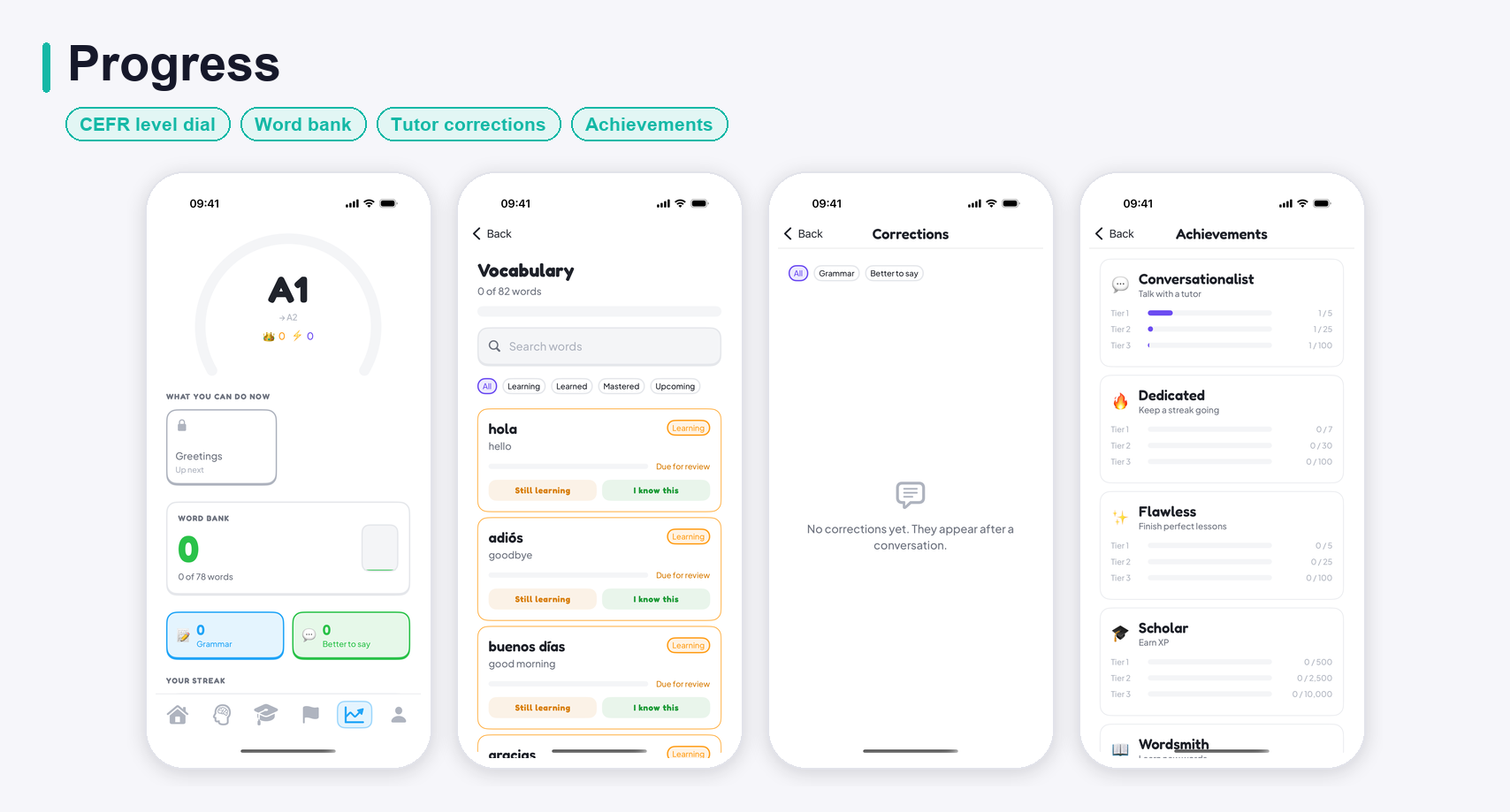
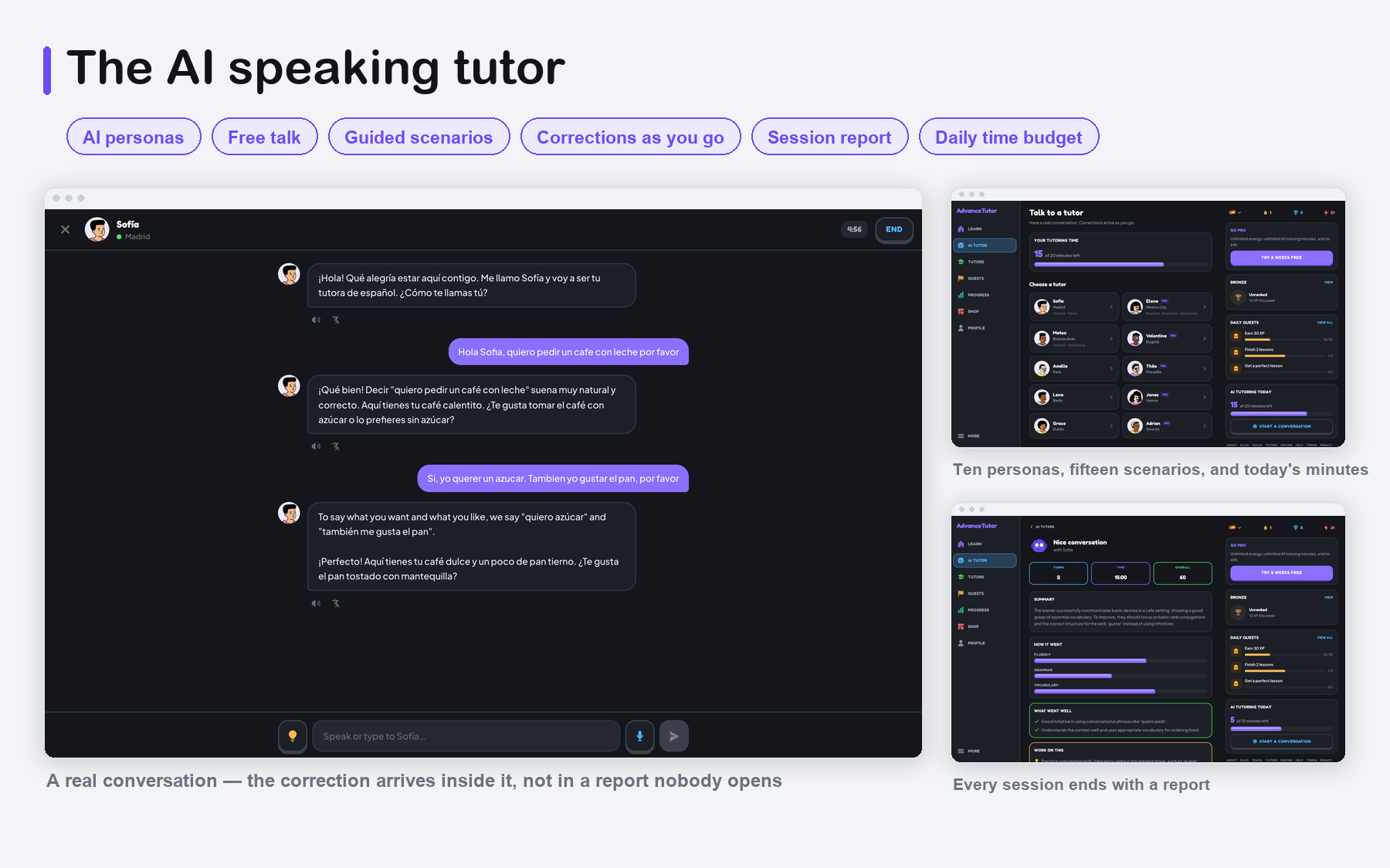
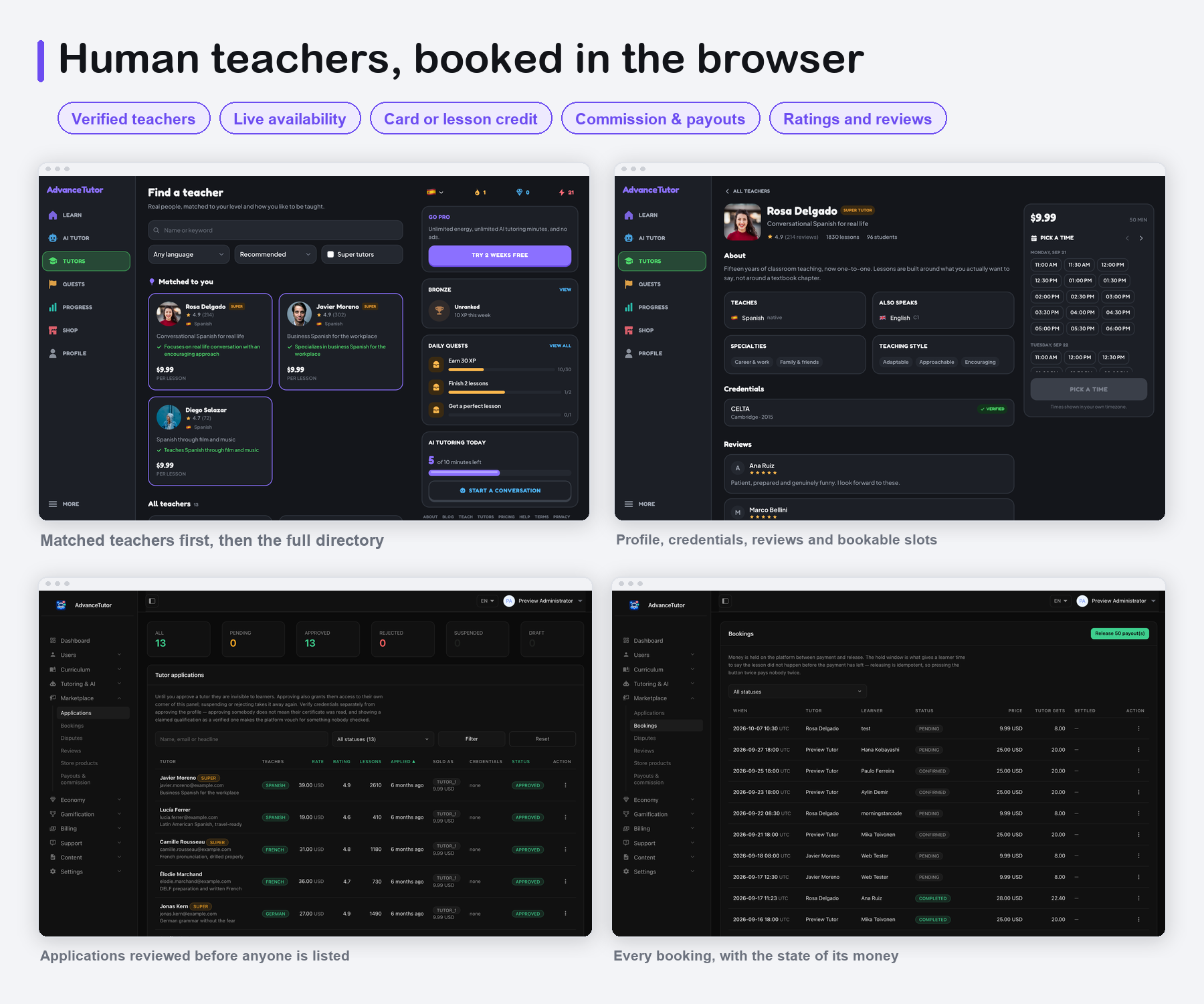
Learners answer a short questionnaire, get a course, and start walking a path of units and lessons — six kinds of exercise, graded the moment they answer. When they want to speak rather than tap, they open a conversation with an AI tutor persona; every correction it makes is kept, split into grammar mistakes and phrasing that was merely unnatural, and waiting on the Progress tab afterwards. When they want a person, they browse real tutor profiles, read reviews, and book a slot from live availability.
Key Value Propositions
- For Learners: A course that remembers where you are, an AI tutor available at any hour to practise speaking with, and a human teacher when you want one — in the app, or in a browser on the same account. Corrections from every conversation are collected in one place, so the mistakes you keep making are the ones you see.
- For Serious Students: Real CEFR progression, a vocabulary bank with spaced review, per-unit reference guidebooks, and session reports after every AI conversation.
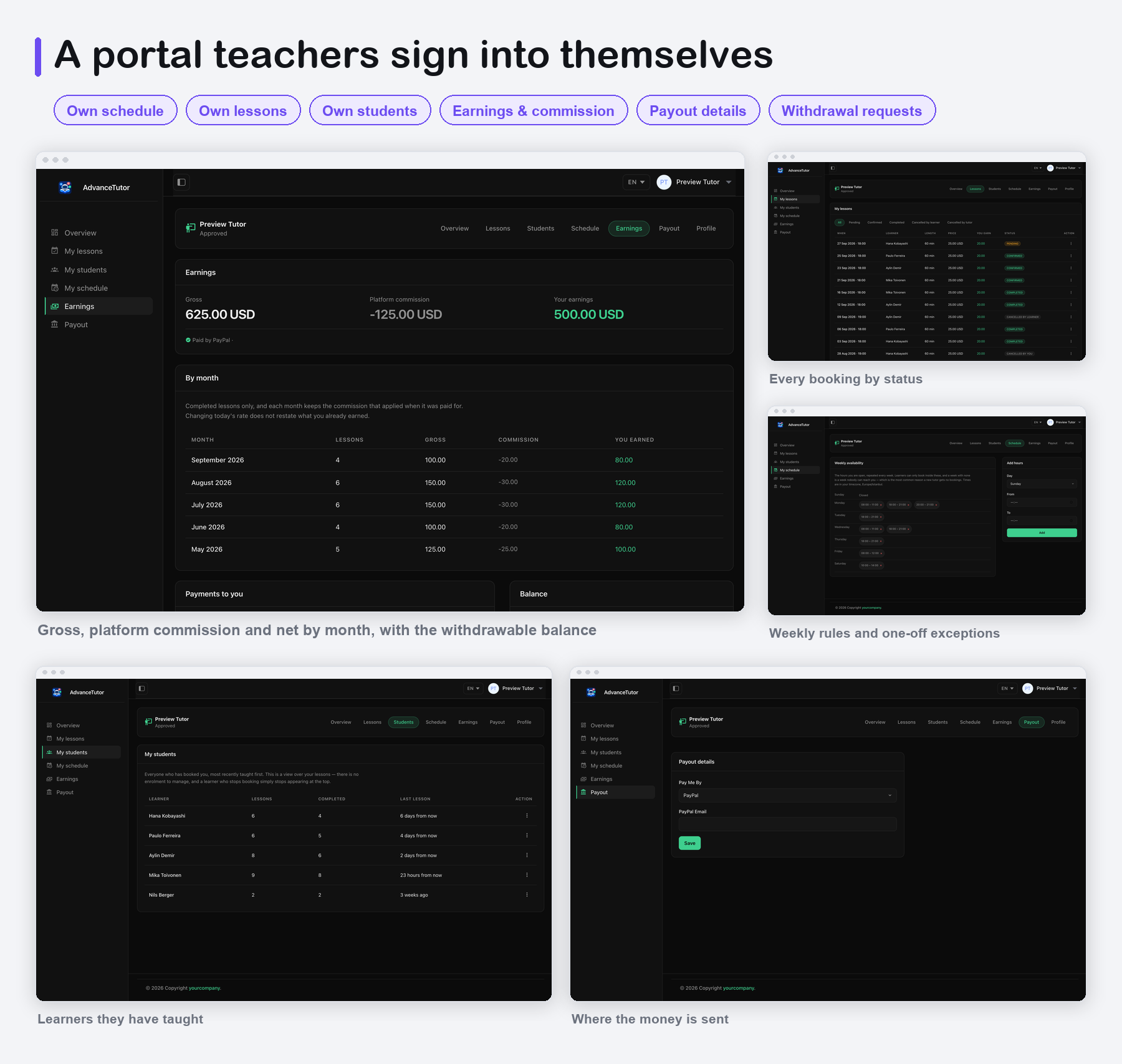
- For Teachers: Their own portal on the web — availability rules, bookings, students, earnings by month with the commission shown, payout details and withdrawal requests. No access to anything that is not theirs.
- For App Owners / Developers: A ready-to-rebrand product with in-app subscriptions on the phone and subscriptions across six payment gateways on the web, an energy and daily-minutes economy that keeps AI costs predictable, paywall layouts, colour themes, push notifications and analytics. Courses, lessons, exercises, tutors, prices, AI providers and usage limits are all rows in the database edited from one dashboard — changing them does not mean shipping a new version of the app.
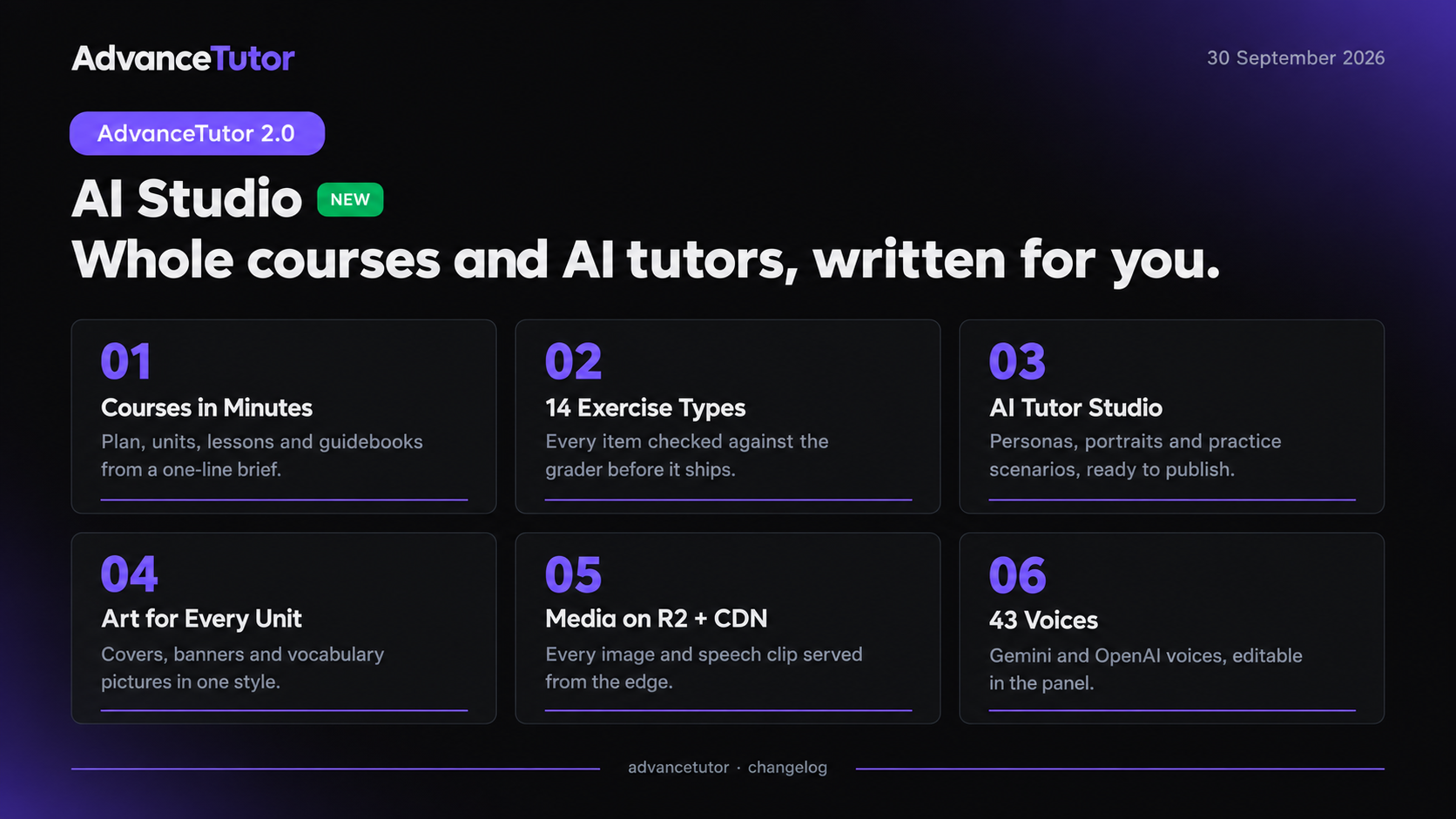
- For Content Teams: AI Studio turns a short brief into a complete course or a line-up of AI tutors, reviewed by you before it is published — a new language pair in an afternoon instead of weeks of writing.
Third-party services: important notice
This item connects to services run by independent companies. Each one operates under its own terms of service, its own account approval process and its own fee structure, and using them may involve costs entirely outside this item’s purchase price. You create every account yourself and pay every fee yourself. No author accounts, API keys, merchant ids, Firebase projects or measurement ids are included.
- Firebase (Google), required for the app: Authentication, Remote Config, Analytics and Crashlytics in the app, and the Firebase Admin SDK on the server to verify every sign-in. Requires your own Firebase project, kept active for as long as the app is live. Usage beyond the free Spark plan is billed by Google (Blaze plan) and is the buyer’s responsibility.
- AI providers, required for the AI features: OpenAI, Anthropic or Google Gemini (and
other providers supported by the open-source
laravel/aipackage). Your own API key; every conversation, transcription, spoken reply and graded answer is billed by the provider you choose. No AI API key is bundled anywhere in the package: every key ships blank and you supply and fund your own. - RevenueCat, Apple App Store: required to sell subscriptions in the app; your own accounts, Apple’s membership fee and store commission, and RevenueCat’s own pricing above its free tier.
- Stripe, Lemon Squeezy, Polar.sh, Paddle, Creem.io, Dodo Payments, optional: payment gateways for selling on the website, each with its own terms, merchant review and fees.
- Mailchimp, optional: newsletter sync through
drewm/mailchimp-apiandspatie/laravel-newsletter, with your own Mailchimp account, API key and list ID (all ship blank); Mailchimp charges above its free tier. - Pusher, optional: real-time messaging, with your own Pusher account and app keys (they ship blank); Pusher charges above its free tier.
- OneSignal, optional: push notifications on iOS, with your own OneSignal app.
- Google AdMob, optional: ads in the app, with your own AdMob account and ad units.
- Facebook / Meta, optional: Meta App Events in the app and Facebook sign-in on the website, with your own Facebook app; the app ships placeholders only, and while they are placeholders the Meta SDK stays inert.
- DiceBear, demo content only: the demo AI tutor portraits are loaded from DiceBear’s free
public API (
api.dicebear.com) each time they are shown, so every viewer’s device makes a request to that third-party server. Replace them with your own uploaded images before launch to remove the request.

Test card: all six web payment providers can be checked in test mode with card number
4242 4242 4242 4242, any future expiry date and any CVC.
Note: All supported web payment gateways (Paddle, LemonSqueezy, Polar.sh, Stripe, Creem.io, and Dodo Payments) are third-party services and may charge transaction fees or other service fees depending on their pricing plans. Some providers may require merchant account approval and verification before accepting live payments. These services are not included in the purchase price, and buyers are responsible for creating their own accounts, completing any required approval processes, configuring API keys, and covering all applicable fees.
Mailchimp (optional, paid third-party service): the newsletter sign-up form integrates with
Mailchimp through the
spatie/laravel-newsletter and drewm/mailchimp-api packages. Mailchimp is a separate
paid service (with a limited free tier), it is not included in the purchase price, and it is not
required: every sign-up is always saved to the admin panel’s own Newsletters list, and nothing is sent
to Mailchimp unless you add your own Mailchimp API key and audience ID. If you connect it, you are responsible
for your Mailchimp account, plan and any fees.
Content Disclosure
AdvanceTutor ships as a complete learning platform with demo content so you can run it end-to-end out of the box:
- The demo AI tutor portraits are DiceBear “Open Peeps” illustrations (CC0). The seeders store only a link
to
api.dicebear.com, not the image, so the app and the website load each portrait from DiceBear when it is shown. Replace them with your own artwork, uploaded or drawn in AI Studio. - The roleplay scenarios ship without cover art. An optional command can draw a cover for each one with Google Gemini, using your own API key.
- The demo human tutors — their profiles, reviews and students — are fictional placeholders and are shown with generated initials avatars rather than photos, so browsing, booking and the lesson flow work during testing. They are meant for development and should not be seeded into production.
- The full catalogue (languages, courses, units, lessons, exercises, vocabulary, guidebooks, AI tutors, scenarios, quests and shop items) is managed entirely by you in the admin panel.
You are responsible for the courses you publish and for the teachers you admit to the marketplace — every tutor application is reviewed by an admin before the profile goes live. Everything the AI tutor says is machine output and should be presented as such. You are also responsible for following each AI provider’s terms of use; AI provider accounts and their usage are up to you.
AI Usage Disclosure
AI-assisted development. This item was developed with AI assistance. The source code of the native iOS app, the Laravel admin panel, the React web front end and the documentation were written with the help of Claude Code using Anthropic’s Claude Opus 5 model. Our team reviewed the output and maintains and supports the item.
AI-made graphics. The tutor mascot animation, the guest profile avatars, the placeholder image and the lesson sound effects were created by the author with AI tools. Scenario covers, if you generate them, are drawn by Gemini on your own key. The demo AI tutor portraits are not AI-generated: they are DiceBear “Open Peeps” illustrations (CC0). The screenshots in this description and in the item gallery are captures of the running iOS app; the feature sheets are composed from those captures.
AI as a feature. The product’s headline functionality also relies on a third-party generative AI service at runtime. The provider is not hard-coded — OpenAI, Anthropic and Google Gemini are registered in the admin panel and you choose which one answers each task:
- Tutor conversation: the spoken and written dialogue with an AI tutor persona.
- Transcription and speech: turning the learner’s recording into text, and the tutor’s reply into audio.
- Grading open answers: marking free-text and open-ended exercises that have no single right answer.
- Corrections and session reports: what the learner got wrong, what they could have said instead, and a written summary after each conversation.
- Translation and exercise generation: on-demand translation in a conversation, and drafting new exercises for review in the panel.
- AI Studio (admin panel): writing complete courses and AI tutor personas and drawing their pictures, with text AI (Gemini, OpenAI, Claude or OpenRouter) and image AI (fal, Replicate, Wiro or Google) — requires your own provider API keys; everything is reviewed by an admin before it is published.
Everything the tutor writes or says is AI-generated and may be wrong. To use the AI features you must create your own account with the provider you choose and supply your own API key. Keys are stored encrypted in the admin panel, are read only on the server, and never reach the app or the browser.
Required Third-Party Services and Costs (please read before buying)
AdvanceTutor depends on external services that are not included in the purchase. You create
every account yourself, under your own name, and all fees, usage charges and approval processes are your
responsibility. The package ships no author-owned accounts, API keys, merchant ids, analytics
ids or other credentials: every key in .env.example is blank, the app ships only example
Firebase and sign-in configuration files, and no revenue or data is routed to the author.
- Firebase (required — an ongoing obligation, not a one-time step): a separate Firebase
project of your own is required for the app to function. The app uses it for sign-in (anonymous, Apple,
Google and e-mail), Remote Config (where the app finds your server), Analytics and Crashlytics; the Laravel
server uses it, through the
kreait/laravel-firebaseSDK and your own service-account key, to verify every sign-in and to send push to Android clients. The package ships onlyGoogleService-Info.example.plistandAppSettings.xcconfig.example(for the Google sign-in client ids); you create your own project, register your bundle id, and add your ownGoogleService-Info.plist. You must keep that project active, within Google’s terms and quotas, for as long as the app is in use. The free Spark plan covers testing; production use can require the pay-as-you-go Blaze plan, billed by Google to you. - AI provider (required for the AI features): the AI tutor, transcription, speech, grading,
session reports and AI Studio need your own API key with OpenAI, Anthropic or Google Gemini (image
generation in AI Studio additionally uses fal, Replicate, Wiro or Google), billed per use by that provider.
The server talks to them through
laravel/ai, Laravel’s official open-source (MIT) package, installed with Composer; it needs no Laravel Cloud or other Laravel subscription, and requests go straight from your server to your provider. Ongoing AI usage costs are yours. Without a key, the AI features stay off and the rest of the product works normally. - Apple Developer Program and RevenueCat (required to publish the app and to sell subscriptions in it): your own accounts. Apple charges its annual membership fee and store commission; RevenueCat may charge above its free tier. The RevenueCat keys are read from your own Remote Config and are empty by default.
- Web payment providers (optional): Stripe, Lemon Squeezy, Polar.sh, Paddle, Creem.io and Dodo Payments, each with its own approval rules, transaction fees and payout terms. Configure only the ones you want.
- OneSignal (optional): push notifications on iOS. The OneSignal app id comes from your own
Remote Config and the REST key from your server’s
.env; without them push is skipped and the in-app notification inbox still works. - Google AdMob (optional): the app ships Google’s public test AdMob app id in
Info.plist, which you must replace with your own; ad unit ids come from your own Remote Config, and ads stay off until you enable them. - Other optional services: Mailchimp (newsletter), Cloudflare Turnstile or Google reCAPTCHA, Google and Facebook sign-in on the website, Zoom for tutor lessons (Jitsi needs no account), Pusher, Upstash QStash, and Amazon S3 storage. Each has its own terms and pricing.
- Hosting and e-mail: PHP/MySQL hosting, a cron entry, an e-mail transport (SMTP, Amazon SES, Mailgun, Postmark or sendmail), bandwidth and storage costs are yours.
Privacy & Data
- No telemetry to the author. The app, the website, the admin panel and the API send no data to the author, and nothing checks a purchase code or calls a licence server.
- Your ids only. Every third-party identifier — Firebase, RevenueCat, OneSignal, AdMob ad units, Meta, payment and AI keys — is supplied by you, and the data each service collects goes to your own account.
- App Tracking Transparency. The app asks for tracking permission once, after the learner’s consent in onboarding, and only when Meta App Events is configured; the answer is passed to the ads and Meta SDKs. You are solely responsible for your own ATT compliance, your App Privacy (privacy nutrition label) answers, your privacy policy, and the outcome of App Store review.
- Demo data is placeholder only. Demo tutors, reviews and learners are fictional, and demo
tutors use generated initials avatars, and demo AI tutors use DiceBear (CC0) portraits loaded from
api.dicebear.com— no stock photography is included.
Shared code
All AdvanceTutor source code was written by the author. Some base components — the setup wizard, the billing
and payment-provider layer, the media storage layer and the admin list screens — are shared with the author’s
other products and were adapted for AdvanceTutor; the author holds full rights to that code. Third-party
libraries keep their own licences and are listed in THIRD-PARTY-LICENSES.md.
Font Awesome attribution. The website uses Font Awesome Free by Fonticons, Inc. (fontawesome.com): icons licensed under CC BY 4.0, fonts under SIL OFL 1.1 and code under the MIT licence (fontawesome.com/license/free).
Disclaimer
This app is built to work with the included Laravel back end and the following third-party services: an AI
provider of your choice (OpenAI, Anthropic or Google Gemini) for the tutor, transcription, speech and grading;
RevenueCat for in-app subscriptions on the phone; one or more payment gateways if you also sell on the web
(Stripe, Lemon Squeezy, Polar, Paddle, Creem or Dodo Payments — configure only the ones you want); an email
transport (SMTP, Amazon SES, Mailgun, Postmark or sendmail); a video SDK of your choice for tutor calls;
OneSignal (push); optional AdMob ads; optionally Google and Facebook OAuth for social sign-in; and optionally
Mailchimp (a paid service) to sync newsletter sign-ups to a mailing list. These
backend services are not included in the purchase — you will need to create your own accounts, deploy Laravel
on a PHP 8.3+ / MySQL host, configure API keys, and manage hosting and AI usage costs yourself. Every tutor
conversation, transcription, spoken reply and graded answer is billed by the AI provider that makes it, to
your account. RevenueCat may also incur additional costs depending on your subscription volume and plan,
beyond any available free-tier limits. A separate Firebase project is required for the app to function: you
must create and configure your own Firebase project, register your bundle id, and add your own
GoogleService-Info.plist in place of the shipped GoogleService-Info.example.plist. Additional charges may apply depending on usage and the
Firebase services you use. An Apple Developer Program membership is required to ship to the App Store. Basic
familiarity with Xcode, Swift, Firebase, PHP/MySQL hosting and App Store Connect is recommended before
launching.
Credits: the admin panel’s layout, the AdvanceTutor theme, every screen, menu and feature are original to this product. Bundled open-source libraries (Bootstrap, jQuery, DataTables, Chart.js, Trix, Material Design Icons and others) keep their own licences. No stock photography is included; the mascot, guest avatars and sound effects are original assets, and the demo AI tutor portraits are DiceBear “Open Peeps” illustrations (CC0).
All product names, logos and trademarks mentioned here are the property of their respective owners. AdvanceTutor is an independent product built with these frameworks and services; it is not affiliated with, sponsored by or endorsed by any of them, such as Laravel.
Learner web app
https://advancetutor.laravelbeginner.net/en
You can sign up with an email address or with Google login to test it.
Laravel admin
https://advancetutor.laravelbeginner.net/en/dashboard
Email: admin@roles.advancetutor.test
Password: RolePreview!2026
Email: moderator@roles.advancetutor.test
Password: RolePreview!2026
Tutor portal
https://advancetutor.laravelbeginner.net/en/tutor
Email: tutor@roles.advancetutor.test
Password: RolePreview!2026
Email: member@roles.advancetutor.test
Password: RolePreview!2026
What’s Included
- Full native iOS application source code (
ai-lang-tutor-ios) — Swift 5, SwiftUI, iOS 17+, Swift Package Manager (no CocoaPods) - Laravel admin panel with the mobile API, the AI proxy, tutor matching, bookings and the RevenueCat
webhook (
ai-lang-tutor-admin-panel) - The learner web app (React 19 + Inertia) and the tutor portal, unobfuscated source
- Complete MySQL migrations and seeders — courses, sections, units, lessons and exercises, vocabulary, unit guidebooks, the onboarding questionnaire, AI tutor personas and scenarios, quests, achievements, leagues, shop items, and a demo tutor roster with bookings, reviews and payouts
- Provider-agnostic AI configuration: OpenAI, Anthropic and Google Gemini registered out of the box, with a separate model profile per task (conversation, grading, transcription, speech, translation, reports) and versioned prompts
- AI Studio: an AI course and AI tutor generator in the admin panel (requires your own AI provider API keys)
- Six payment integrations for the web behind one checkout interface: Stripe, Lemon Squeezy, Polar, Paddle, Creem and Dodo Payments — plus RevenueCat for store purchases made in the app
- Email transports for every host: SMTP, Amazon SES, Mailgun, Postmark, sendmail, a failover chain and a log driver — with every message the product sends editable in the panel
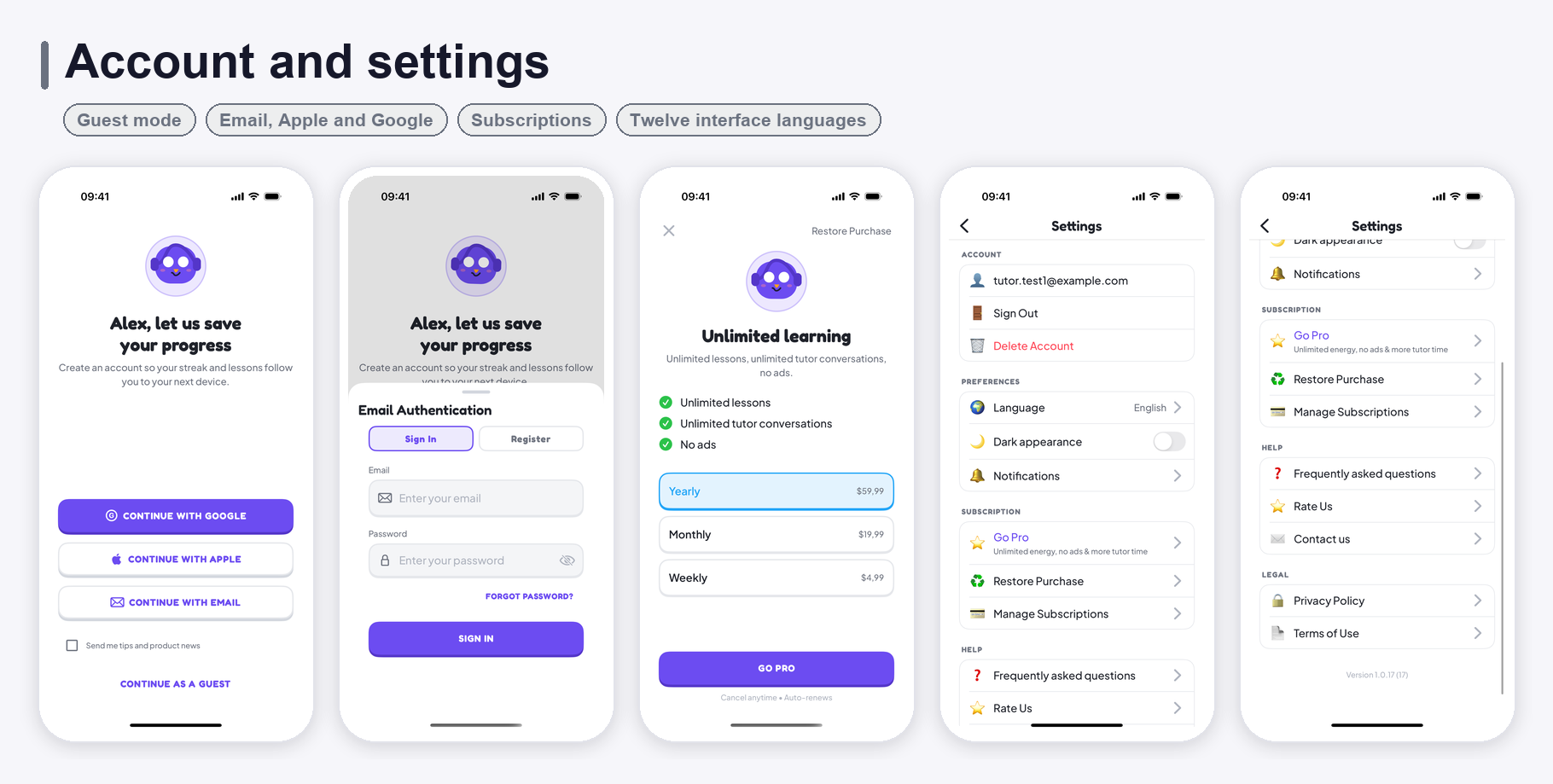
- Social sign-in with Google and Facebook, and a first-password flow verified by a code mailed to the address the provider vouched for
- Newsletter sign-up with a local subscriber list in the admin panel, and optional sync to Mailchimp (a paid third-party service; needs your own Mailchimp account and API key)
- Built-in app colour themes and onboarding layout variants
- Paywall layout variants and four subscription plans (weekly, monthly, yearly, lifetime)
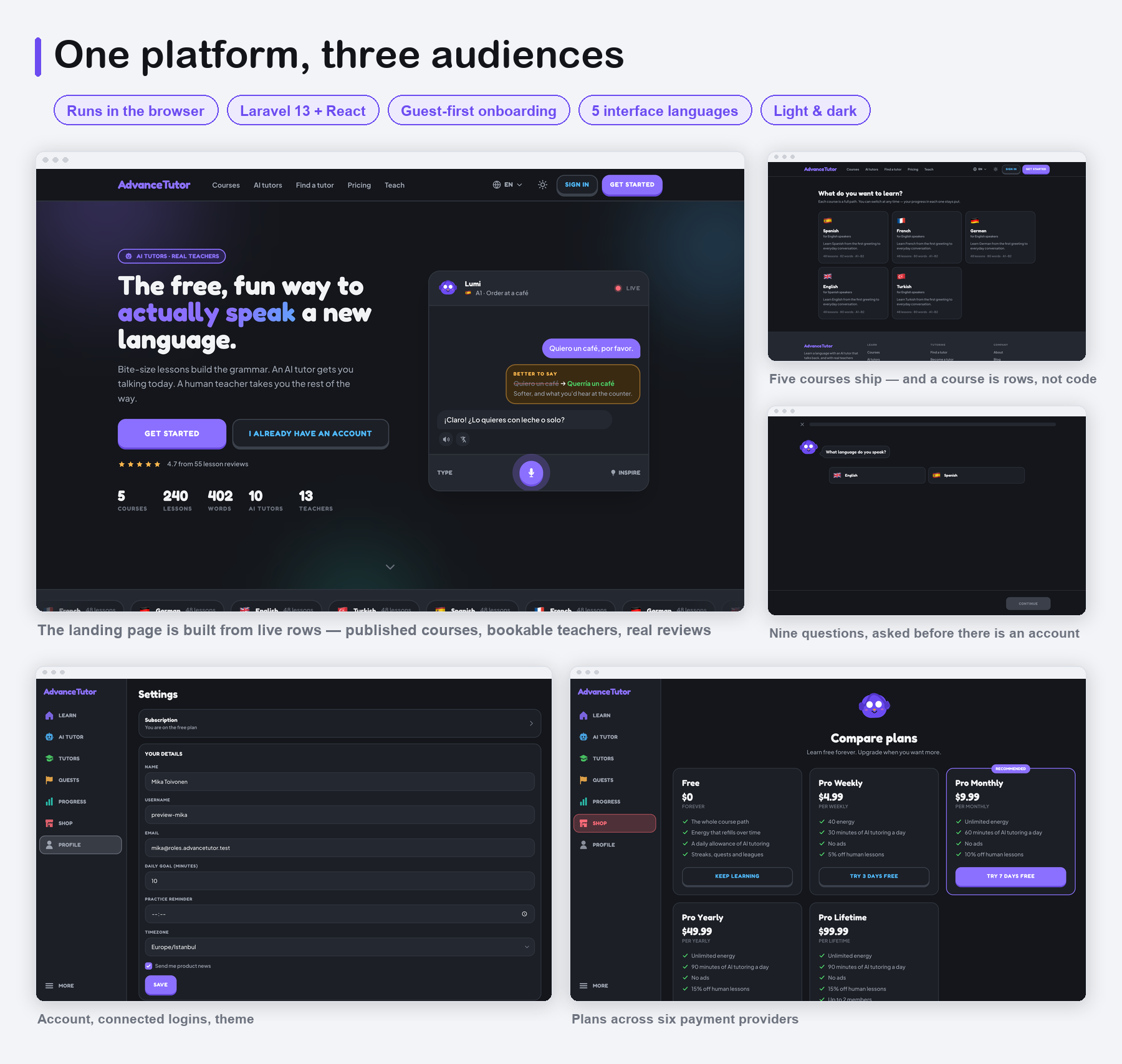
- 12-language localization in the app (ar, de, en, es, fr, it, ja, ko, pt, ru, tr, zh), five interface languages on the web, and a translation layer for course content per locale
- Four starter courses (English, Spanish, French, German) — courses are data, not code
- A browser installer at
/setupfor shared hosting, and a one-command local setup script - Complete detailed documentation — including Laravel deployment, AI provider setup, all six payment gateways, email providers, social login, theming, the API, RevenueCat, OneSignal, AdMob and App Store / Google Play configuration
Key Features
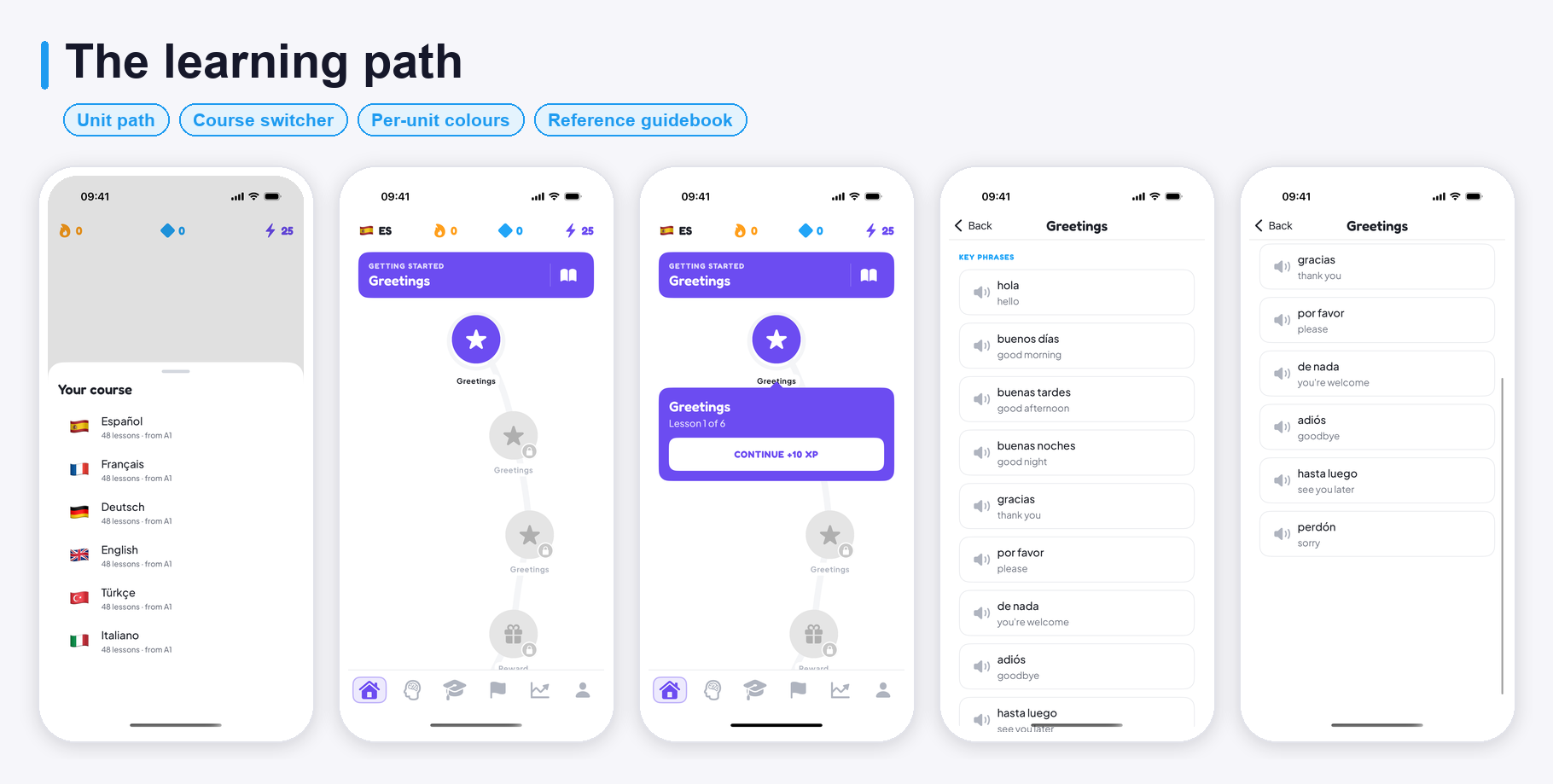
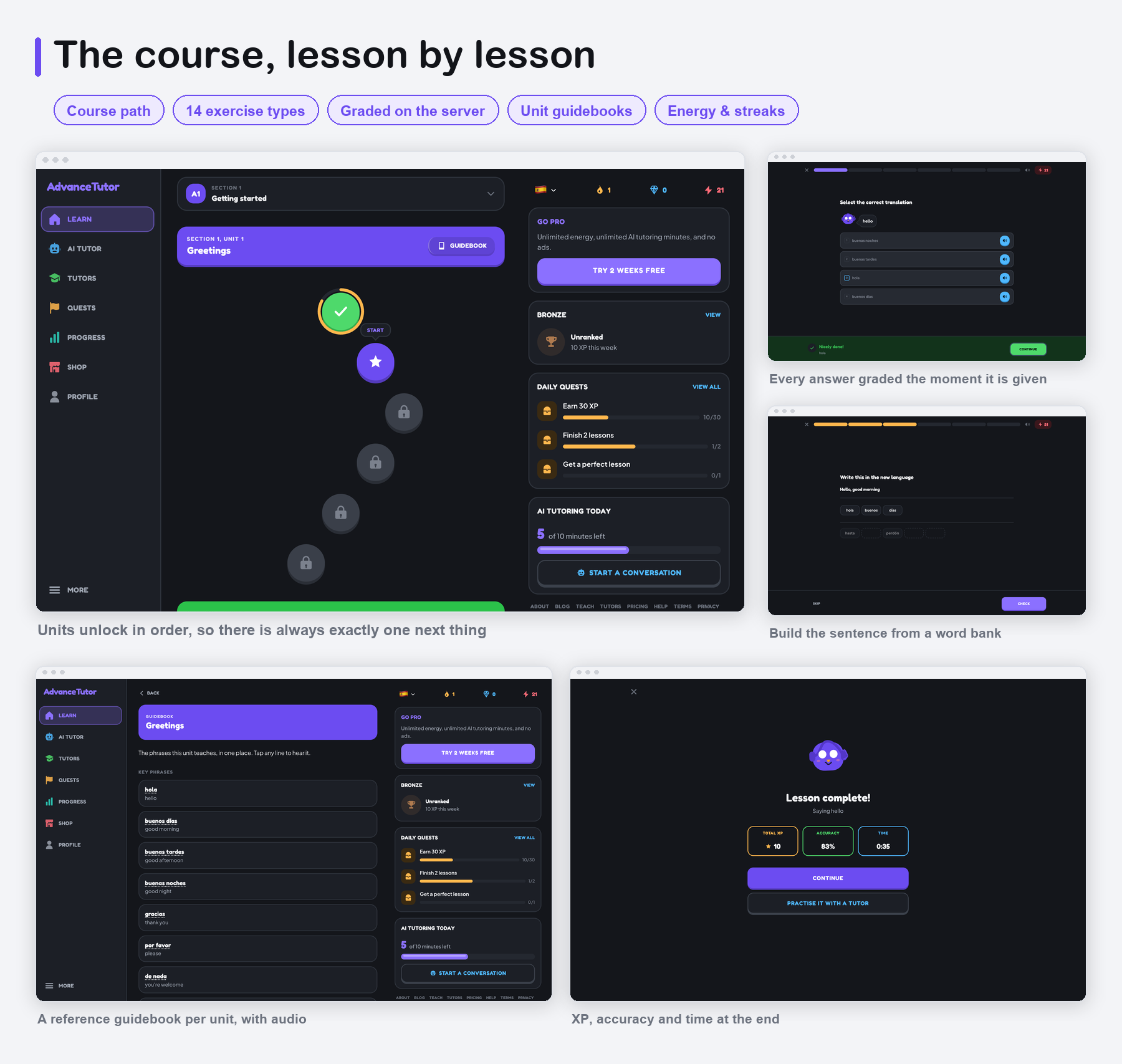
- Guided Course Path: Courses split into sections, units and lessons, drawn as a path the learner walks, with unlock rules set in the panel.
- Six Exercise Types in the App: Choose the translation, listen and choose, match pairs, build a sentence from a word bank, type the answer, and say it out loud. Answers are graded the moment they are given.
- Unit Guidebooks: Key phrases with audio and short grammar notes with worked examples, written per unit and edited in the panel.
- AI Speaking Tutor: Conversations with a choice of tutor personas, free talk or a guided scenario (“order a coffee”, “a job interview”), with a server-authoritative daily time budget.
- Corrections That Persist: Every correction is kept and split into grammar mistakes and phrasing that was merely unnatural.
- Human Tutor Marketplace: Tutor profiles with ratings, reviews, specialities and languages; live availability; trial and full lessons; in-app messaging and lesson reviews. Money is held, released after the lesson, and split at the commission rate in force when it was sold.
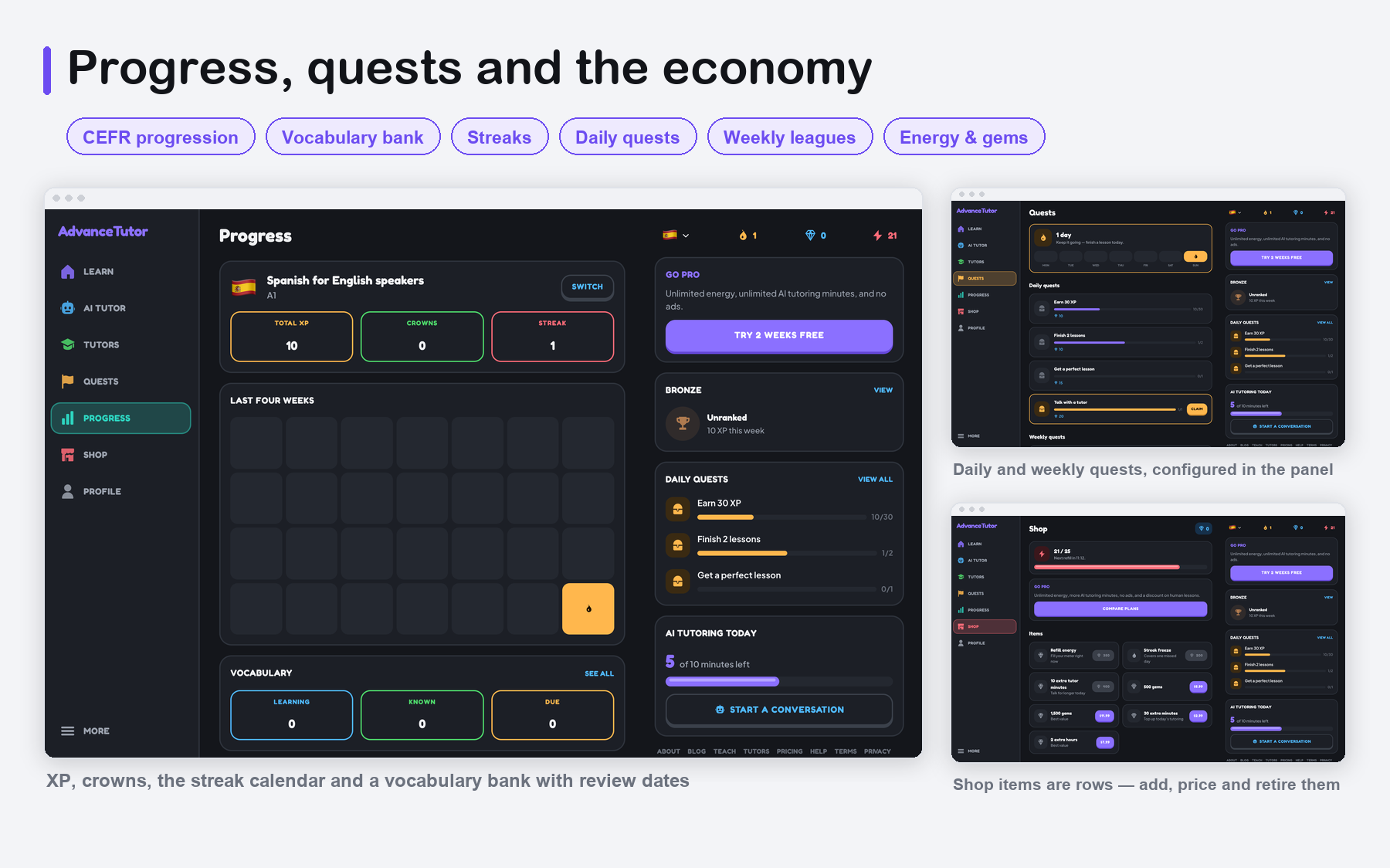
- Progress: A CEFR level dial, the units you have finished phrased as things you can now do, a vocabulary bank with strength and review dates, and your correction history.
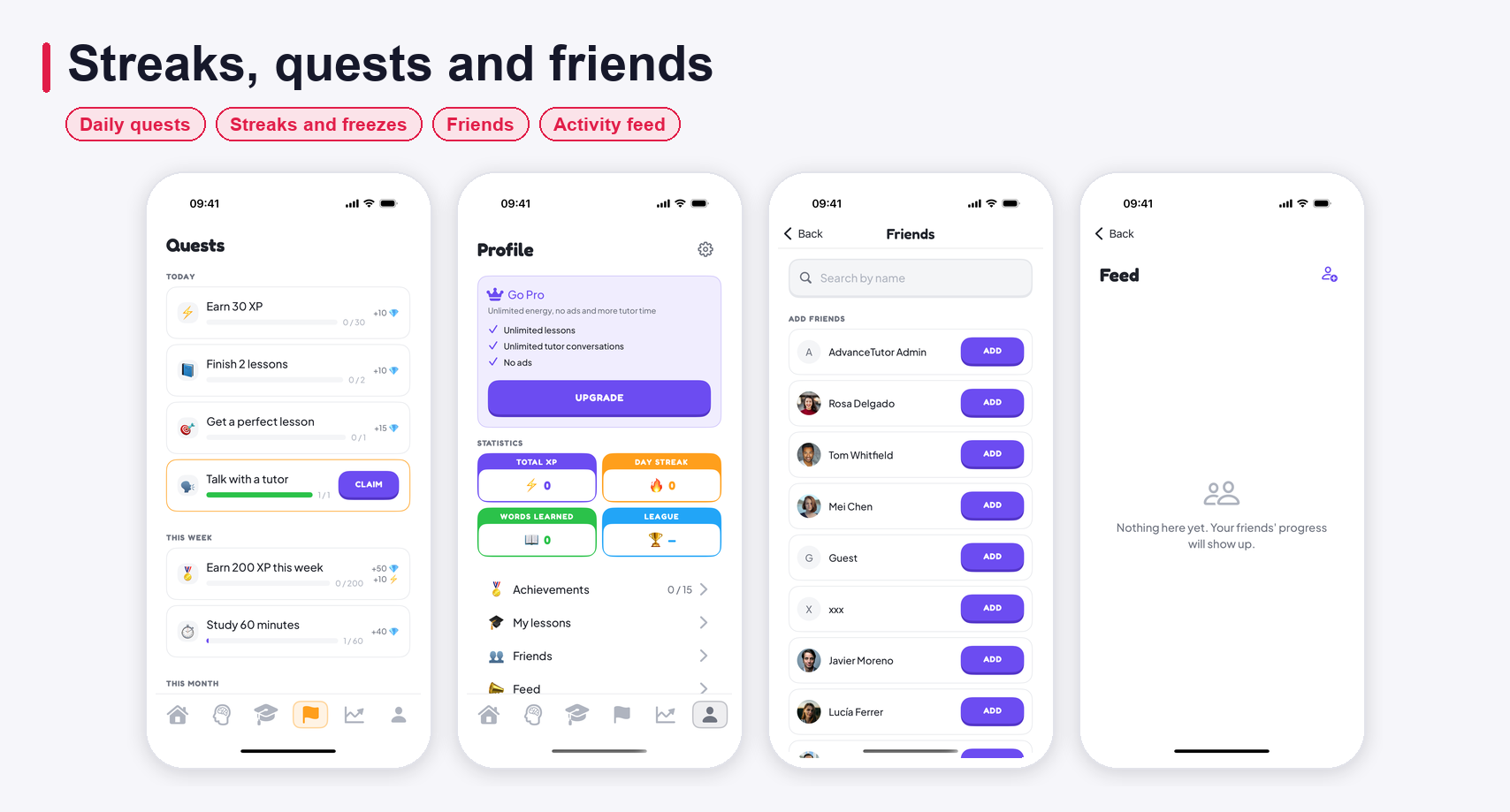
- Streaks, Quests and Achievements: Daily and weekly quests, streaks with freezes, achievement tiers, and weekly leagues — all configured from the panel.
- Friends and Feed: Add friends and see their milestones, with per-item visibility.
- Energy and Gems: Energy gates lessons and refills over time; gems are earned and spent in the shop, with a separate daily minutes budget for AI conversation.
- In-App Subscriptions: Weekly / monthly / yearly / lifetime through RevenueCat, with discount offers and multiple paywall layouts.
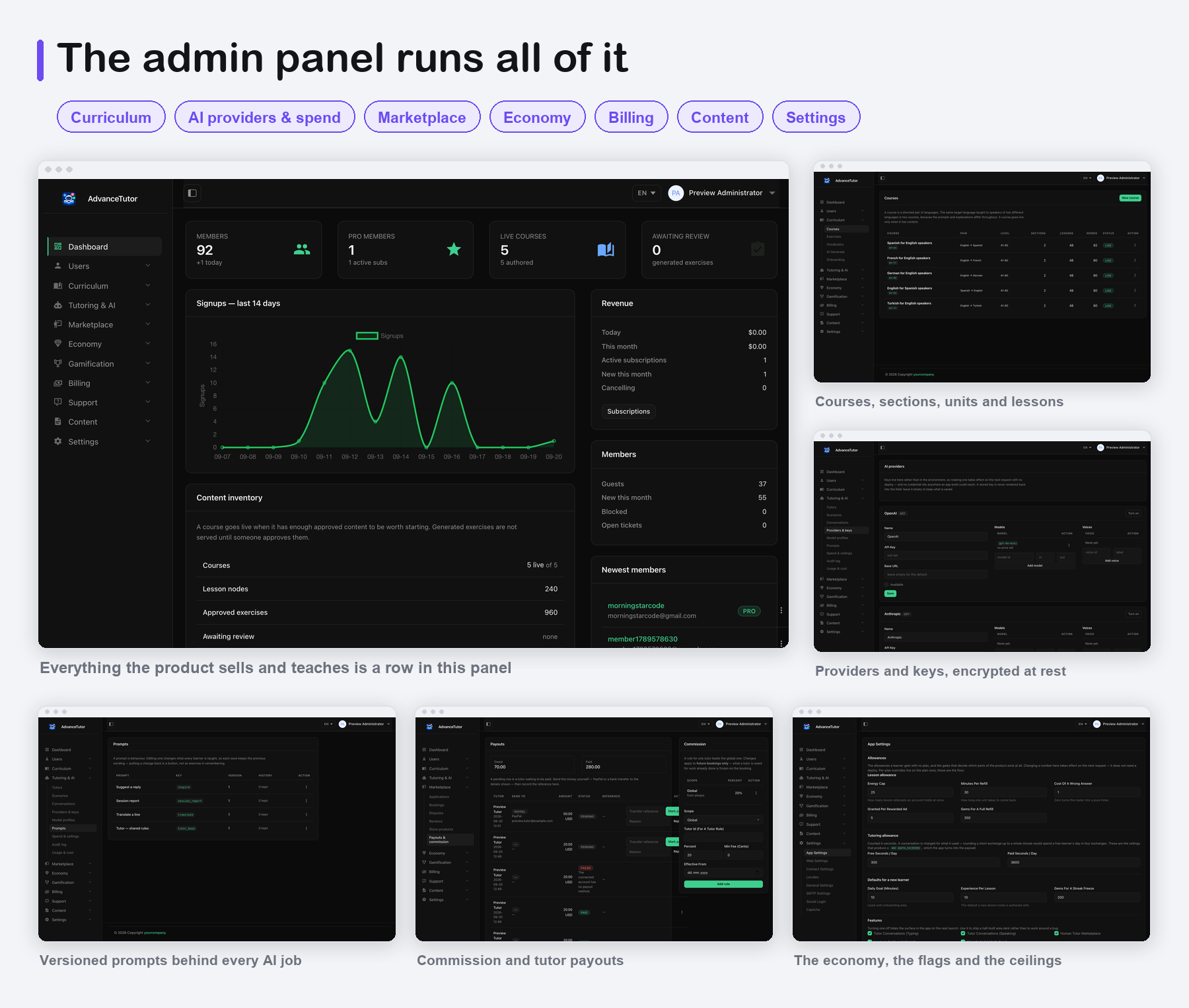
- Provider-Agnostic AI: Choose OpenAI, Anthropic or Google Gemini per task in the panel, with model, temperature, token cap, timeout and a fallback profile for each. Keys are encrypted at rest and never reach the app.
- AI Cost Control: A daily seconds budget per plan, daily spend ceilings platform-wide and per learner, and a usage screen that tells you which model and which day the money went to.
- AI Studio — Course & AI Tutor Generator: describe a course in a few lines and AI plans it, writes every unit — vocabulary with pictures, graded exercises, guidebook and tutor role-play — and draws the cover and banners; or describe the tutors you want and get their personas, portraits and practice scenarios. You edit the plan, read every exercise with its answer, and publish in one click, hidden until you put it live.
- Laravel Admin: Users and roles, courses and lesson content, exercises, vocabulary, guidebooks, AI providers, model profiles, prompts and spend ceilings, usage and cost by day, tutors and applications, bookings, payouts, quests, achievements, leagues, shop items, plans, subscriptions, orders, pages, FAQs, email templates, support tickets and every setting.
- Settings and Personalization: Light/dark theme, 12 interface languages, notification preferences, guest mode with an account upgrade path.
- Everything Managed From the Panel: Course content, unlock rules, AI providers and limits, prices, quests and tutor approvals are all settings you change in the dashboard — no new app release needed.
Web Platform
- One Deployment, Three Audiences: Learners, teachers and staff use the same Laravel app and the same database.
- Fourteen Exercise Types: Pick the image, pick the translation, listen and choose, tap the word you hear, match pairs, word bank, order words, type the translation, listen and type, fill the blank, complete a dialogue, reading comprehension, speak the phrase, and open written response — all graded on the server.
- Tutor Portal: Teachers manage their own schedule, lessons, students, earnings, payout details and withdrawals.
- Subscriptions and One-off Sales Across Six Gateways: Plans, gems, AI minutes and lesson credits, sold through whichever provider you configure.
- Guest-First Onboarding: A visitor can answer the questionnaire and take a lesson before signing up, and keeps the path, streak and XP they earned when they do.
We are actively improving this app. Feel free to send feature requests via email — together we can make an awesome product.
Server Requirements
- PHP 8.3 or newer, with
pdo_mysql,mbstring,openssl,curl,fileinfo,zip,gd(or Imagick) andintl - MySQL 8.0 or MariaDB 10.6+
- A document root that can point at
public/ - One cron entry for the scheduler
- HTTPS, for OAuth callbacks and payment webhooks
For the app itself: a Mac with Xcode 16 or newer, an iOS 17+ device or simulator, and an Apple Developer Program membership to ship to the App Store.
Important Notice to Our Valued Customers
We are committed to building a reliable and continuous business system, with your satisfaction and the success of
this product as our top priorities. Your feedback is crucial, and we encourage you to share any bugs,
suggestions,
or new feature ideas. Your input directly supports our ongoing improvement and innovation.
We’re here to help — feel free to contact us anytime via the CodeCanyon messaging system.
Thank you for being part of our journey.
Warm regards,
The Morningstarcode Team
| Author | morningstarcode |
|---|---|
| Price | $19 |
| Sales | 0 |
| Rating | 0 (0) |
| Published | Oct 23, 2026 |
| Last Update | Oct 23, 2026 |
| Compatible Software | iOS 15, iOS 14, iOS 13, iOS 12 |
| Compatible With | Swift |
| Demo Url | https://advancetutor.laravelbeginner.net/en |
| Mobile Files Included | Layered PNG, JavaScript JS, PHP, HTML |
| Video Preview Resolution | 1080x2424 |
Categories
Tags
External listing. code.market does not sell this product and does not process payment for it. Pricing, payment, delivery, licensing, refunds, and support are handled by the third-party merchant on its own website. We may earn an affiliate commission from a referral. Details.