
Advanced WooCommerce Deposits and Payment Plans

Description
A complete WooCommerce Deposits and Payment Plans system. Allows easy to configure deposits and payment plans functionality on your WooCommerce shop. You can run deposits, installments, layaway, payment plans, variable payments, buy now pay later, etc.
Looking for the PRO version?
Great news — it’s now available on the official WooCommerce Marketplace! You can purchase the PRO version using the link below: https://woocommerce.com/products/ultimate-payment-plans/.

Ultimate Payment Plans for WooCommerce
Features in PRO version
- Supports both product & cart level payment plans.
- Config payment plans using rules, storewide & productwide settings.
- Config payment plans either optional or mandatory using rules.
- Create payment plans using fixed price & fixed date.
- Supports automatic payments via WooCommerce Stripe.
- Supports automatic payments via WooCommerce PayPal.
- Supports automatic payments via Reward Gateway (requires Add-on for WooCommerce Points and Rewards plugin).
- Supports manual payments via any WooCommerce supported payment gateways.
- Supports email reminders for automatic and manual payments.
- Future payment orders will be generated on initial payment itself.
- Customers can pay their future payments anytime via My account page.
- Customers can apply WooCommerce coupons for the whole order, not just the initial amount.
- Guests can place payment plan orders without having an account.
- Site admin can create custom email reminder templates.
- Site admin can export plan order in CSV format.
- Site admin can calculate payment plans based on regular / sale price.
- Site admin can allow coupon usage in cart / checkout.
- Site admin can allow mixed checkout.
- Site admin can force guests to create an account during classic checkout.
- Site admin can grant downloadable content access either after initial payment / final payment.
- Site admin can disable payment plans by user roles.
- Site admin can disable specific payment gateways when the cart contains payment plans.
- Site admin can restrict payment plans by specific countries.
- Site admin can change payment plan order statuses in bulk.
- Site admin can filter payment plan orders using payment method.
- Site admin can easily track customers placed payment plan orders.
- Site admin can test custom email reminder templates instantly by sending email.
- Setup custom email reminder templates to send different email content for various reminder intervals for their customers.
- Customer placed payment plan orders can be viewed on their Account page under the separate menu.
- Separate emails are provided for payment plans.
WooCommerce Deposits and Payment Plans – Lite
Features in Lite version
- Supports product level payment plans only.
- Config payment plans using storewide & productwide settings.
- Create payment plans using fixed price & fixed date.
- Supports automatic payments via WooCommerce Stripe.
- Supports manual payments via any WooCommerce supported payment gateways.
- Supports email reminders for automatic and manual payments.
- Customers can apply WooCommerce coupons for the whole order, not just the initial amount.
- Guests can place deposit orders without having an account.
- Site admin can allow coupon usage in cart / checkout.
- Site admin can allow mixed checkout.
- Site admin can force guests to create an account during classic checkout.
- Site admin can grant downloadable content access either after initial payment / final payment.
- Site admin can disable deposits by user roles.
- Separate emails are provided for deposits.
Do you have interested to purchase our Ultimate Payment Plans for WooCommerce plugin?

Demo URL
Supported Extensions
- WooCommerce Stripe
- WooCommerce PayPal (Only in Pro version)
- Email Previewer for WooCommerce
- WooCommerce Test Order
Setup and Configuration
Go to WooCommerce > Deposits > Settings
General
By enabling WooCommerce Deposits and Payment Plans – Lite, customers can start deposits for products in your shop.
Storewide Deposits Settings
By default all products in your shop will follow these settings. You can also override these settings for each product separately to make exceptions.
To apply the Deposit option on a global or storewide basis,
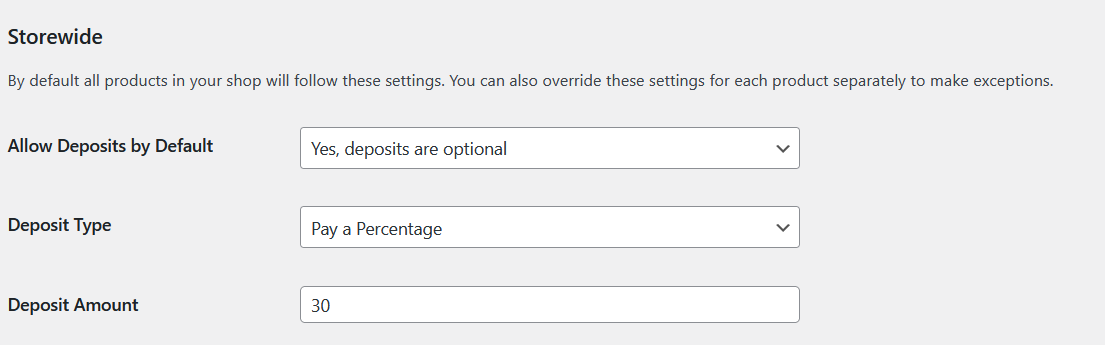
1. Deposit Type – Percentage
Option for site admin to set Deposit Type as Percentage.
Eg: Let’s say product price is $100 and the deposit percentage as 30%, then the customer will be allowed to pay 30% of product price i.e $30 as deposit amount and the remaining amount will be paid later.
2. Deposit Type – Fixed Amount
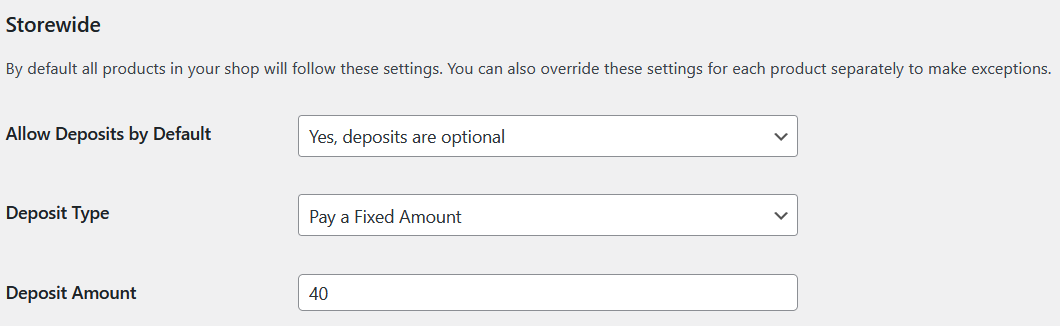
Option for site admin to set Deposit Type as Fixed Amount.
Eg: Let’s say product price is $100 and the fixed deposit amount as $40, then customer will be allowed to pay $40 as deposit amount and the remaining amount will be paid later.
3. Deposit Type – Payment Plans
Option for site admin to set Deposit Type as Payment Plans.
Payment Plans give customers the option to pay an down payment and the remaining payments at a later date, dividing payments into multiple parts over time. This would be similar to a loan, layaway, installment payments, flexible payments or credit plan.
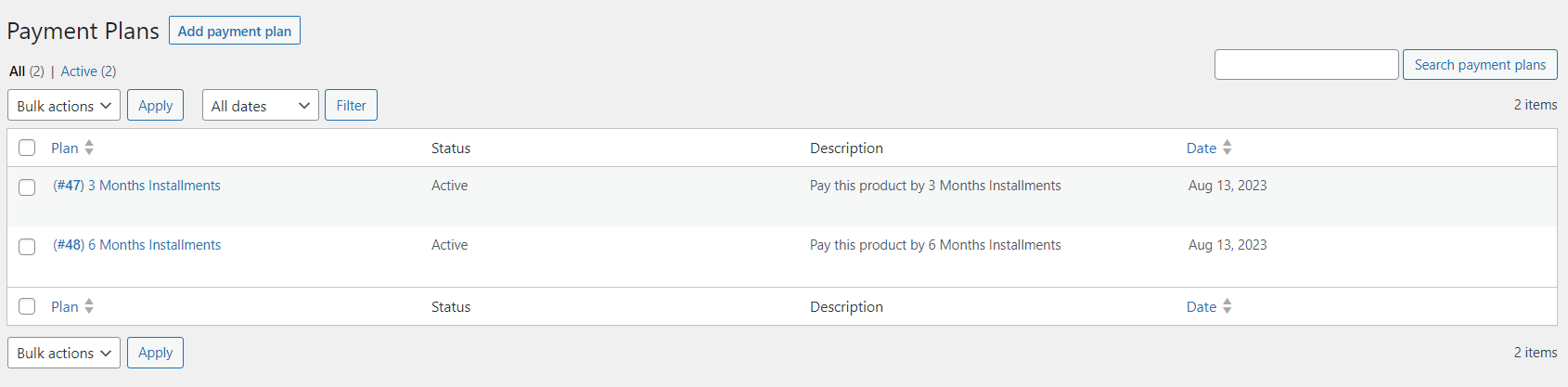
Set the created plans in the Payment Plans option,
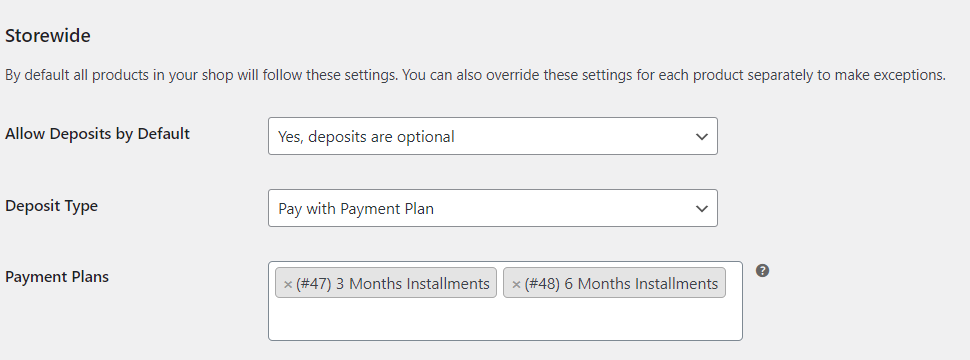
If you do not want deposits enabled for all products, skip these settings and go to Productwide Deposits Settings below,
Productwide Deposits Settings
To override storewide settings for specific product,
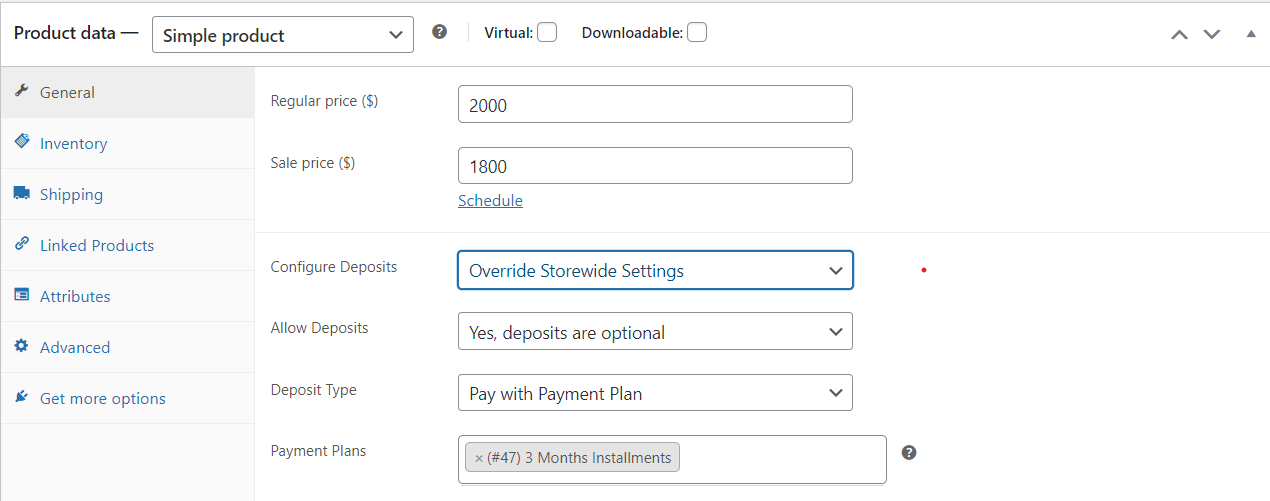
Note:Supports both Simple and Variable(Variation Level) Products.
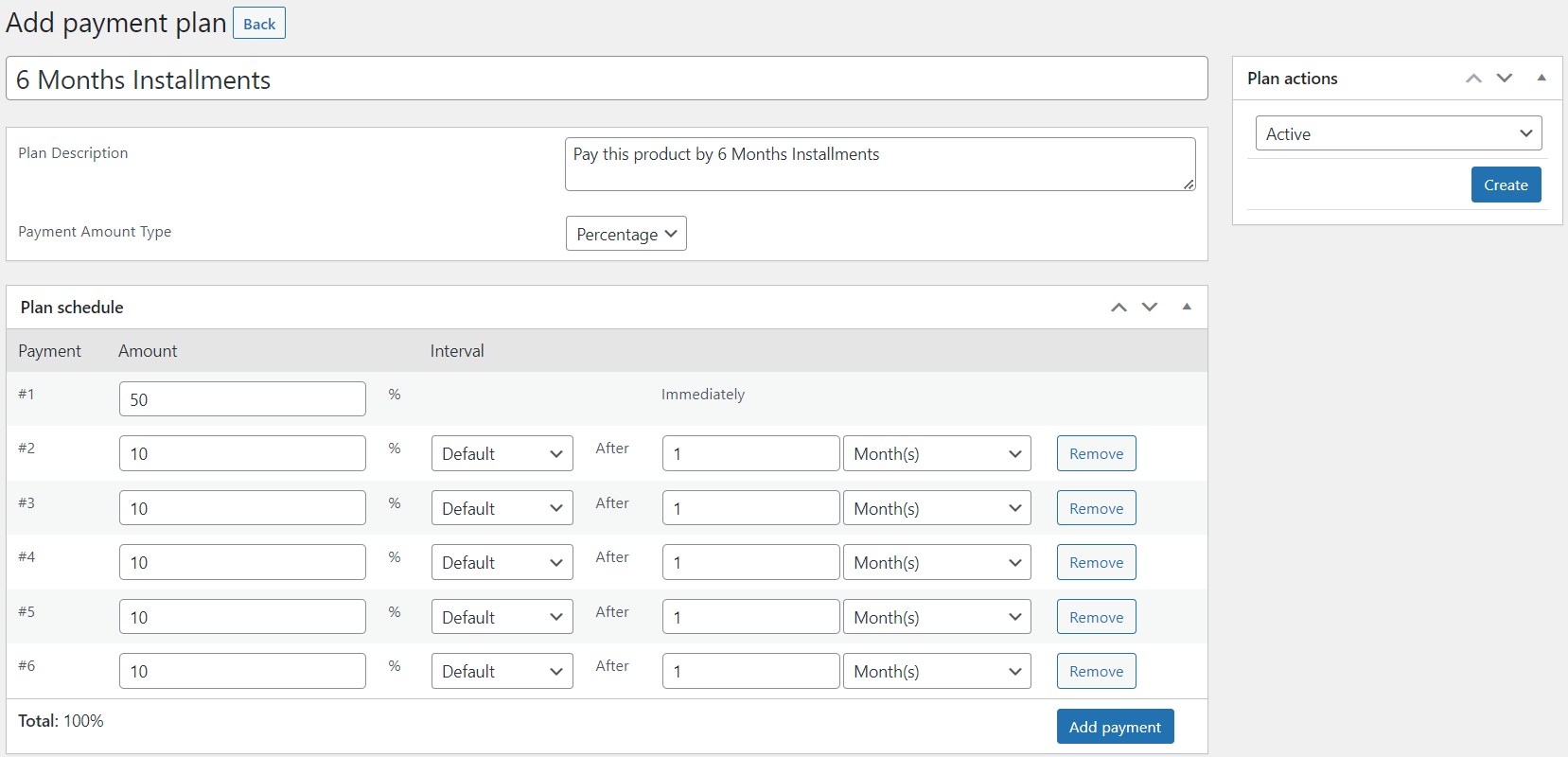
Go to WooCommerce > Deposits > Payment Plans.
- Plan Name – Name shown to the customer when viewing the plan.
- Plan Description – Description shown to the customer when choosing a plan.
Plan Schedule
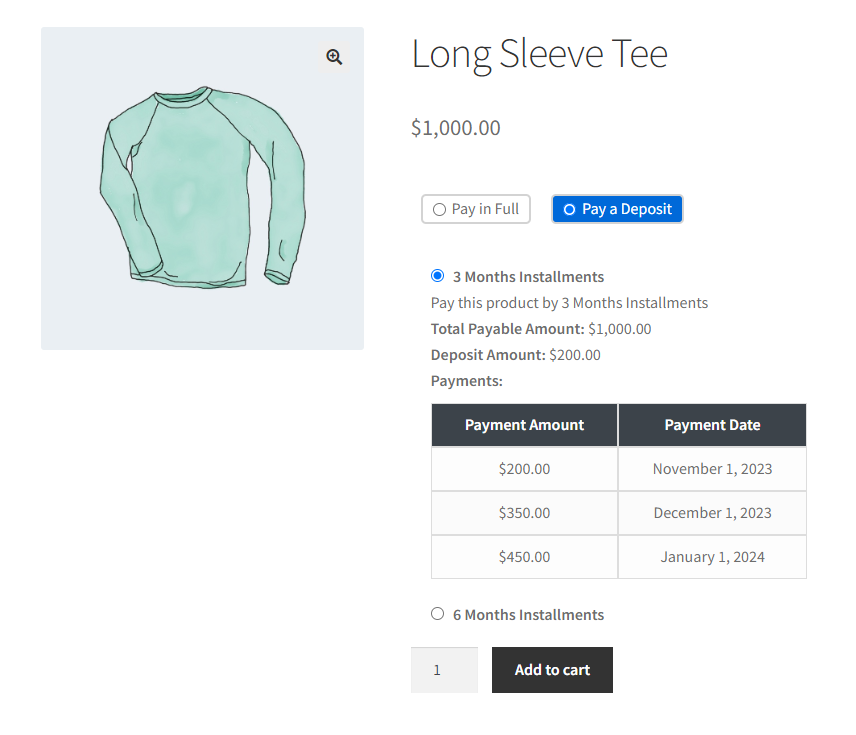
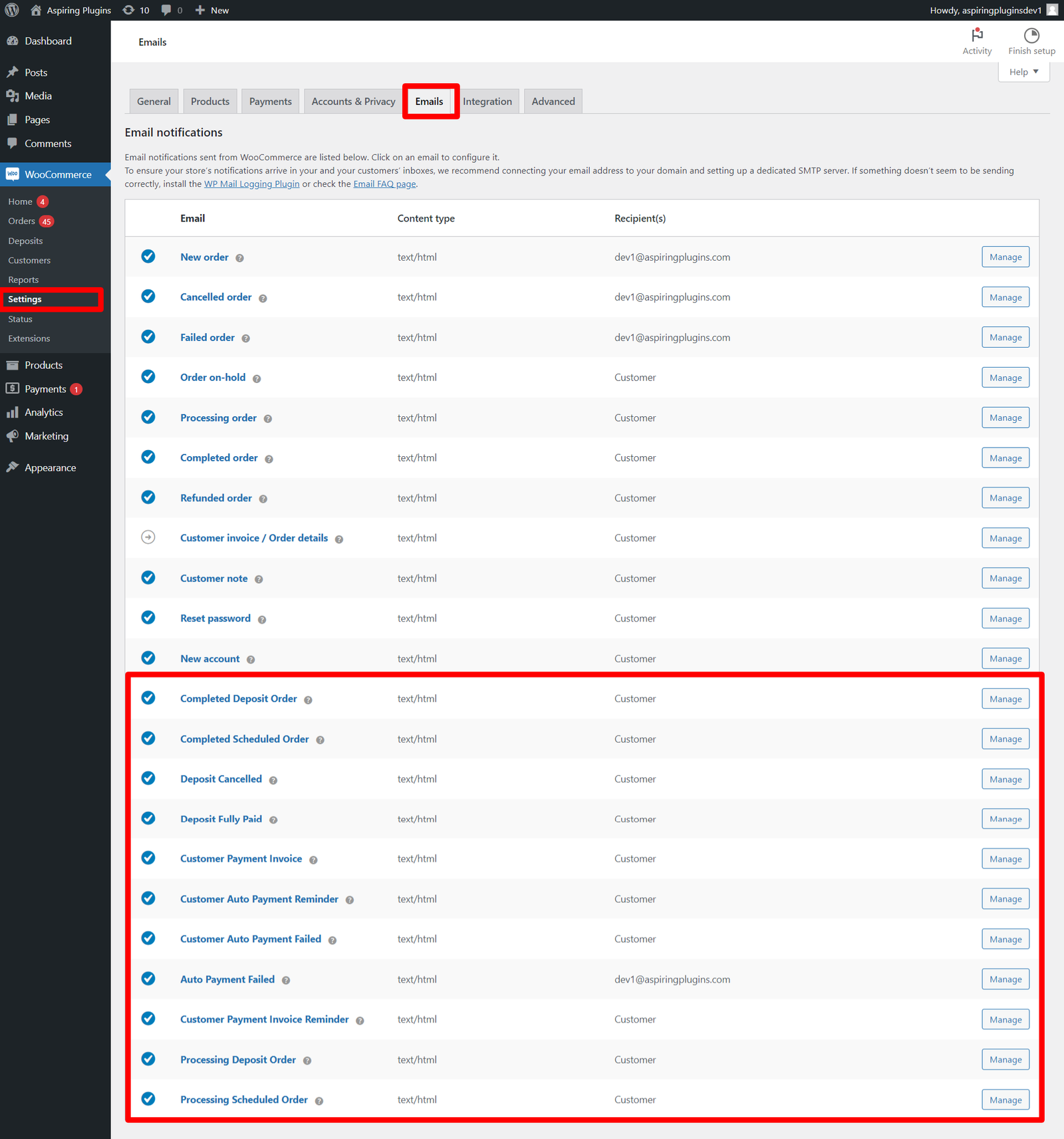
Emails
Emails can be sent to the customers for the respective deposit activities.
Support
Feel free to reach out to us via support through our email aspiringpluginshelp@gmail.com and hence our team will take care as soon as possible. For more information, Check out our website at https://aspiringplugins.com/.
Updates
Version 2.2.0 on 30 Sep 2026
 * Fix - Scheduled payment orders reducing product stock multiple times for the same purchase
 * Tweak - Tested with WooCommerce 11.1
 * Tweak - Tested with WordPress 7.1

Version 2.1.0 on 10 June 2026
 * Tweak - Code stability and improvements
 * Tweak - Compatibility with latest WooCommerce Stripe 10.7.0
 * Tweak - Compatibility with latest WooCommerce 10.8.1
 * Tweak - Tested with WordPress 7.0

Version 2.0.0 on 27 Jan 2026
 * Tweak - Code stability and improvements
 * Tweak - Compatibility with latest WooCommerce Stripe 10.1.0
 * Tweak - Compatibility with latest WooCommerce 10.4.0
 * Tweak - Tested with WordPress 6.9.0

Version 1.9.0 on 14 Sep 2025
 * Tweak - Optimized automatic payment handling when charging via WooCommerce Stripe
 * Tweak - Tested with WooCommerce 10.1.2

Version 1.8.1 on 26 Mar 2025
 * Tweak - Tested with WooCommerce 9.7.1
 * Tweak - Code improvements

Version 1.8.0 on 13 Feb 2025
 * Fix       - Critical error on checkout
 * Tweak - Tested with WooCommerce 9.6.1
 * Tweak - Tested with WordPress 6.7.2

Version 1.7.0 on 02 Jan 2025
 * Fix   - Deposit amount not calculated properly in Cart and Checkout
 * Fix   - Division by zero error in Cart and Checkout

Version 1.6.0 on 19 Dec 2024
* Tweak - PO translation improvements
* Tweak - Tested with WooCommerce 9.5.1
* Tweak - Tested with WordPress 6.7.1

Version 1.5.0 on 16 June 2024
* Fix: Fatal error in frontend in some cases.
* Tweak: Tested with WooCommerce 8.9.3

Version 1.4.0 on 09 June 2024
* New: Compatible with New WC Stripe Checkout Experience.
* Tweak: Tested with WooCommerce 8.9.2
* Tweak: Tested with WordPress 6.5.4
* Fix: Automatic payments via WC Stripe failed in some cases.
* Fix: Variation level deposit form is not working in some cases.

Version 1.3.0 on 01 April 2024
* Fix: Scheduled payments are not editable in some cases.
* Tweak: Tested with WooCommerce 8.7.0

Version 1.2.0 on 18 February 2024
* New: Added WooCommerce Cart and Checkout Blocks compatibility.
* Tweak: Tested with WooCommerce 8.6.0

Version 1.1.0 on 08 February 2024
* New : Added automatic payment failed emails for customer & admin.
* Tweak : Tested with WooCommerce 8.5.2
* Tweak: Tested with WordPress 6.4.3

Version 1.0.0 on 01 November 2023
* Initial Release
| Type | WooCommerce Plugin |
|---|---|
| Author | aspiringplugins |
| Category | Wordpress / Ecommerce / Woocommerce |
| Price | $39 |
| Sales | 39 |
| Rating | 5.00 from 4 ratings |
| Published | Nov 1, 2023 |
| Last Update | Sep 30, 2026 |
| Compatible Browsers | IE11, Firefox, Safari, Opera, Chrome, Edge |
| Compatible Software | WordPress 6.3.x, WordPress 6.2.x, WordPress 6.1.x, WordPress 6.0.x, WordPress 5.9.x, WordPress 5.8.x, WordPress 5.7.x, WordPress 5.6.x |
| Compatible With | WooCommerce 8.x.x, WooCommerce 7.x.x, WooCommerce 6.x.x, WooCommerce 5.x.x, WPML |
| Gutenberg Optimized | No |
| Source Files Included | JavaScript JS, HTML, CSS, PHP, SQL |
Categories
Tags
External listing. code.market does not sell this product and does not process payment for it. Pricing, payment, delivery, licensing, refunds, and support are handled by the third-party merchant on its own website. We may earn an affiliate commission from a referral. Details.
Products of the Week.
Submit🥇

STOP GUESSING WHAT TO POST
AI that learns your brand voice and builds a month of consistent, on-brand social content: carousels, posts and hooks that sound like you, not like everyone else's AI.
SaaS · 4,636 views · 44 clicksSaaS · Week 45 · 4,636 views · 44 clicks
🥈

Conversational Backlinks for Busy Founders
Place Backlink Relevant Conversation for your domain across Forums and Conversations
Website · 42,488 views · 225 clicksWebsite · Week 45 · 42,488 views · 225 clicks
🥉

upvote.club
Free Social Media Engagement that Helps Boost Your Content. Upvote Club supports 19 social networks with 100+ engagement actions in one dashboard. Add links to your posts and get free engagement from real users.
SaaS · 40,536 views · 120 clicksSaaS · Week 45 · 40,536 views · 120 clicks
#4

Substack Posting API
Onboard your Agent to Substack. Write Publish on Substack via API
SaaS · 59,503 views · 200 clicksSaaS · Week 45 · 59,503 views · 200 clicks
#5

Seenshot App
Free, Fast, MacOS Screenshot app. Make Screenshot cmd+shift+2 and send it via link
Desktop App · 28,879 views · 124 clicksDesktop App · Week 45 · 28,879 views · 124 clicks
#6

Hand-Placed Backlinks $9.99 per link. Flat rate.
Buy hand-placed forum, Q-A and directory backlinks. Flat $9.99 per link, no subscriptions — you only pay for approved listings.
Website · 4,677 views · 19 clicksWebsite · Week 45 · 4,677 views · 19 clicks
#7

Free Invoice Generator - PDF Invoices in Your Browser, No Sign-Up
A free invoice maker for freelancers and small businesses: fill in the invoice, check the live preview, and download a PDF that looks exactly like it. Any currency, tax per item, three templates, no sign-up, and nothing leaves your device.
3,335 views · 17 clicksWeek 45 · 3,335 views · 17 clicks
#8

Merge PDF Files Free - Combine PDFs in Your Browser, No Upload
A free PDF merger for office workers, students, and freelancers: combine PDFs and images into one file in the browser, reorder files and pages, pick page ranges, keep bookmarks, and open password-protected PDFs. Nothing is uploaded, no sign-up, no watermark.
3,082 views · 14 clicksWeek 45 · 3,082 views · 14 clicks