
Advance Google Maps Business Extractor with Images

Description
Update Version : 1.0.0.8 more fast version publish on—21-03-2025 100% working software and also best selling software for google map.. if you face any issue/ want to white label software you can email us at bhansalisoft781986@gmail.com.. Latest update : 29-09-2024
What is Advance Google Business Extractor?
Google Map Business Extractor – is Advance Software with Unique Feature for Extract Google Business Contact with Location Wise and Also Export Business Images into your Local Computer
-
Software Extract All Detail from Google Business
- Business Full Address with City And State and Longitude and Latitude
- Business Name
- Business Phone
- Business Email – Google map now Extract Email improvement.(95%) if available on Website home page
- Business Website
- Business Rating
- Business Review
- Location wise Search
- Business Images – with Live Link and Also Download images into Local Computer
- Business working hour
- Google map now extract Social media Profile link.
- Google map now Extract Email improvement.(95%) if available on Website home page
- Business Category
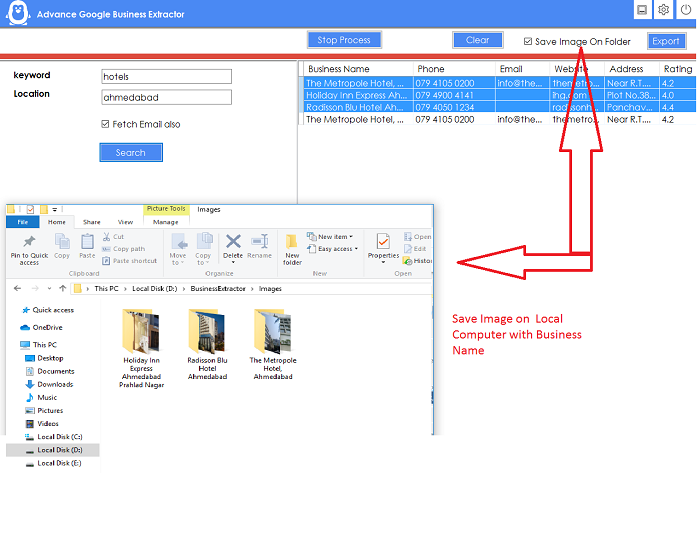
- Software Download Business images into Local Computer with Business Name Folder seperately
- Software Search Google Business Contact Location Wise Filter.
- 100% Real Time Extract Business Contact with Advance Export into Excel ,CSV and Text Format.
- Software Support Proxy Server – so if you have proxy server For hide your ip , then you can configure
see Software Video : https://www.youtube.com/watch?v=TNT3Eadng48
Project Requirement
- Google Chrome Latest Version
Installation Process
- You will Recieve only Software. Code is not Included
- After Purchase Product purchase code is your Licence code. if you face issue in license please email me at bhansalisoft781986@gmail.com you can check what is Purchase Code from this link : https://help.market.envato.com/hc/en-us/articles/202822600-Where-Is-My-Purchase-Code-
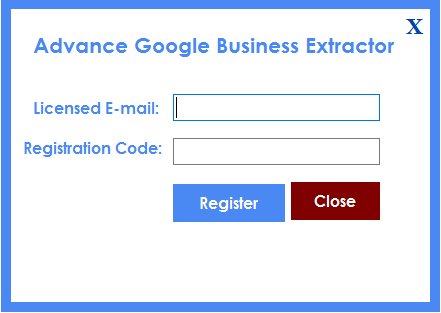
- After i Confirm your purchase Code , Please Unzip Main File and Run GoogleBusinessExtractor.exe and Register your Licence as per below Screen.
- Licence Email : Registered Email.
- Registration Code : Evanto Purchase Code.
- After Registration you can Use Software.
Getting Started
After Registration Licence , Start Software, software start with below screen
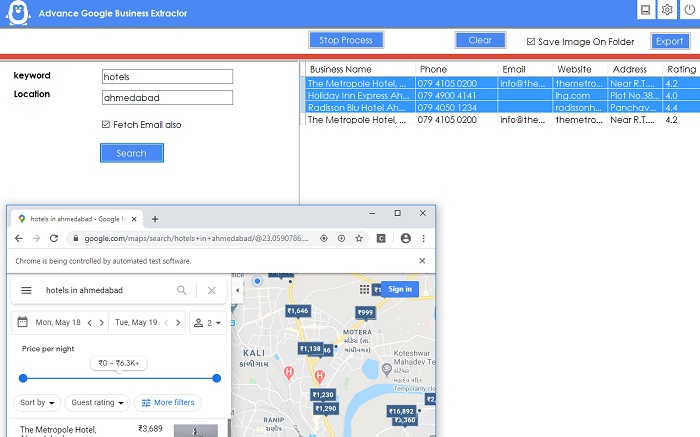
- Now you can Search Using below parameter.
- Keyword : Any Keyword like Hotels ,Doctors etc.
- Location : Enter your location so that software search keyword in this location only.
- Fetch Email Also : If you want to fetch Email of business contact then Select this option
- Click on Search Button , Software Start Fetch All Business Detail
- For Export Business Images , you need to Select “Save Images on Folder” option, after select this option , choose folder where you want to save Business Images
- Click on Export Button , All Data will be exported with Business Images with Business wise Seperate
- You can Export All Details in Multiple Format : Excel, CSV , And Text Format.
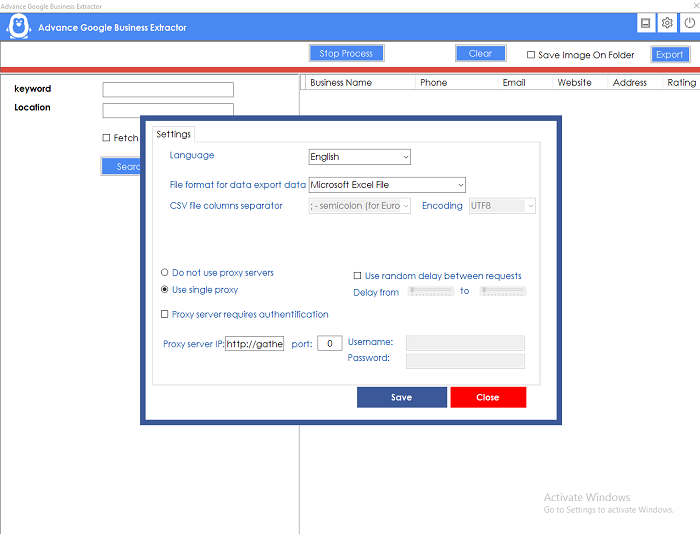
- Click on Setting Icon on Top Bar ,
 ,
You can do setup
- setup Export Format , Excel, CSV,Text Format
- setup Software Language
- setup Proxy VPN Setting
 ,
You can do setup
Support Policy
- Support Will provide from our profile Contact form on codecanyon .
- Support Will not Provide any types of customization.
- If you need any customization so extra cost will be charge.
- Single license support will provide for one single domain.
Contact Us
For Support you can directly contact with us via email.
Contact Email: bhansalisoft781986@gmail.com
1.0.0.7 – 26-06-2024
- Introduce Version : 1.0.0.7 more fast version
- Software update with new Google MAP feature functionality
1.0.0.6 – 08-jan-2024
- Introduce Version : 1.0.0.6 more fast version
- Software update with new Google MAP feature functionality
1.0.0.5 – 09/11/2023
- Improve software as latest changes on Google map
- Google chrome driver automatically update as per chrome browser version before start software
1.0.01 – 08/07/2021
- Google chrome driver update.
- Minor bug fixed.
1.0.01 – 10/12/2020
- Google chrome driver update.
1.0.01 – 28/05/2021
- Google chrome driver update.
Changelog
1.0.02– 04/19/2021
- Google chrome consent pop up problem fixed up.
1.0.02– 04/19/2021
- Google chrome consent pop up problem fixed up.
1.0.01 – 18/08/2020
- Working hour included.
- Big Business image size.
- Bug Fixed.
| Type | Windows App |
|---|---|
| Author | bhansalisoft |
| Category | Apps / Windows |
| Price | $15 |
| Sales | 417 |
| Rating | 3.44 from 41 ratings |
| Published | May 23, 2020 |
| Last Update | Aug 7, 2026 |
| Application Runtime | .NET 4 |
| Operating System Versions | Windows 10, Windows 8 Metro, Windows 8 Desktop, Windows 7, Windows Vista, Windows XP |
Categories
Tags
External listing. code.market does not sell this product and does not process payment for it. Pricing, payment, delivery, licensing, refunds, and support are handled by the third-party merchant on its own website. We may earn an affiliate commission from a referral. Details.
Products of the Week.
Submit🥇

STOP GUESSING WHAT TO POST
AI that learns your brand voice and builds a month of consistent, on-brand social content: carousels, posts and hooks that sound like you, not like everyone else's AI.
SaaS · 4,324 views · 38 clicksSaaS · Week 45 · 4,324 views · 38 clicks
🥈

Conversational Backlinks for Busy Founders
Place Backlink Relevant Conversation for your domain across Forums and Conversations
Website · 42,063 views · 223 clicksWebsite · Week 45 · 42,063 views · 223 clicks
🥉

upvote.club
Free Social Media Engagement that Helps Boost Your Content. Upvote Club supports 19 social networks with 100+ engagement actions in one dashboard. Add links to your posts and get free engagement from real users.
SaaS · 40,108 views · 117 clicksSaaS · Week 45 · 40,108 views · 117 clicks
#4

Substack Posting API
Onboard your Agent to Substack. Write Publish on Substack via API
SaaS · 59,112 views · 198 clicksSaaS · Week 45 · 59,112 views · 198 clicks
#5

Seenshot App
Free, Fast, MacOS Screenshot app. Make Screenshot cmd+shift+2 and send it via link
Desktop App · 28,487 views · 122 clicksDesktop App · Week 45 · 28,487 views · 122 clicks
#6

Hand-Placed Backlinks $9.99 per link. Flat rate.
Buy hand-placed forum, Q-A and directory backlinks. Flat $9.99 per link, no subscriptions — you only pay for approved listings.
Website · 4,318 views · 19 clicksWebsite · Week 45 · 4,318 views · 19 clicks
#7

Free Invoice Generator - PDF Invoices in Your Browser, No Sign-Up
A free invoice maker for freelancers and small businesses: fill in the invoice, check the live preview, and download a PDF that looks exactly like it. Any currency, tax per item, three templates, no sign-up, and nothing leaves your device.
2,992 views · 17 clicksWeek 45 · 2,992 views · 17 clicks
#8

Merge PDF Files Free - Combine PDFs in Your Browser, No Upload
A free PDF merger for office workers, students, and freelancers: combine PDFs and images into one file in the browser, reorder files and pages, pick page ranges, keep bookmarks, and open password-protected PDFs. Nothing is uploaded, no sign-up, no watermark.
2,763 views · 13 clicksWeek 45 · 2,763 views · 13 clicks