
AdSpot TV - Digital Signage Player for Android TV
Description
AdSpot TV – Digital Signage Player for Android TV (Flutter)
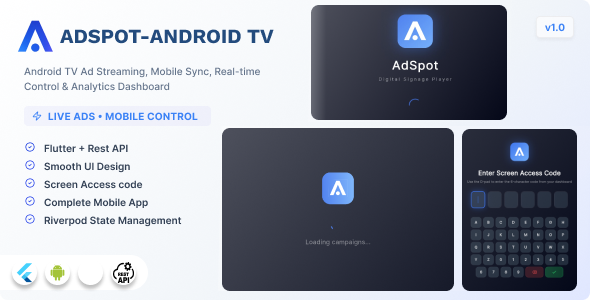
AdSpot TV is a professional digital signage and advertising display application built with Flutter for Android TV devices. It connects to a backend server to receive and manage advertising campaigns, plays image and video content in a continuous scheduled loop on TV screens, and reports detailed analytics back to the server. The application includes full offline support, real-time campaign updates via WebSocket, and a clean fullscreen TV-optimized interface.
Designed for out-of-home advertising networks, retail stores, restaurants, hotels, airports, and any environment where managed digital signage is required on Android TV or Amazon Fire TV hardware.
This project requires the AdSpot Pro backend for API endpoints, campaign management, and analytics. The backend is available separately on CodeCanyon: AdSpot Pro – Digital Signage and Advertising Platform.
Key Features
Device Management
- Pair the TV device with a 6-character access code from the admin panel
- Secure encrypted token storage for authentication persistence across reboots
- Automatic device registration with hardware metadata (model, manufacturer, OS version)
Campaign Playback
- Supports image campaigns (JPEG, PNG, WebP) and video campaigns (MP4)
- Configurable display duration per campaign
- Campaign scheduling with start and end time rules and timezone support
- Automatic campaign rotation and looping
- Smooth fade transitions between campaigns
- Idle screen displayed when no campaigns are scheduled
Real-Time Updates and Connectivity
- Live campaign updates delivered via WebSocket and Socket.IO with no manual refresh required
- Automatic reconnection on network drop with exponential backoff
- Offline media caching so playback continues without internet access
- Connection status indicator overlay
- Graceful degradation when the server is unreachable
Analytics and Reporting
- Per-campaign view duration tracking
- Heartbeat service sending device status to the server every 30 seconds
- Batched analytics event upload to minimize network overhead
- Local SQLite database for event queuing when offline
TV-Optimized Interface
- Fullscreen immersive display with system UI hidden
- Landscape-only orientation lock
- Always-on screen wake lock for 24/7 signage operation
- D-pad compatible navigation on the pairing screen
- Dark theme with gradient design
Developer and Debug Tools
- Hidden debug overlay activated by the Konami code sequence
- Live display of playback state, current campaign index, and offline status
- Structured logging system
- Environment-based API configuration for production, staging, and local development
Tech Stack
- Framework: Flutter 3.41 with Dart 3
- State management: Riverpod 2 with code generation
- Navigation: go_router
- HTTP client: Dio
- Real-time communication: Socket.IO client
- Video playback: video_player
- Media caching: flutter_cache_manager
- Local database: sqflite
- Secure storage: flutter_secure_storage
- Network monitoring: connectivity_plus
- Data models: Freezed and JSON serializable
- Device info: device_info_plus
- Wake lock: wakelock_plus
Requirements
- Flutter SDK 3.41.0 or later
- Dart 3.0.0 or later
- Android SDK API level 21 or higher (Android 5.0+)
- Target device: Android TV or Amazon Fire TV
- Backend: AdSpot Pro REST API server with Socket.IO support (sold separately)
Use Cases
- Digital advertising networks managing multiple TV screens remotely
- Retail store digital signage and product promotion displays
- Restaurant menu boards and promotional content
- Hotel lobby and corridor advertising screens
- Airport or transit lounge information and advertising displays
- Corporate office digital notice boards
What is Included
- Full Flutter source code (42 Dart files, clean MVVM-like architecture)
- Riverpod state management with code generation
- REST API and Socket.IO integration layer
- Local SQLite analytics database
- Media caching and offline playback system
- Heartbeat and analytics sync services
- Pairing screen, playback screen, idle screen, and debug overlay
- HTML documentation file
Notes
- A backend API server with REST and Socket.IO endpoints is required. The backend is not included in this item.
- After purchase, set your server URL in
lib/core/config/app_config.dartand rundart run build_runner buildbefore building. - The application is designed exclusively for Android TV and Fire TV. It is not intended for use on phones or tablets.
| Type | Flutter App |
|---|---|
| Author | Soloarc |
| Price | $29 |
| Sales | 19 |
| Rating | 0 (0) |
| Published | Apr 15, 2026 |
| Last Update | Apr 15, 2026 |
| Compatible Software | Flutter 3.x |
| Mobile Files Included | Dart, .java, .kotlin |
Categories
Tags
External listing. code.market does not sell this product and does not process payment for it. Pricing, payment, delivery, licensing, refunds, and support are handled by the third-party merchant on its own website. We may earn an affiliate commission from a referral. Details.
Products of the Week.
Submit🥇

STOP GUESSING WHAT TO POST
AI that learns your brand voice and builds a month of consistent, on-brand social content: carousels, posts and hooks that sound like you, not like everyone else's AI.
SaaS · 6,693 views · 64 clicksSaaS · Week 46 · 6,693 views · 64 clicks
🥈

Conversational Backlinks for Busy Founders
Place Backlink Relevant Conversation for your domain across Forums and Conversations
Website · 45,719 views · 230 clicksWebsite · Week 46 · 45,719 views · 230 clicks
🥉

upvote.club
Free Social Media Engagement that Helps Boost Your Content. Upvote Club supports 19 social networks with 100+ engagement actions in one dashboard. Add links to your posts and get free engagement from real users.
SaaS · 43,698 views · 125 clicksSaaS · Week 46 · 43,698 views · 125 clicks
#4

Substack Posting API
Onboard your Agent to Substack. Write Publish on Substack via API
SaaS · 62,625 views · 204 clicksSaaS · Week 46 · 62,625 views · 204 clicks
#5

Seenshot App
Free, Fast, MacOS Screenshot app. Make Screenshot cmd+shift+2 and send it via link
Desktop App · 31,869 views · 125 clicksDesktop App · Week 46 · 31,869 views · 125 clicks
#6

Hand-Placed Backlinks $9.99 per link. Flat rate.
Buy hand-placed forum, Q-A and directory backlinks. Flat $9.99 per link, no subscriptions — you only pay for approved listings.
Website · 7,558 views · 19 clicksWebsite · Week 46 · 7,558 views · 19 clicks
#7

Free Invoice Generator - PDF Invoices in Your Browser, No Sign-Up
A free invoice maker for freelancers and small businesses: fill in the invoice, check the live preview, and download a PDF that looks exactly like it. Any currency, tax per item, three templates, no sign-up, and nothing leaves your device.
6,172 views · 21 clicksWeek 46 · 6,172 views · 21 clicks
#8

Merge PDF Files Free - Combine PDFs in Your Browser, No Upload
A free PDF merger for office workers, students, and freelancers: combine PDFs and images into one file in the browser, reorder files and pages, pick page ranges, keep bookmarks, and open password-protected PDFs. Nothing is uploaded, no sign-up, no watermark.
5,702 views · 16 clicksWeek 46 · 5,702 views · 16 clicks