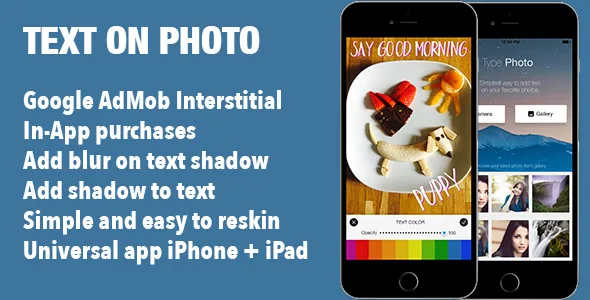
Add Text on Photo Image iOS Universal App Template
Description


Overview
This source code is an App Template written in Swift for you to build your Awesome Photo app. It is very easy to maintain and reskin. Allows to add real-time text directly to any photos. You can easily add add captions, quotes or anything else you can think of to photos and share quickly and easily with friends. Download your copy today and start making money! It’s already optimized for latest version of iOS. DEMOFeatures and Requirements
- Easy to understand and update
- In-app purchases
- Integrated Google AdMob Interstitial
- Add unlimited fonts
- Add multiple lines of text with no character limits
- Add multiple text stickers
- Change text color
- Add text blur shadow
- Add text shadow with color
- Text size is changeable.
- Text is rotatable.
- Add photos from camera roll or take picture
- More apps sections
- Show rate app after in-app purchase
- Can add watermark on all photos
- Simple and easy to reskin
- You can share photos on Facebook, Twitter, Instagram and other apps.
- Compatible with Swift 5
- Xcode 10.x
- iOS 9.x
How to Setup and Reskin
It’s very easy to reskin the app, most of the UI graphic elements are into Storyboard and ImageAsset file. In order to reskin the project, you need to change the design of button images, icon and splash screen. The “Code Documentation.pdf” file included in the package explains how to change In App Purchase ID’s, change the app’s name and layout etc. All configuration constants are placed in one file Config.swift, which contains:
struct Config {
    static let numberOfPhotosLoaded = 30
    static let AdMobAppID = ""
    static let InterstitialAdID = ""

    // Show Ads after every 60 seconds, by default
    static let ShowAdsTimeInterval = TimeInterval(60)

    static let EmailAccountIsNotSet = "Your mail account is not set!"

    static let ContactUSEmail = ""

    static let WatermarkText = ""

    static let RateUsAppID = ""

    static let InAppPurchaseID = ""

    static let OtherAppsDetails = [(name:"", icon:"", appstoreID:""),
                                  (name:"", icon:"", appstoreID:"")]
}
Versions:
2020-23-01
  -Fixed: Use paid fonts for free
  -Fixed: Crash when unlock paid version

2019-10-08
  -Fixed: Add support for Swift 5 and Xcode 10

2018-02-09
  -Fixed: Improved displaying Admob Ads

2017-05-11
  -Initial: Initial Version.
Categories
Tags
External listing. code.market does not sell this product and does not process payment for it. Pricing, payment, delivery, licensing, refunds, and support are handled by the third-party merchant on its own website. We may earn an affiliate commission from a referral. Details.
Products of the Week.
Submit🥇

STOP GUESSING WHAT TO POST
AI that learns your brand voice and builds a month of consistent, on-brand social content: carousels, posts and hooks that sound like you, not like everyone else's AI.
SaaS · 4,324 views · 38 clicksSaaS · Week 45 · 4,324 views · 38 clicks
🥈

Conversational Backlinks for Busy Founders
Place Backlink Relevant Conversation for your domain across Forums and Conversations
Website · 42,063 views · 223 clicksWebsite · Week 45 · 42,063 views · 223 clicks
🥉

upvote.club
Free Social Media Engagement that Helps Boost Your Content. Upvote Club supports 19 social networks with 100+ engagement actions in one dashboard. Add links to your posts and get free engagement from real users.
SaaS · 40,108 views · 117 clicksSaaS · Week 45 · 40,108 views · 117 clicks
#4

Substack Posting API
Onboard your Agent to Substack. Write Publish on Substack via API
SaaS · 59,112 views · 198 clicksSaaS · Week 45 · 59,112 views · 198 clicks
#5

Seenshot App
Free, Fast, MacOS Screenshot app. Make Screenshot cmd+shift+2 and send it via link
Desktop App · 28,487 views · 122 clicksDesktop App · Week 45 · 28,487 views · 122 clicks
#6

Hand-Placed Backlinks $9.99 per link. Flat rate.
Buy hand-placed forum, Q-A and directory backlinks. Flat $9.99 per link, no subscriptions — you only pay for approved listings.
Website · 4,318 views · 19 clicksWebsite · Week 45 · 4,318 views · 19 clicks
#7

Free Invoice Generator - PDF Invoices in Your Browser, No Sign-Up
A free invoice maker for freelancers and small businesses: fill in the invoice, check the live preview, and download a PDF that looks exactly like it. Any currency, tax per item, three templates, no sign-up, and nothing leaves your device.
2,992 views · 17 clicksWeek 45 · 2,992 views · 17 clicks
#8

Merge PDF Files Free - Combine PDFs in Your Browser, No Upload
A free PDF merger for office workers, students, and freelancers: combine PDFs and images into one file in the browser, reorder files and pages, pick page ranges, keep bookmarks, and open password-protected PDFs. Nothing is uploaded, no sign-up, no watermark.
2,763 views · 13 clicksWeek 45 · 2,763 views · 13 clicks