Add Multiple Products To Cart Magento 2
Description
Front End DEMO


Overview:
Customers who arrive on an e-commerce website to do shopping usually prefer to buy more than a single product at times, they want to load their cart with items before a checkout. Also, some people look forward for buying a product in multiple quantities.
Adding multiple products to the cart can become a pretty tough task, tiring the customer when they have to continuously click on “add to cart” option. SofProdigy introduces another great extension for your customers to make the shopping easier for them.
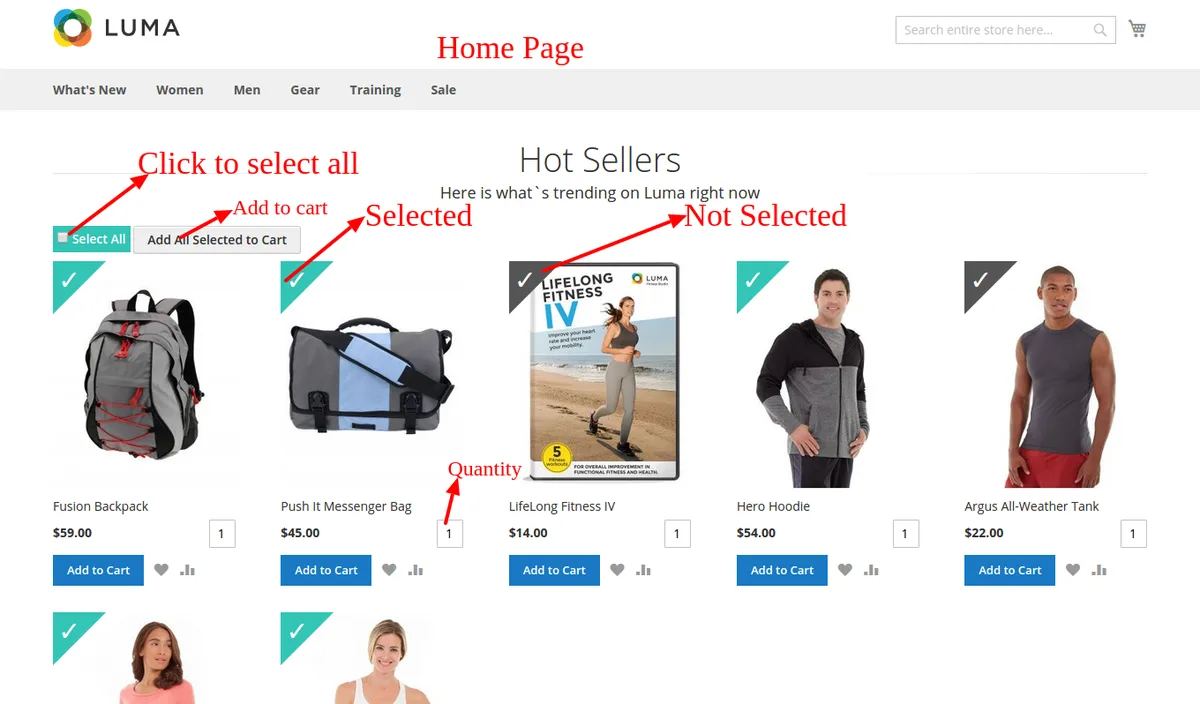
The Magento2 add multiple products to cart extension is the right choice for your e-commerce store, enabling the option for adding multiple products to the shopping cart. If a customer is willing to buy multiple products at a time, this extension allows them to do it right-away. Just by viewing the product list, they can insert more quantities for each product.
Details:
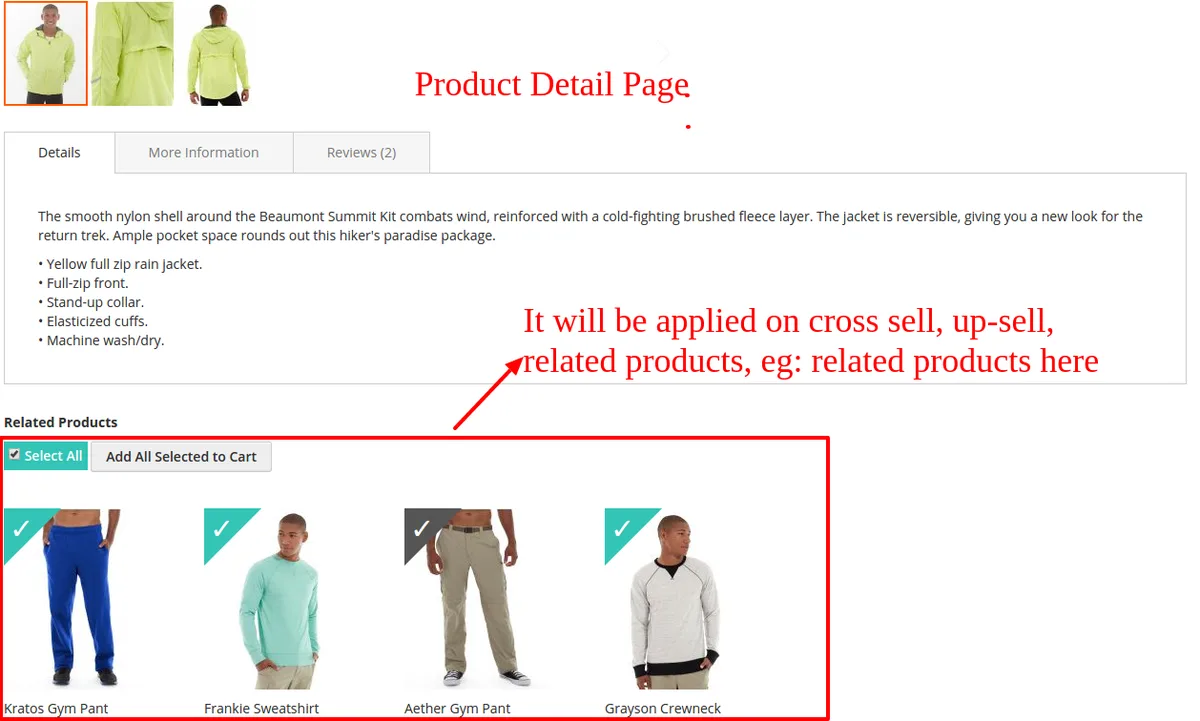
Magento add product to cart extension allows your customers to add multiple products to cart at once without the need to browse through product pages separately. This extension can be applied to any section of your e-commerce store such as homepage, product list pages, wish list, or compare etc.
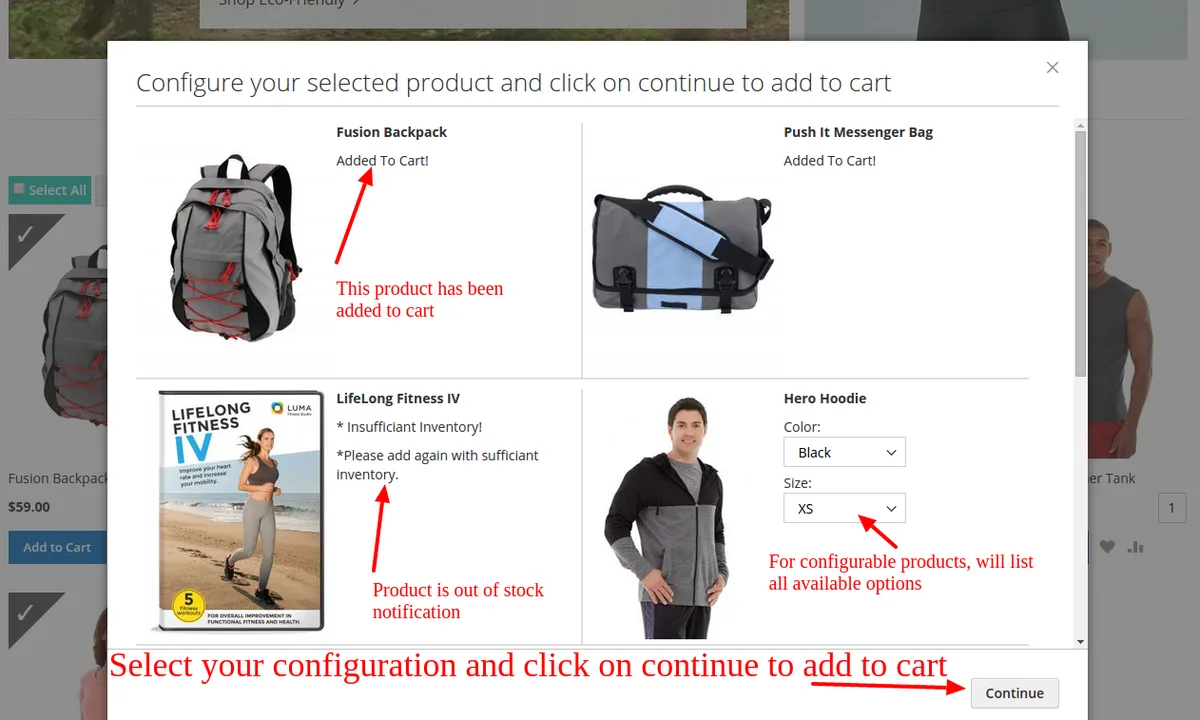
- AJAX pop-up function to select the multiple products options.
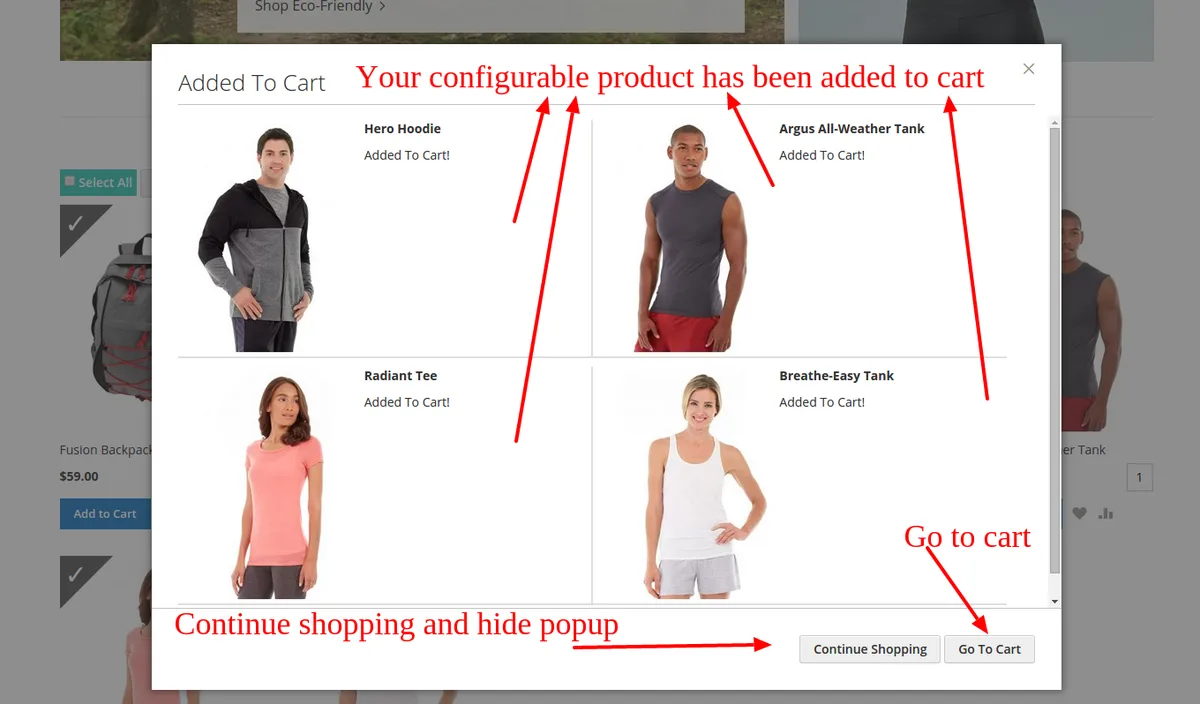
- Success pop-up notifying details of products that are added to the cart.
- Simple to use, easily configurable, add product bundles, and simple products with custom options.
- Apply it at any place on your online store such as homepage, product list pages, wishlist, and compare etc.
- Use checkbox, quantity box, or “Add all to cart” button for supporting bulk ordering.
The Magento2 extensions are useful for adding multiple products to the shopping cart at once. If your customers are willing to buy multiple products, then this extension will provide them to do it right away. Also, providing the option to view product list and insert quantities for each product.
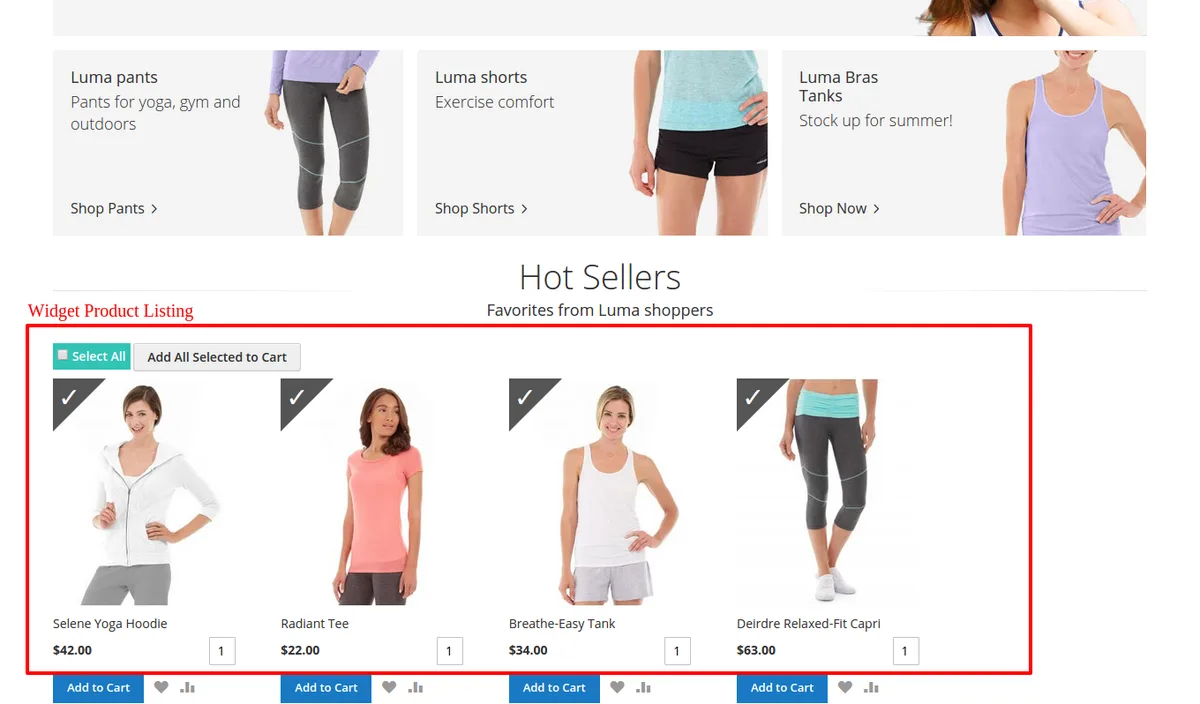
The Magento2 AJAX add to cart extension is easy to install and provides a plenty of options to improve the control of store admin.
It allows a lot of possibilities to improve the overall shopping experience for the customers such as:
- Add multiple products with just a single click at any product listing page.
- Add products right on your homepage.
- Add products to the CMS block or right on the page where the product listing is listed with a product widget.
- Make the selection of multiple products to cart at one time fun by using a checkbox, quantity box, or the selected icon.
- “Check all” button to choose all the displayed products at once is the fastest way to add multiple products to cart in Magento store.
This extension provides your customers an amazing shopping experience. Moreover, they are able to add bulk products to their shopping cart in a single go. When customers are looking forward for shopping in bulk, this Magento2 add to cart button makes the process easier and comfortable.
A great solution for those who want to provide the option to place bulk orders on their online store. This new extension has helped in enhancing the shopping experience for the customers on various e-commerce online stores.
Key Features:
- Manage the design
“Add everything to cart” button can be freely set for displaying the position and either total quantity or the total products to be shown. The store admin can choose the displaying elements in the shopping cart pop-up after addition of products to the cart.
- Simplify purchase
The simpler the purchase process, the more customer attraction towards your website. In Magento add multiple products to cart extension, the buying procedure improves when the customer can select all the products they want to add to cart with just one click.
- User-friendly
Easy to understand buttons and checkbox, such graphic elements to simplify the shopping experience.
- Stylish Cart
Add graphic elements to the cart icon and make it attractive and this extension also provides full control to the page admin.
Use the premium extensions offered by SoftProdigy and enhance the shopping experience for your customers!
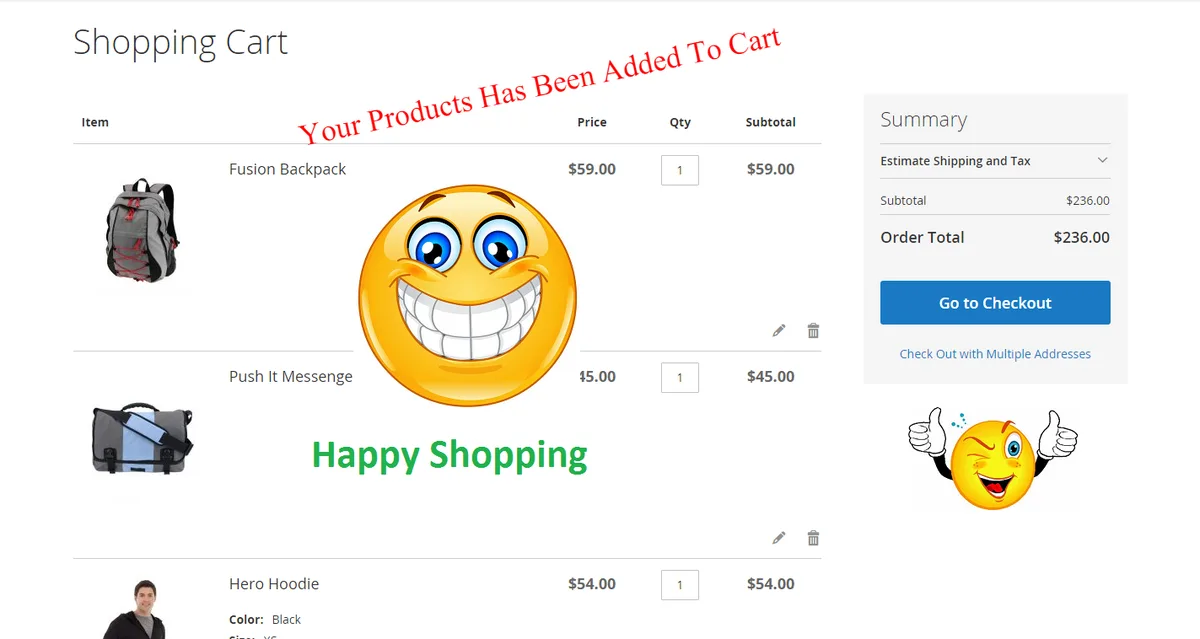
Note: The Extension only work for simple products.
Categories
Tags
External listing. code.market does not sell this product and does not process payment for it. Pricing, payment, delivery, licensing, refunds, and support are handled by the third-party merchant on its own website. We may earn an affiliate commission from a referral. Details.
Products of the Week.
Submit🥇

STOP GUESSING WHAT TO POST
AI that learns your brand voice and builds a month of consistent, on-brand social content: carousels, posts and hooks that sound like you, not like everyone else's AI.
SaaS · 4,319 views · 38 clicksSaaS · Week 45 · 4,319 views · 38 clicks
🥈

Conversational Backlinks for Busy Founders
Place Backlink Relevant Conversation for your domain across Forums and Conversations
Website · 42,055 views · 223 clicksWebsite · Week 45 · 42,055 views · 223 clicks
🥉

upvote.club
Free Social Media Engagement that Helps Boost Your Content. Upvote Club supports 19 social networks with 100+ engagement actions in one dashboard. Add links to your posts and get free engagement from real users.
SaaS · 40,099 views · 117 clicksSaaS · Week 45 · 40,099 views · 117 clicks
#4

Substack Posting API
Onboard your Agent to Substack. Write Publish on Substack via API
SaaS · 59,103 views · 198 clicksSaaS · Week 45 · 59,103 views · 198 clicks
#5

Seenshot App
Free, Fast, MacOS Screenshot app. Make Screenshot cmd+shift+2 and send it via link
Desktop App · 28,477 views · 122 clicksDesktop App · Week 45 · 28,477 views · 122 clicks
#6

Hand-Placed Backlinks $9.99 per link. Flat rate.
Buy hand-placed forum, Q-A and directory backlinks. Flat $9.99 per link, no subscriptions — you only pay for approved listings.
Website · 4,310 views · 19 clicksWebsite · Week 45 · 4,310 views · 19 clicks
#7

Free Invoice Generator - PDF Invoices in Your Browser, No Sign-Up
A free invoice maker for freelancers and small businesses: fill in the invoice, check the live preview, and download a PDF that looks exactly like it. Any currency, tax per item, three templates, no sign-up, and nothing leaves your device.
2,984 views · 17 clicksWeek 45 · 2,984 views · 17 clicks
#8

Merge PDF Files Free - Combine PDFs in Your Browser, No Upload
A free PDF merger for office workers, students, and freelancers: combine PDFs and images into one file in the browser, reorder files and pages, pick page ranges, keep bookmarks, and open password-protected PDFs. Nothing is uploaded, no sign-up, no watermark.
2,755 views · 13 clicksWeek 45 · 2,755 views · 13 clicks