
Academy LMS Course Bundle Subscription Addon

Description
Introduction
This addon provides course bundle facility to the Academy Lms Site admin. Through this addon, the admin can create bundles of the existing courses and sell the bundles at a new price in a subscription model. The admin can also set the subscription period of each Course Bundle. Students can subscribe to a bundle and access it’s courses and need to renew the expired bundles by subscribing again.
How it works
- Academy lms should be pre-installed in your server
- Purchase course bundle subscription addon for academy lms from codecanyon
- Download and install the addon to your academy lms portal
- After installation, the admin will get a new option name “Course Bundle” in the navigation bar.
- The admin can create a new bundle by selecting existing courses uploaded by the admin.
- Admin can set a new price to the created bundle.
- Subscription days can also be selected by the admin which defines the active time of the bundle after each purchase.
- Students will get a new option named Course bundles in their Courses menu.
- From the Course bundles option, students can view and subscribe to their preferred course bundles.

Benefits for admin & instructors
- Admin can earn recurring revenue from the same course bundle through the bundle subscription system.
- Admin will be able to get more profit since selling will increase with the course bundles.
Benefits for students
- Students will get access to several courses at a lower price.
- Students can renew their course bundle subscription as many times as they want to.

Student Demo
Login as a student in the online demo portal and then navigate here: http://demo.academy-lms.com/addon/course_bundlesAdmin, Instructor Demo
Login as an admin or instructor in the online demo portal and then navigate here: http://demo.academy-lms.com/addon/admin/coursesScreenshots
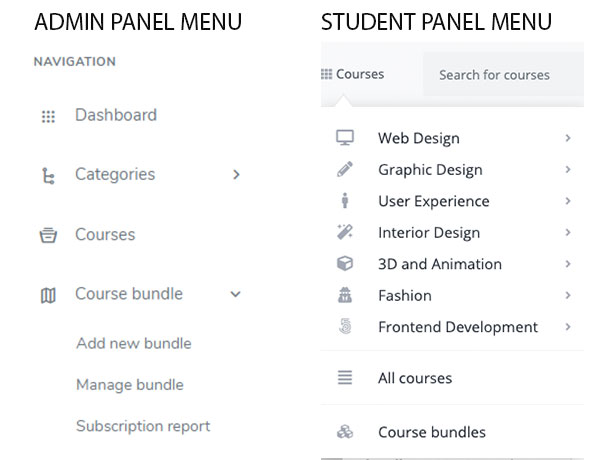
The new addon Course Bundle will be available both in the Admin user and the Student user menu. From the option, the admin and students can access the course bundles.
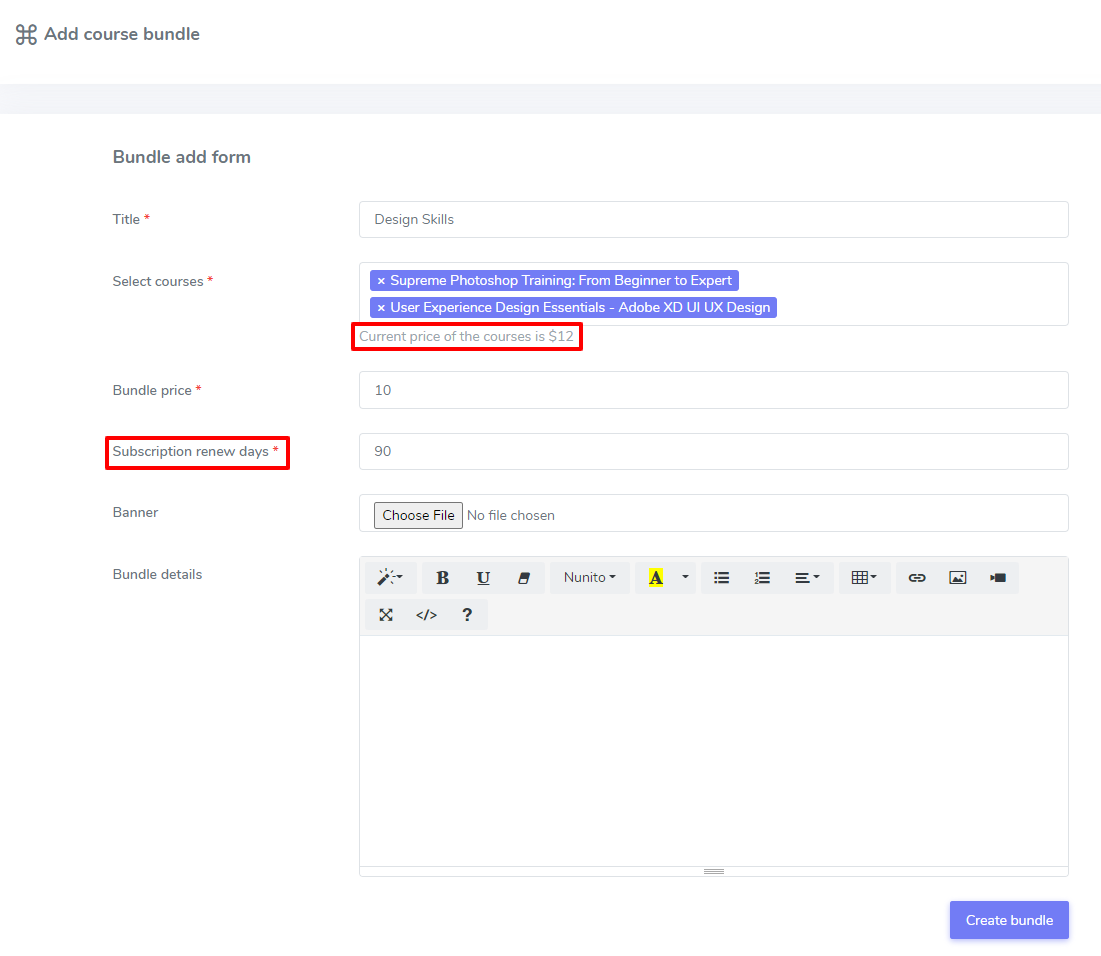
Admin can create a course bundle from the Add new bundle option. The admin can set the new discounted price and subscription validity to the new course bundles. Adding subscription time to the new bundles creates a validity period for the bundles. Students will be able to access the purchased bundles for a specific time chosen by the admin. Students need to purchase the bundle again when the subscription time expires.
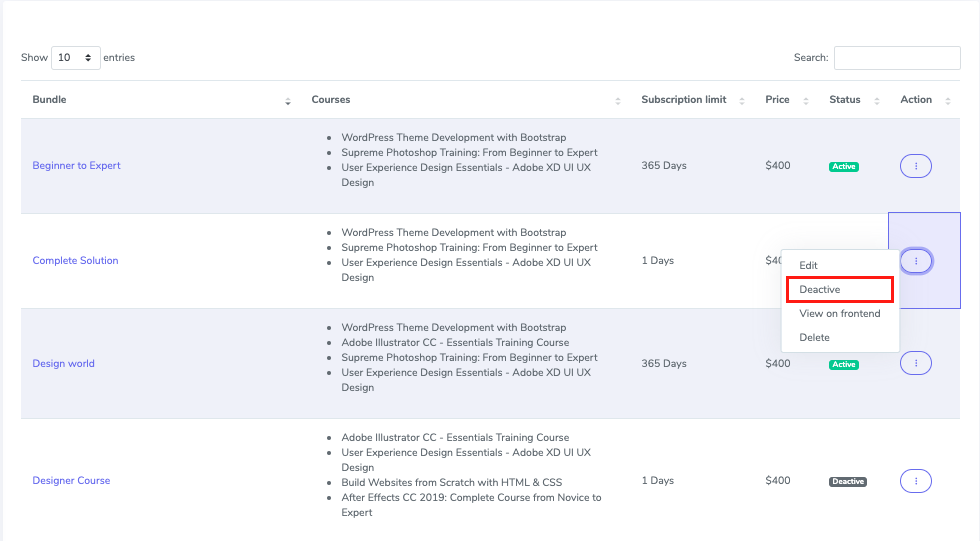
From the manage bundle option, the admin can check on the bundle status and other information like bundle details, subscription limit, and price. The admin can edit, delete, Activate or Deactivate the bundles from here
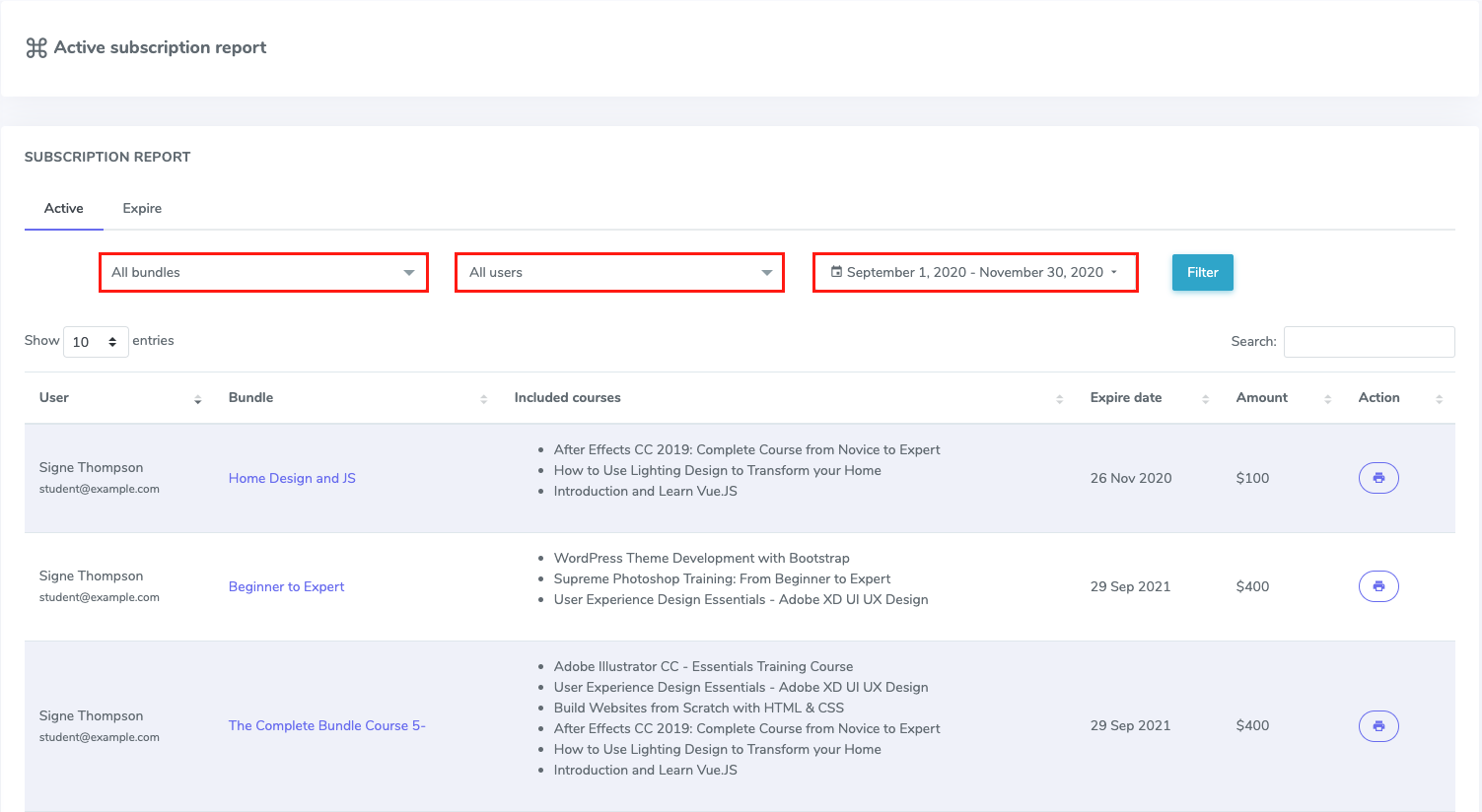
Admin can also view subscriber information, bundle details, subscription expiry dates, and payment reports from the Subscription report option. All the payment reports are printable. Searching and filtering of the reports based on bundle names, dates, and user names are included here
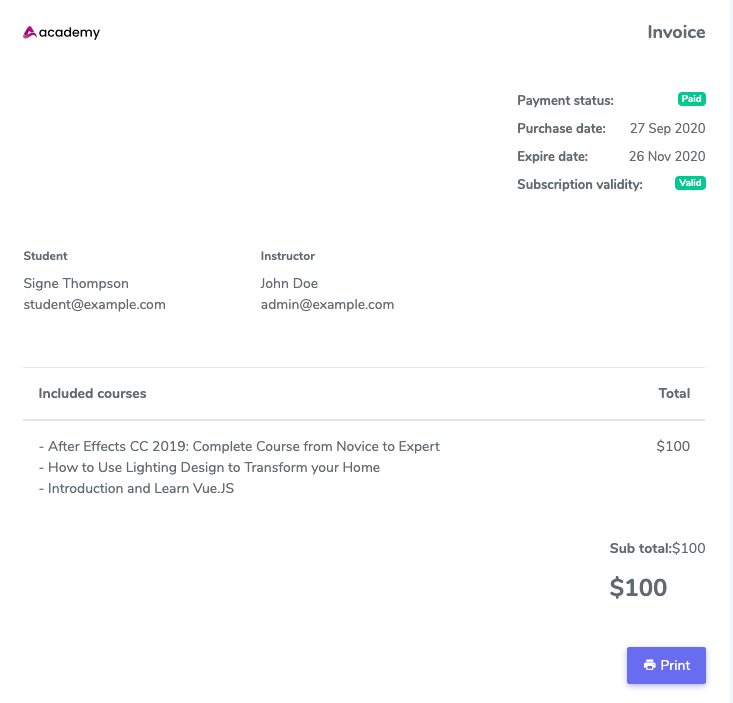
The printable payment invoice contains course details, subscribers information, payment report, and subscription validity of the purchased course bundle
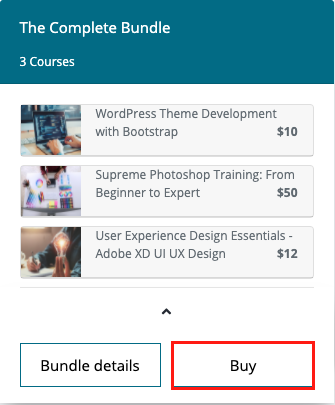
Students can browse the course bundles with or without logging in. Using the option named “Course bundles” on the “Courses” menu students can check the details of the bundle and the courses included in a bundle. The bundle rating, number of subscribers, and bundle’s pricing info are shown here
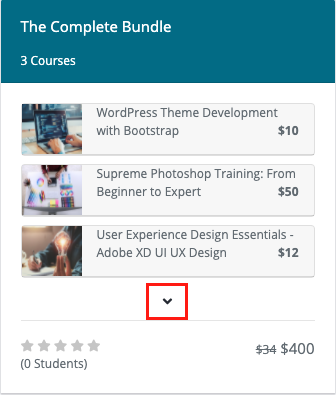
Students can purchase bundles from the course bundles menu. Students will get detailed information and a “Buy” option with each course bundle. Already purchased but expired bundles can also be renewed from here. Payment can be done with the existing online payment methods

Students can see the bundle details which contains all the information about all courses added to a bundle. Here bundle ratings and reviews will also be available
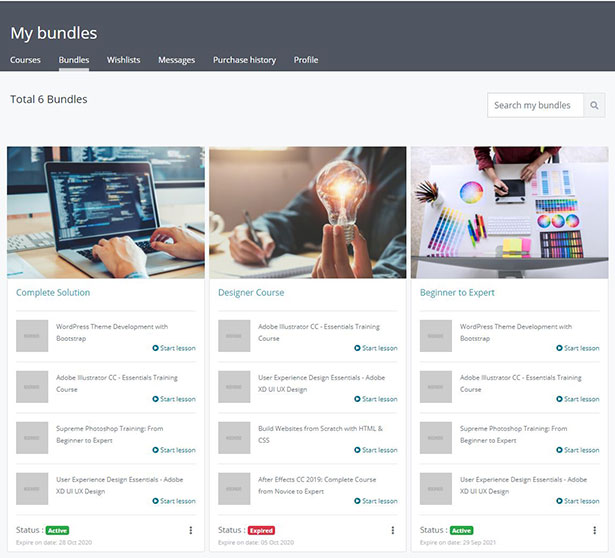
Students can access the purchased bundles from the “Bundles” option of the “My Courses” menu. The purchased bundles which have subscription validity left will show Active and those with validity period crossed will show Expired
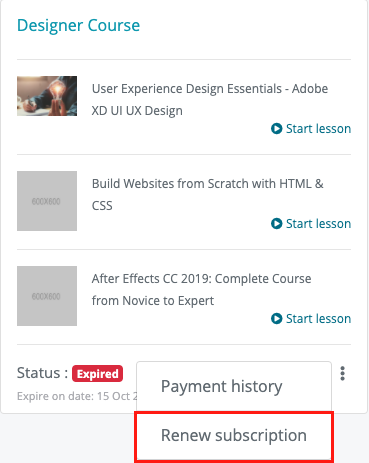
Students can Renew subscription of the expired bundles by payment of the bundle subscription fee again. Through the subscription renew option students can extend their subscription validity to a bundle
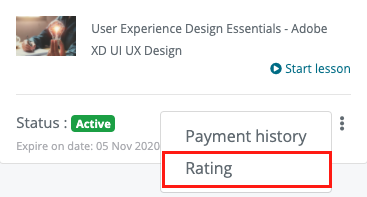
Students can rate the course bundles purchased by them by giving it stars and can also add comments while rating. Bundle rating adds value to the bundles and generates trust among the subscribers
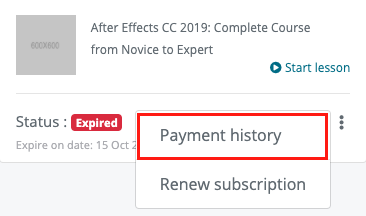
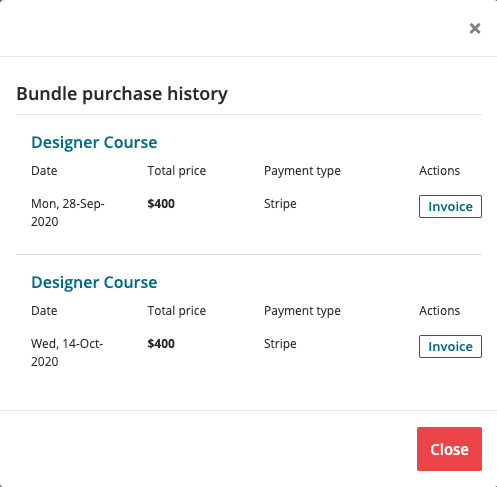
The bundle subscriber can view the payment report which consists of all the invoices for the specific bundle purchased by the student. Students can view details and also can print the invoices generated in Purchase history
Requirements :
- Academy LMS pre installed in your web server.
- Download academy here – https://1.envato.market/jGqOZ
Update Log
Version 1.6 – 19 March, 2025
- Default theme layout update
Version 1.5 – 21 November, 2023
- Course bundle layout has been improved
- Bundle search issue has been solved
- More minor changes and improvements
Version 1.4 – 31 July, 2023
- Now available with the latest version of Academy LMS (v6.0)
Version 1.3 – 23 March, 2023
- All payment gateways are now available
- New payment gateway structure has been updated
- Student layout updated
Version 1.2 – 12 August, 2022
- Bootstrap 5 has beed updated
- UI issue has been fix
- User experience has been improved
Version 1.1 – 16 February, 2021
- Template file for Elegant and Firdaus RTL theme added.
Support
Send us a ticket for presale questions and getting after sales developer support via zendesk. http://support.creativeitem.com| Type | PHP Script |
|---|---|
| Author | Creativeitem |
| Category | Php Scripts / Project Management Tools |
| Price | $25 |
| Sales | 521 |
| Rating | 3.75 from 4 ratings |
| Published | Nov 12, 2020 |
| Last Update | Mar 19, 2025 |
| Compatible Browsers | Firefox, Safari, Opera, Chrome, Edge |
| Compatible Software | PHP 7.x |
| Software Framework | CodeIgniter |
| Source Files Included | JavaScript JS, HTML, CSS, PHP |
Categories
Tags
External listing. code.market does not sell this product and does not process payment for it. Pricing, payment, delivery, licensing, refunds, and support are handled by the third-party merchant on its own website. We may earn an affiliate commission from a referral. Details.
Products of the Week.
Submit🥇

STOP GUESSING WHAT TO POST
AI that learns your brand voice and builds a month of consistent, on-brand social content: carousels, posts and hooks that sound like you, not like everyone else's AI.
SaaS · 6,656 views · 62 clicksSaaS · Week 46 · 6,656 views · 62 clicks
🥈

Conversational Backlinks for Busy Founders
Place Backlink Relevant Conversation for your domain across Forums and Conversations
Website · 45,666 views · 229 clicksWebsite · Week 46 · 45,666 views · 229 clicks
🥉

upvote.club
Free Social Media Engagement that Helps Boost Your Content. Upvote Club supports 19 social networks with 100+ engagement actions in one dashboard. Add links to your posts and get free engagement from real users.
SaaS · 43,648 views · 124 clicksSaaS · Week 46 · 43,648 views · 124 clicks
#4

Substack Posting API
Onboard your Agent to Substack. Write Publish on Substack via API
SaaS · 62,577 views · 204 clicksSaaS · Week 46 · 62,577 views · 204 clicks
#5

Seenshot App
Free, Fast, MacOS Screenshot app. Make Screenshot cmd+shift+2 and send it via link
Desktop App · 31,822 views · 125 clicksDesktop App · Week 46 · 31,822 views · 125 clicks
#6

Hand-Placed Backlinks $9.99 per link. Flat rate.
Buy hand-placed forum, Q-A and directory backlinks. Flat $9.99 per link, no subscriptions — you only pay for approved listings.
Website · 7,512 views · 19 clicksWebsite · Week 46 · 7,512 views · 19 clicks
#7

Free Invoice Generator - PDF Invoices in Your Browser, No Sign-Up
A free invoice maker for freelancers and small businesses: fill in the invoice, check the live preview, and download a PDF that looks exactly like it. Any currency, tax per item, three templates, no sign-up, and nothing leaves your device.
6,127 views · 21 clicksWeek 46 · 6,127 views · 21 clicks
#8

Merge PDF Files Free - Combine PDFs in Your Browser, No Upload
A free PDF merger for office workers, students, and freelancers: combine PDFs and images into one file in the browser, reorder files and pages, pick page ranges, keep bookmarks, and open password-protected PDFs. Nothing is uploaded, no sign-up, no watermark.
5,659 views · 16 clicksWeek 46 · 5,659 views · 16 clicks