
9MAIL – WordPress Email Templates Designer

Description





WordPress Email Templates Designer is a useful tool for creating and customizing WordPress emails. If the default WordPress email template appears plain to you and you want to customize it, this is what you need. With no coding knowledge required, you can easily drag and drop, edit, and customize the layouts/contents within the email templates. Try our plugin to make the template look friendly and match your store design, and easily customize WordPress emails sent to customers.

Features of WordPress Email Templates Designer
- Drag-and-drop builder: The easy-to-use email template builder allows you to create professional and eye-catching WordPress email templates.
- Layouts: Layouts can be added quickly by dragging and dropping appropriate layouts, available from 1 -4 columns.
- Elements: All elements you need to build a complete WordPress email are provided with full customization options for their appearance.
- Custom CSS: Add your own custom CSS to the email template if the available options are not enough for you. Moreover, you can add custom CSS directly to the text element.
- Unlimited Number of Rows: Unlimited rows can be added to the email template and include everything you need in the emails.
- Direction: Based on your current language, make the email display from right to left, or left to right accordingly.
- Live Preview of Changes: Visually observe emails by the preview, update any changes in the preview mode, and integrate to see on the desktop, and mobile.
- Send Test Emails: Check the email design before the real sending.
- Display Dynamic Data with Placeholders: Displaying placeholders makes it easy to design templates. Placeholders such as customer name, site name, User name, Password, and My account URL will be replaced by real user while sending the WordPress emails.
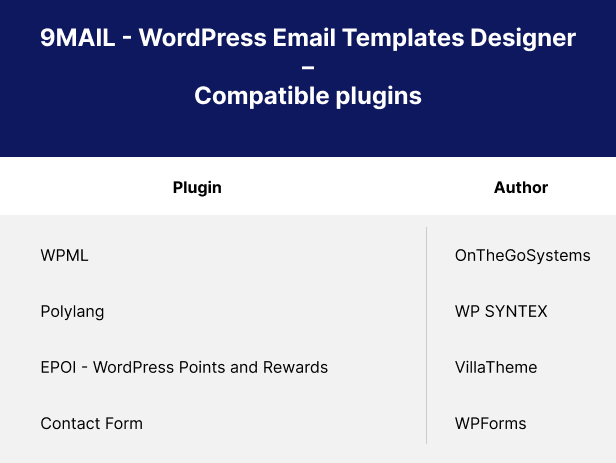
- Support multilingual plugins: WPML, Polylang.
- Import/Export email templates in just a few taps – Reduce your workload.
- Build your template in no time with mutual blocks, and shortcodes.
- Responsive and works perfectly on any device.
Elements in WordPress Email Templates Designer
- Text: Add text content to the template and customize the font color, font size, alignment, border width, insert/edit link, insert/edit image, shortcode, info icon, social icon, border style, border color, background color, text padding, and text margin.
- Divider: Add a single line divider to the template and choose a style for the divider. Customize the divider’s style, width, height, color, alignment, margin, and padding.
- Socials: Add social icons to the email template, and enter your URL in the placeholder including Facebook, Twitter, Instagram, Youtube, Linkedin, Whatsapp, Telegram, Tiktok, and Printest.
- Image: Add an image to the email template and adjust its size and alignment, border style, border color, background color, text padding, and text margin.
- Button: Add and customize the button: Name, the link of a button, style the border, alignment, background, and padding.
- Menu bar: Add and customize the menu bar or name the navigation bar that includes links to the most important sections of the site: Home, Shop, Contact…
- Contact: Display contact information with icons on the email template.
- Spacer: Add a space between other elements and customize its height, borders with style and color, and the background color.
- Default template: If you are using the 3rd plugin and the email contents of this 3rd plugin are not attached to WordPress default emails, they create their own email templates. In this case, you can use the default template type.
- Post: Add your suggested block posts of any categories you select to the email template.
- Block: Building the mutual blocks that can be used among the templates can reduce your workload significantly.
Additional features in WordPress Email Templates Designer
- Actively support: VillaTheme is always ready to support you!
- Add admin’s note to particular templates: A simple reminder of things you need to pay attention to in those templates.
- User-friendly: 9MAIL is simpler to use and always has the user in mind and adds appropriate updates to improve the user experience.
- Integration compatibility: Compatible with 3rd parties.
Compatible plugins
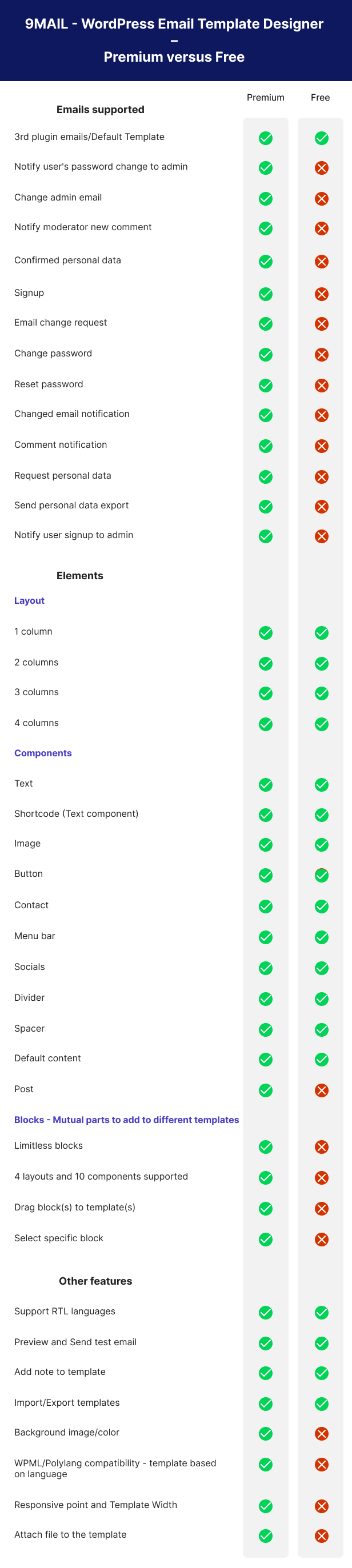
Free – Premium comparison
Video tutorial: Let’s discover our video on how to install and use 9MAIL WordPress Email Templates Designer
CHANGELOG
| Type | WordPress Plugin |
|---|---|
| Author | villatheme |
| Category | Wordpress / Media |
| Price | $59 |
| Sales | 239 |
| Rating | 5.00 from 5 ratings |
| Published | Aug 17, 2022 |
| Last Update | Aug 27, 2026 |
| Compatible Browsers | Firefox, Safari, Opera, Chrome |
| Compatible Software | WordPress 7.0.x, WordPress 6.9.x, WordPress 6.8.x, WordPress 6.7.x, WordPress 6.6.x, WordPress 6.5.x, WordPress 6.4.x, WordPress 6.3.x, WordPress 6.2.x, WordPress 6.1.x |
| Compatible With | Aesop Story Engine, bbPress 2.6.x, bbPress 2.5.x, Beaver Builder, Block Editor, BuddyPress 10.x.x, BuddyPress 9.x.x, Easy Digital Downloads, Elementor, Elementor Pro, Exchange 1.10.x, Gravity Forms, iThemes Exchange, Layers WP, Visual Composer, WooCommerce 9.x.x, WooCommerce 8.x.x, WooCommerce 7.x.x, WooCommerce 6.x.x, WooCommerce 5.x.x, WP EasyCart, WP e-Commerce, WPBakery Page Builder, WPML, Cornerstone |
| Gutenberg Optimized | Yes |
| Source Files Included | JavaScript JS, CSS, PHP |
External listing. code.market does not sell this product and does not process payment for it. Pricing, payment, delivery, licensing, refunds, and support are handled by the third-party merchant on its own website. We may earn an affiliate commission from a referral. Details.
Products of the Week.
Submit🥇

STOP GUESSING WHAT TO POST
AI that learns your brand voice and builds a month of consistent, on-brand social content: carousels, posts and hooks that sound like you, not like everyone else's AI.
SaaS · 3,982 views · 35 clicksSaaS · Week 45 · 3,982 views · 35 clicks
🥈

Conversational Backlinks for Busy Founders
Place Backlink Relevant Conversation for your domain across Forums and Conversations
Website · 41,629 views · 222 clicksWebsite · Week 45 · 41,629 views · 222 clicks
🥉

upvote.club
Free Social Media Engagement that Helps Boost Your Content. Upvote Club supports 19 social networks with 100+ engagement actions in one dashboard. Add links to your posts and get free engagement from real users.
SaaS · 39,657 views · 114 clicksSaaS · Week 45 · 39,657 views · 114 clicks
#4

Substack Posting API
Onboard your Agent to Substack. Write Publish on Substack via API
SaaS · 58,686 views · 198 clicksSaaS · Week 45 · 58,686 views · 198 clicks
#5

Seenshot App
Free, Fast, MacOS Screenshot app. Make Screenshot cmd+shift+2 and send it via link
Desktop App · 28,067 views · 122 clicksDesktop App · Week 45 · 28,067 views · 122 clicks
#6

Hand-Placed Backlinks $9.99 per link. Flat rate.
Buy hand-placed forum, Q-A and directory backlinks. Flat $9.99 per link, no subscriptions — you only pay for approved listings.
Website · 3,926 views · 19 clicksWebsite · Week 45 · 3,926 views · 19 clicks
#7

Free Invoice Generator - PDF Invoices in Your Browser, No Sign-Up
A free invoice maker for freelancers and small businesses: fill in the invoice, check the live preview, and download a PDF that looks exactly like it. Any currency, tax per item, three templates, no sign-up, and nothing leaves your device.
2,603 views · 17 clicksWeek 45 · 2,603 views · 17 clicks
#8

Merge PDF Files Free - Combine PDFs in Your Browser, No Upload
A free PDF merger for office workers, students, and freelancers: combine PDFs and images into one file in the browser, reorder files and pages, pick page ranges, keep bookmarks, and open password-protected PDFs. Nothing is uploaded, no sign-up, no watermark.
2,422 views · 13 clicksWeek 45 · 2,422 views · 13 clicks