
6amMart - Store App

Description
6amMart vendor app is another most important part of the 6amMart multivendor delivery system. The store owners (vendors) can do all operations with this app besides the vendor web panel.
IMPORTANT NOTE
Please register as a new vendor from the admin panel for a better experience because demo credentials may use lots of people, which makes your testing unstable. And our all demo Vendor’s password is 12345678.
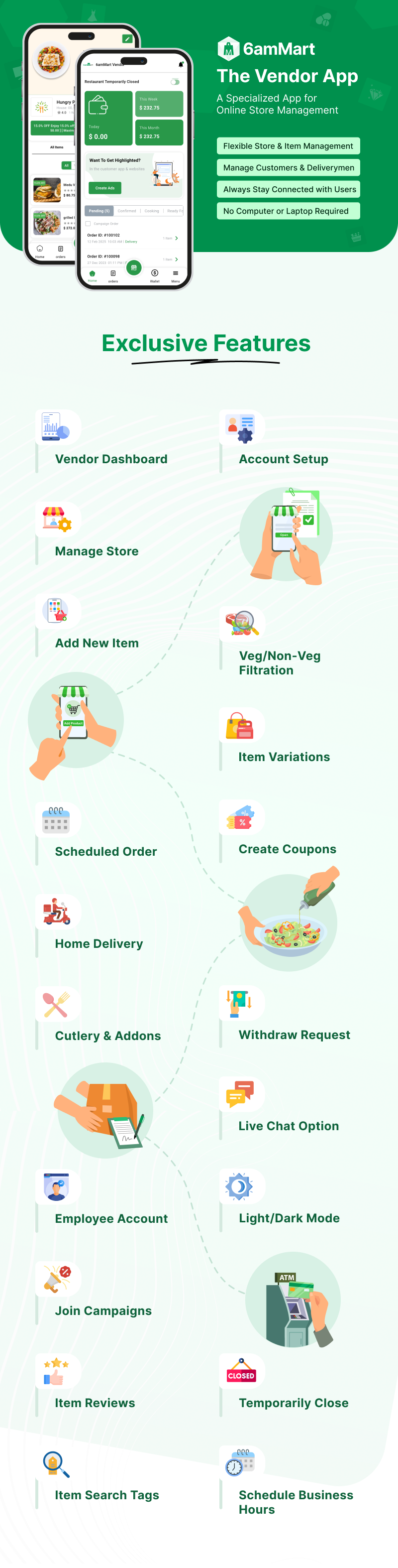


Some amazing features of 6amMart Vendor App:
- Dashboard
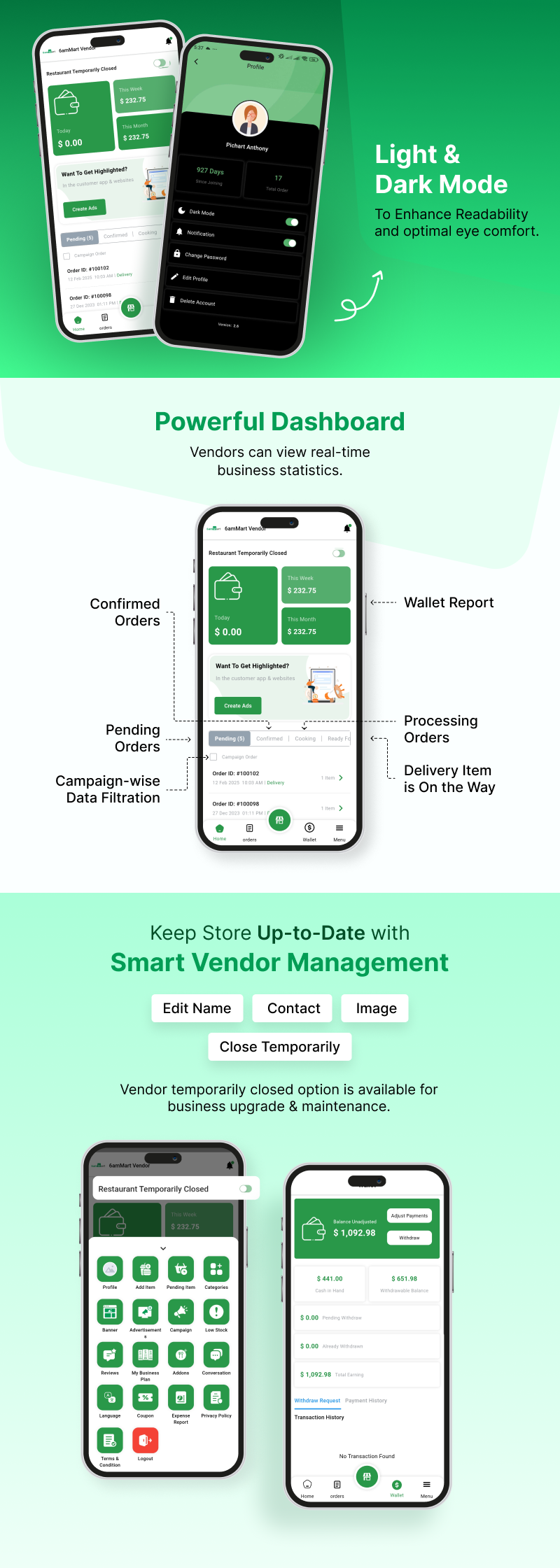
The 6amMart Vendor App comes with a dynamic dashboard. It provides real-time data on a Vendor’s daily activity statistics, such as wallet history and order activity updates.
- Wallet Report
In the wallet section of the 6amMart Vendor App, users can view detailed wallet reports such as withdrawable amounts, pending withdrawals, cash collected from customers, total earnings, wallet history, etc. They can also request a withdrawal to their bank account from the admin.
- Manage Store
Store owners can manage their store easily from the 6amMart Vendor App. They can edit and change the store’s name, contact information, address, logo, etc., from here.
- Minimum Order Amount
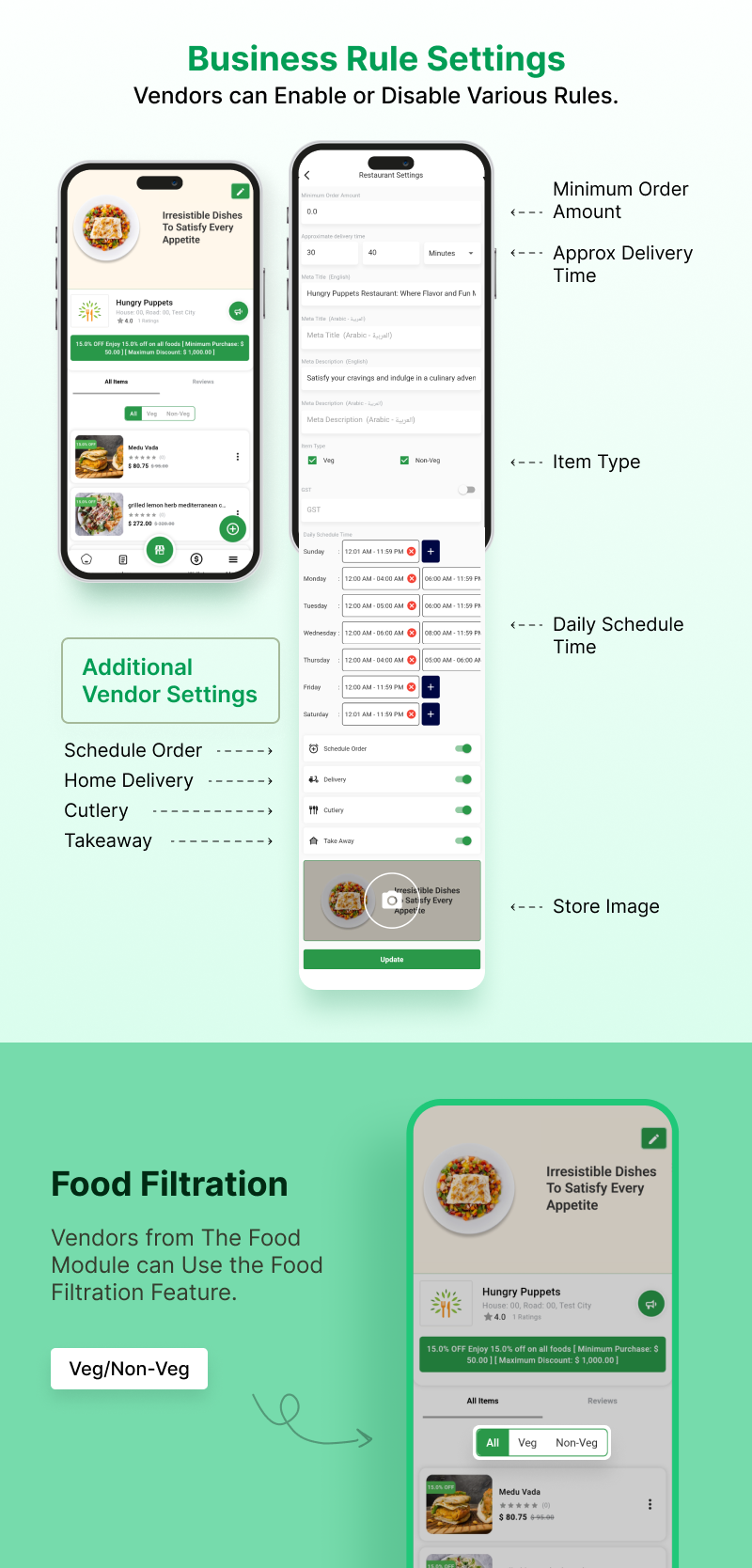
From the Vendor settings page, Vendor can define the minimum order amount that a customer must purchase during a single order placement.
- Approx Delivery Time
Vendor can decide how much time they’ll need to process and deliver the order. Customers can view this information during checkout.
- Daily Business Hours
From the Vendor settings page, Vendors can create different business hours (opening & closing times) on a daily basis. This allows customers to know when the Vendor is available to take orders.
- Schedule Order
Vendors can enable/disable the schedule order system. If enabled, this feature allows customers to choose their preferred delivery time by selecting the schedule order option.
- Home Delivery
If the home delivery option is enabled from the 6amMart Vendor app, customers can choose the home delivery option during order placement.
- Cutlery
Vendors can enable or disable the cutlery option. If enabled, customers can request cutleries during checkout.
- Takeaway
If the takeaway option is enabled by the Vendor, customers can choose to collect the ordered item by themselves from the Vendor.
- Bank Info
Vendors can add their bank information to the 6amMart Vendor App. Later, they can request a withdrawal from the admin
- Close Temporarily
Vendors can temporarily close the store for the store’s maintenance or rebranding. If the ‘temporarily closed’ option is enabled, customers cannot order from the Vendor.
- Item Management
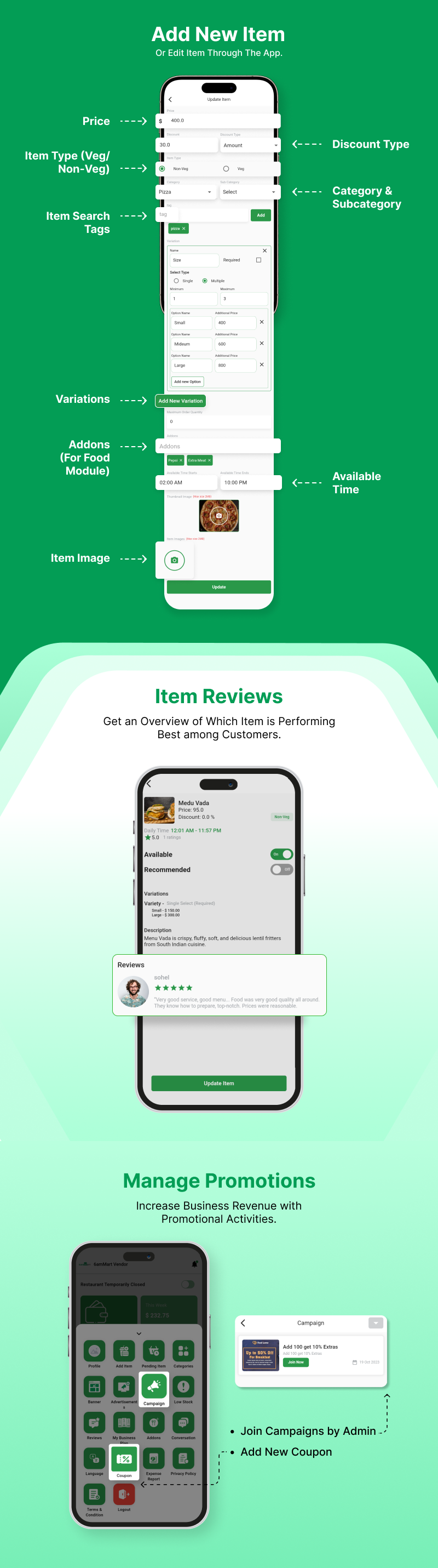
From the item section of the 6amMart Vendor App, Vendors can manage items easily. They can edit or delete existing items and add new items from here.
- Edit or Add New Item
Vendors can edit or add new items from the Vendor App, such as product name, price, discount, etc.
- Veg/Non-veg
From the new item creation page, food module Vendors can filter food, edit food item type by veg/non-veg option.
- Category & Subcategory
Vendors can choose the item’s category and subcategory pre-defined by the admin from the Vendor app.
- Search Tags
From the 6amMart Vendor App, Vendors can add various search tags in the item description page.
- Food Variations
Vendors can add multiple food variations while creating a new food item in the food module of the 6amMart Vendor app. This allows customers to choose from various items easily.
- Addons
Every addon makes food delicious. In the food module of the 6amMart Vendor app, Vendor owners can include those special addons (such as extra cheese, extra sauce, extra patty, etc.) while creating a new food item.
- Item Available Time
Using the Vendor App, Vendors can define when a specific item is available for order. This allows customers to see if the item is available for order while browsing through the 6amMart Web App.
- Item Reviews
From the food list section, Vendors can view the customer reviews on every item they’re selling through the 6amMart Vendor App. This feature allows them to understand which item performs best among customers.
- Promotion Management
From the 6amMart Vendor App, Vendors can manage various promotional activities. They can join any campaign launched by the admin to provide the best deals to their customers. Vendors can also create promotional coupons and offer discounts during purchases to their customers.
- Order Management
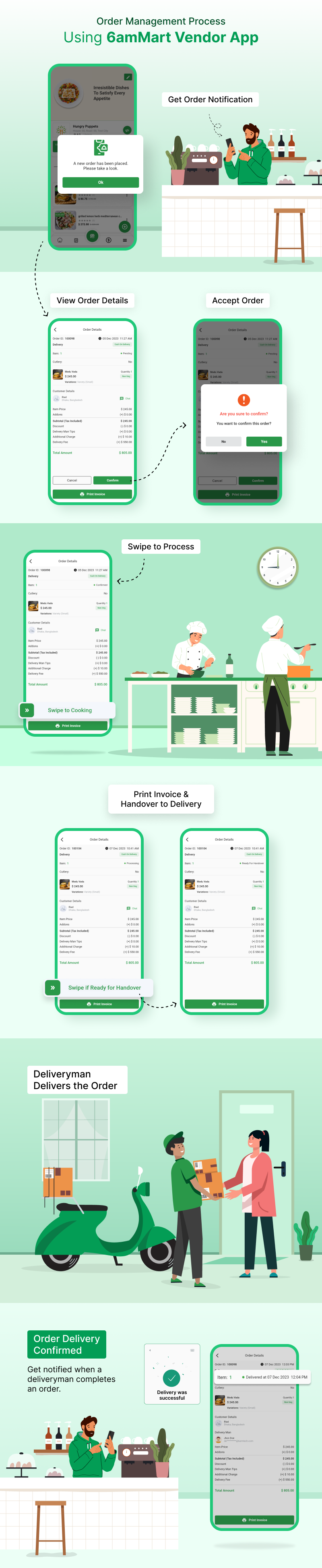
Just like the 6amMart Vendor Panel, Vendors can manage their orders from the Vendor App seamlessly. From the order management section, Vendors can view order details, delivery status, and print invoices.
- Deliveryman Management
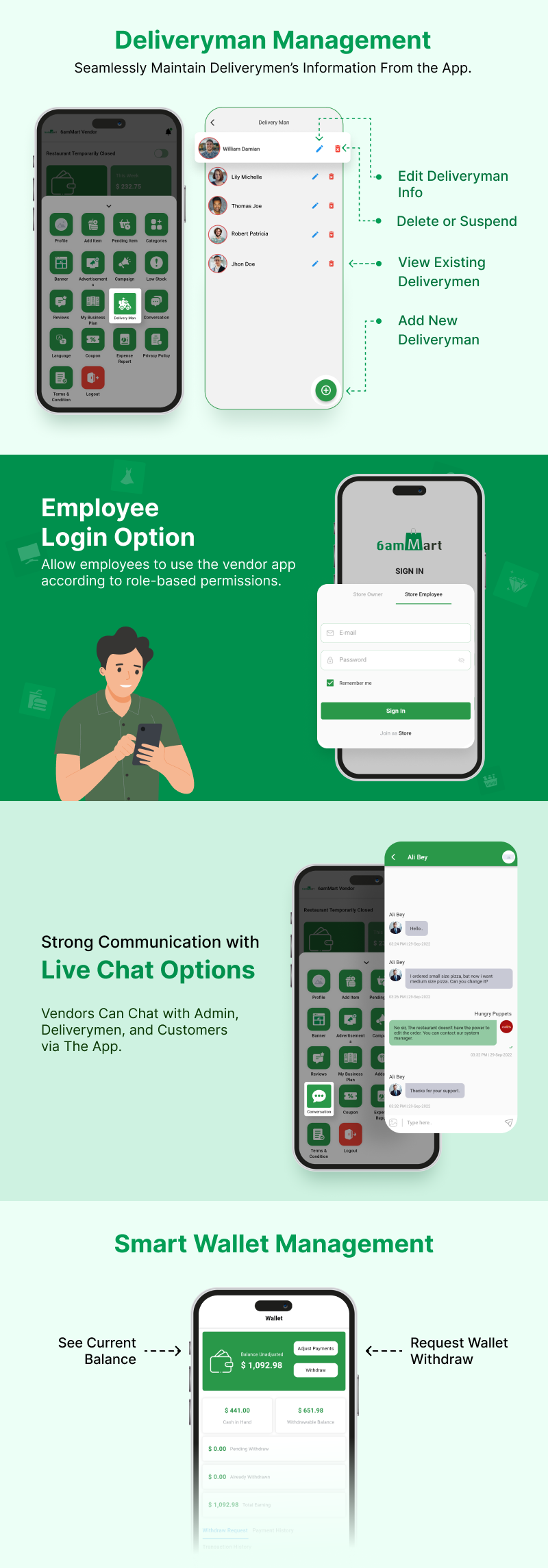
Vendors can add new deliverymen and edit existing deliveryman’s information from the Vendor app.
- Conversation
From the conversation section in the menu page, Vendors can chat with customers and deliverymen in real-time.
- Wallet Management
Vendors can view their wallet balance from the wallet section of the Vendor App. This includes the withdrawable amount, total withdrawal, pending withdrawal, customer cash collected, total earnings, withdrawal history, etc. Vendors can also request cash withdrawals from the admin from here.
- Edit Vendor Owner Profile
Vendors can edit their profile information which includes name, image, and phone number.
- App Settings
From the 6amMart Vendor App, vendor can change necessary app settings such as app language, light/dark mode, enable/disable notifications, change passwords, etc.
The 6amMart Vendor App is the user-friendly mobile version of the 6amMart Vendor Panel. The app compiles all the necessary features in the Vendor Panel and brings an easy operation procedure.
This app is very handy for all your Vendors who want to manage their entire store on the go. And you can help them do it. So get the Vendor App now!
| Type | Flutter App |
|---|---|
| Author | sixamtech |
| Category | Mobile / Flutter |
| Price | $39 |
| Sales | 2,495 |
| Rating | 4.96 from 76 ratings |
| Published | Mar 24, 2022 |
| Last Update | Oct 1, 2026 |
| Compatible Software | Flutter 3.x |
| Mobile Files Included | Dart, YAML, .kotlin, .swift |
Categories
Tags
External listing. code.market does not sell this product and does not process payment for it. Pricing, payment, delivery, licensing, refunds, and support are handled by the third-party merchant on its own website. We may earn an affiliate commission from a referral. Details.
Products of the Week.
Submit🥇

STOP GUESSING WHAT TO POST
AI that learns your brand voice and builds a month of consistent, on-brand social content: carousels, posts and hooks that sound like you, not like everyone else's AI.
SaaS · 4,320 views · 38 clicksSaaS · Week 45 · 4,320 views · 38 clicks
🥈

Conversational Backlinks for Busy Founders
Place Backlink Relevant Conversation for your domain across Forums and Conversations
Website · 42,057 views · 223 clicksWebsite · Week 45 · 42,057 views · 223 clicks
🥉

upvote.club
Free Social Media Engagement that Helps Boost Your Content. Upvote Club supports 19 social networks with 100+ engagement actions in one dashboard. Add links to your posts and get free engagement from real users.
SaaS · 40,102 views · 117 clicksSaaS · Week 45 · 40,102 views · 117 clicks
#4

Substack Posting API
Onboard your Agent to Substack. Write Publish on Substack via API
SaaS · 59,106 views · 198 clicksSaaS · Week 45 · 59,106 views · 198 clicks
#5

Seenshot App
Free, Fast, MacOS Screenshot app. Make Screenshot cmd+shift+2 and send it via link
Desktop App · 28,480 views · 122 clicksDesktop App · Week 45 · 28,480 views · 122 clicks
#6

Hand-Placed Backlinks $9.99 per link. Flat rate.
Buy hand-placed forum, Q-A and directory backlinks. Flat $9.99 per link, no subscriptions — you only pay for approved listings.
Website · 4,312 views · 19 clicksWebsite · Week 45 · 4,312 views · 19 clicks
#7

Free Invoice Generator - PDF Invoices in Your Browser, No Sign-Up
A free invoice maker for freelancers and small businesses: fill in the invoice, check the live preview, and download a PDF that looks exactly like it. Any currency, tax per item, three templates, no sign-up, and nothing leaves your device.
2,986 views · 17 clicksWeek 45 · 2,986 views · 17 clicks
#8

Merge PDF Files Free - Combine PDFs in Your Browser, No Upload
A free PDF merger for office workers, students, and freelancers: combine PDFs and images into one file in the browser, reorder files and pages, pick page ranges, keep bookmarks, and open password-protected PDFs. Nothing is uploaded, no sign-up, no watermark.
2,757 views · 13 clicksWeek 45 · 2,757 views · 13 clicks