
007AJ - WordPress Performance and Caching

Description
 007AJ
007AJ Performance and Caching
Safe, Reversible Page Caching and Speed Tools
Serve pages from a fast disk cache, run a setup check first, and switch everything off with one click if anything looks wrong. Every file change is backed up before it is made, and the speed options stay off until you turn them on.
Fully licensed version — use on your own sites Fully licensed
use on your own sites
Setup check first
nothing changes if a check blocks
One-click Safe mode
undoes every file change
WordPress 6.3+
PHP 7.4+
Page cache status, at a glance
The dashboard shows whether pages are being served from the cache, runs a self-check, and puts Safe mode and the setup check beside it.
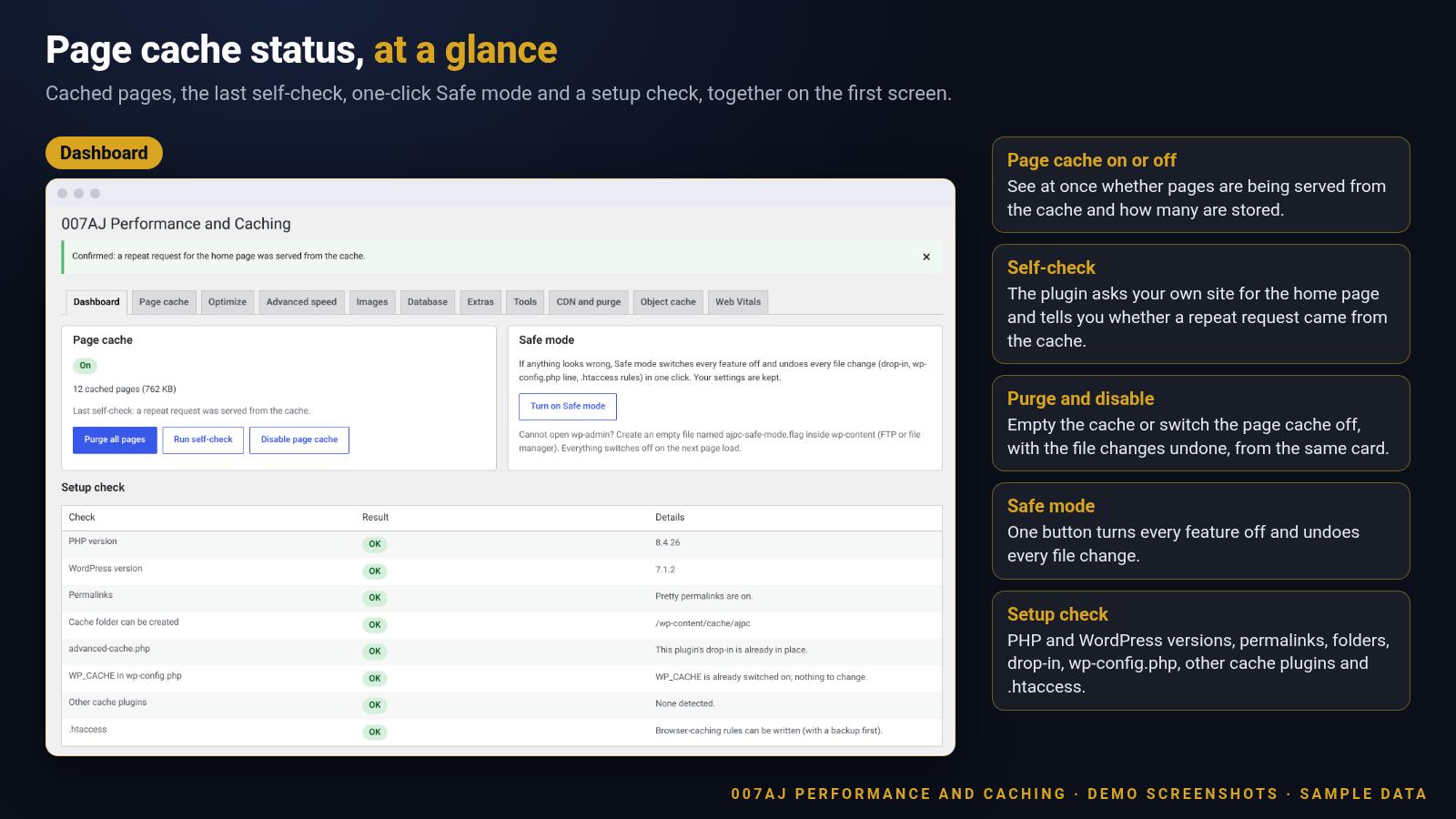 The dashboard: page cache status, self-check, Safe mode and the setup check. Demo install with sample data.
Caching you can trust, changes you can undo
The page cache, the checks around it and the safety net, all in one plugin.
Disk page cache
Visitors are given a saved copy of each page, served by a small file that runs before WordPress loads, with a compressed copy kept alongside it. The cache lifetime is yours to set.
A setup check before anything changes
Before the page cache is switched on, a checklist covers your PHP and WordPress versions, multisite, permalinks, folders, the advanced-cache.php file, wp-config.php, other cache plugins, your host and .htaccess. If a check is blocking, nothing is changed.
Host detection
Recognises WP Engine, Kinsta, Pantheon, Flywheel, GoDaddy Managed WordPress, WordPress.com, Bluehost, SiteGround, Cloudways and Hostinger. If your host already runs its own page cache, page caching stays off unless you confirm that you want it. Cloudflare, Varnish and LiteSpeed are noted for information.
Conflict detection
Checks for other cache and speed plugins and for another plugin’s advanced-cache.php file. A file that belongs to something else is never replaced.
A backup before every file change
Before wp-config.php or .htaccess is edited, a copy is saved in a closed folder. The newest five copies of each are kept, and changes sit between clear markers so they are easy to find.
One-click Safe mode
One button switches every optimization off and undoes the file changes: the advanced-cache.php file, the wp-config.php line and the .htaccess rules. Cached pages are cleared and your settings are kept. If you cannot reach wp-admin, an empty file named ajpc-safe-mode.flag in wp-content does the same.
Rolled back if something fails
If switching the page cache on fails part-way, the changes made so far are undone. Disabling the page cache from the dashboard undoes its file changes too, and “Undo last change” returns your optimization settings to how they were before.
Sensible things are never cached
Logged-in visitors, form posts, pages with query strings, REST requests, admin and AJAX requests, feeds, search, 404 and preview pages, password-protected posts and shop cart and checkout pages are always served fresh. Common tracking parameters in a link do not stop a page from being cached.
Automatic cache clearing
Cached pages are cleared when you publish, update, trash or delete content, when comments change, when terms, widgets, options or profiles change, and when shop stock changes.
Control what is cached
Exclude pages by address (wildcards work), by cookie or by browser. Choose how long copies last and, if you like, keep a separate cache for mobile visitors.
Purge from the admin bar
A “Cache” menu in the admin bar offers “Purge all cached pages” and “Purge this page”. The dashboard adds a self-check that asks your own site for its home page twice and reports whether the second answer came from the cache.
A visible status header
Responses can carry an X-AJPC-Cache header showing HIT, MISS or BYPASS and the reason. It is on by default and you can turn it off.
Proof you can see on the front end
Cached pages are served with a status header, and the admin bar adds purge shortcuts.
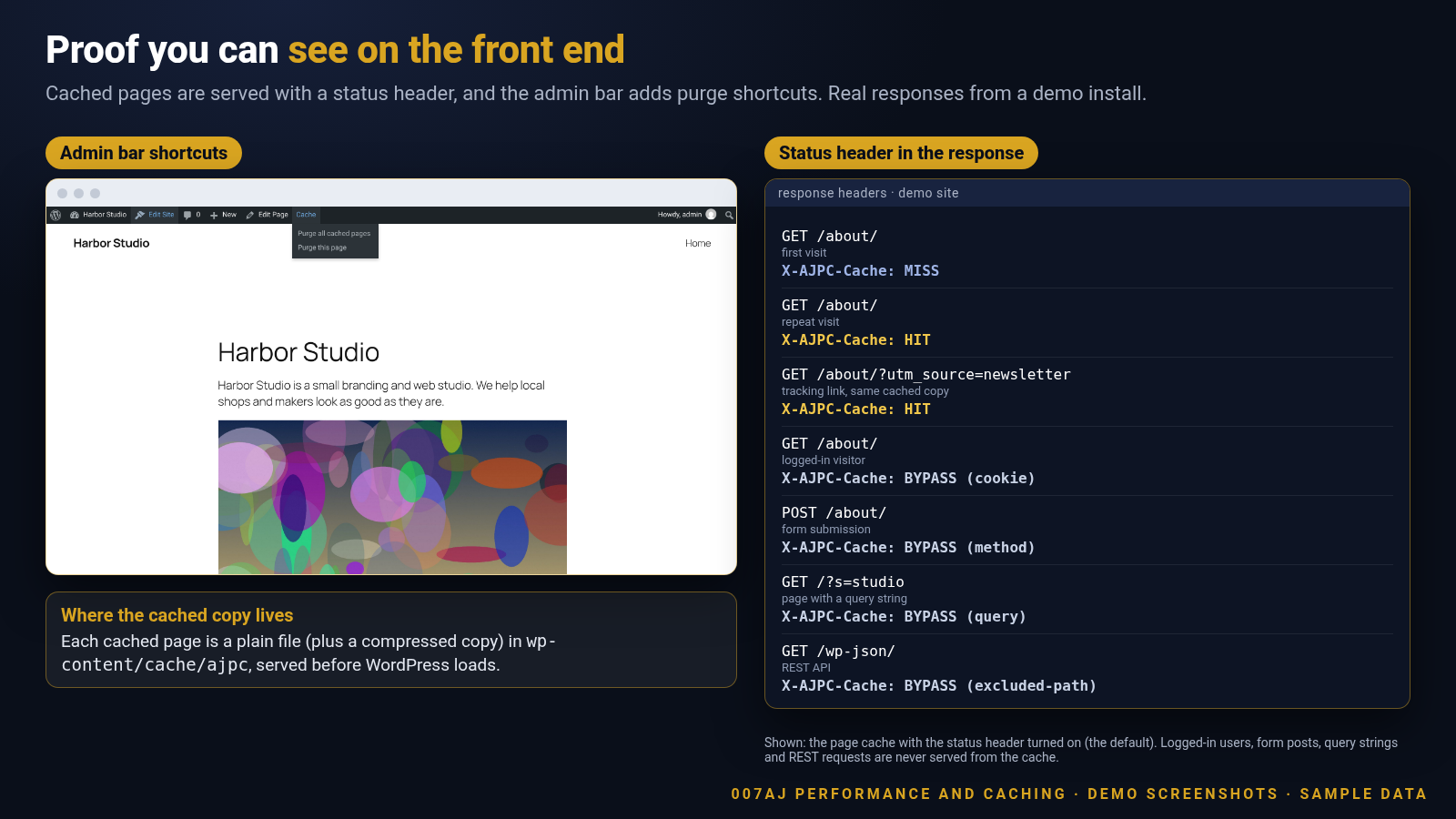 The admin-bar Cache menu and real response headers from a demo site: a first visit, a repeat visit, a tracking link, a logged-in visitor, a form post, a search and the REST API. Demo install with sample data.
Page cache settings you control
Lifetime, exclusions, a separate mobile cache and the status header, each in plain language.
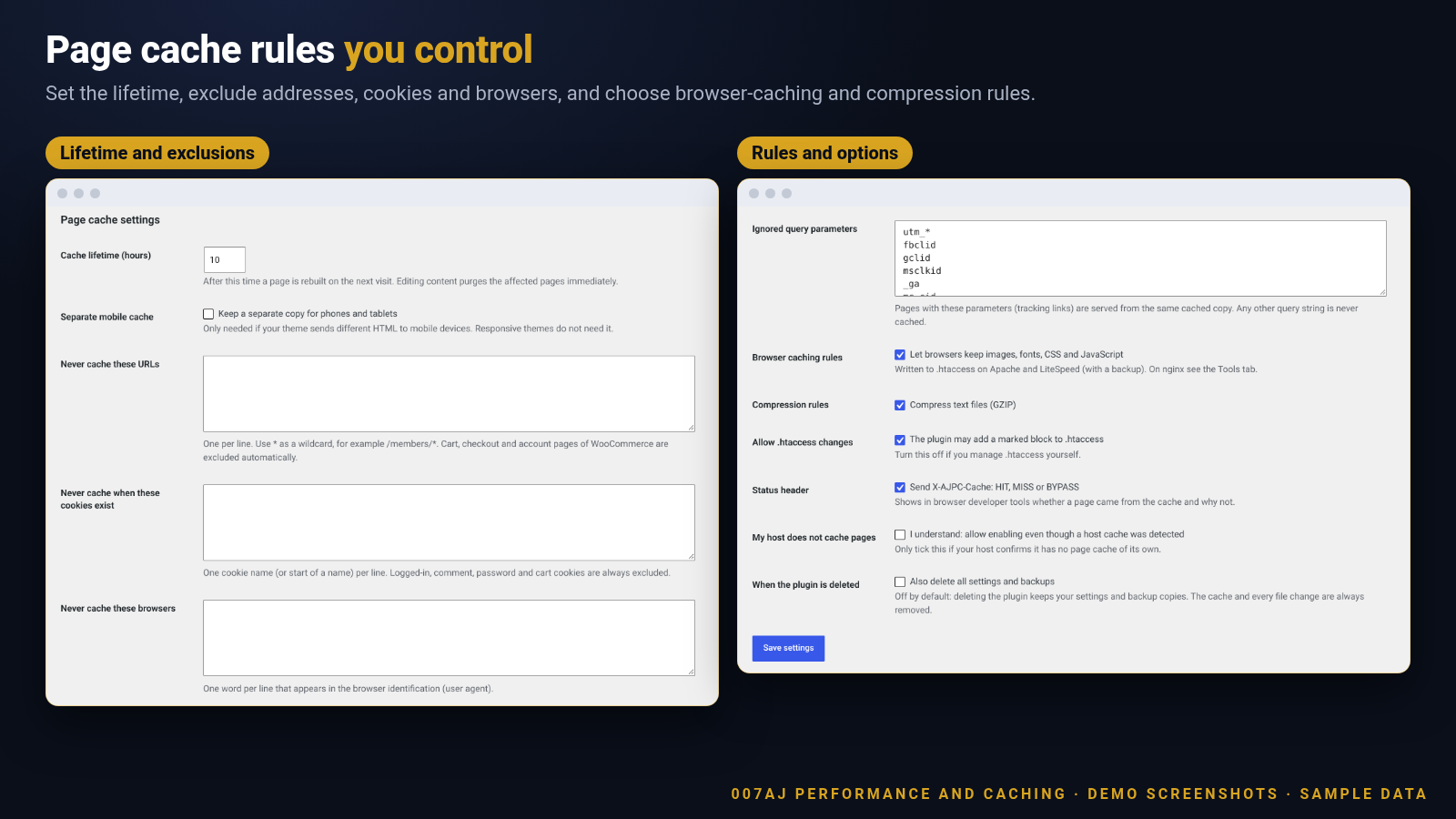 Page cache settings. Demo install with sample data.
Safe mode and file backups
Every edit to wp-config.php and .htaccess is backed up first. One button puts the files back and switches everything off.
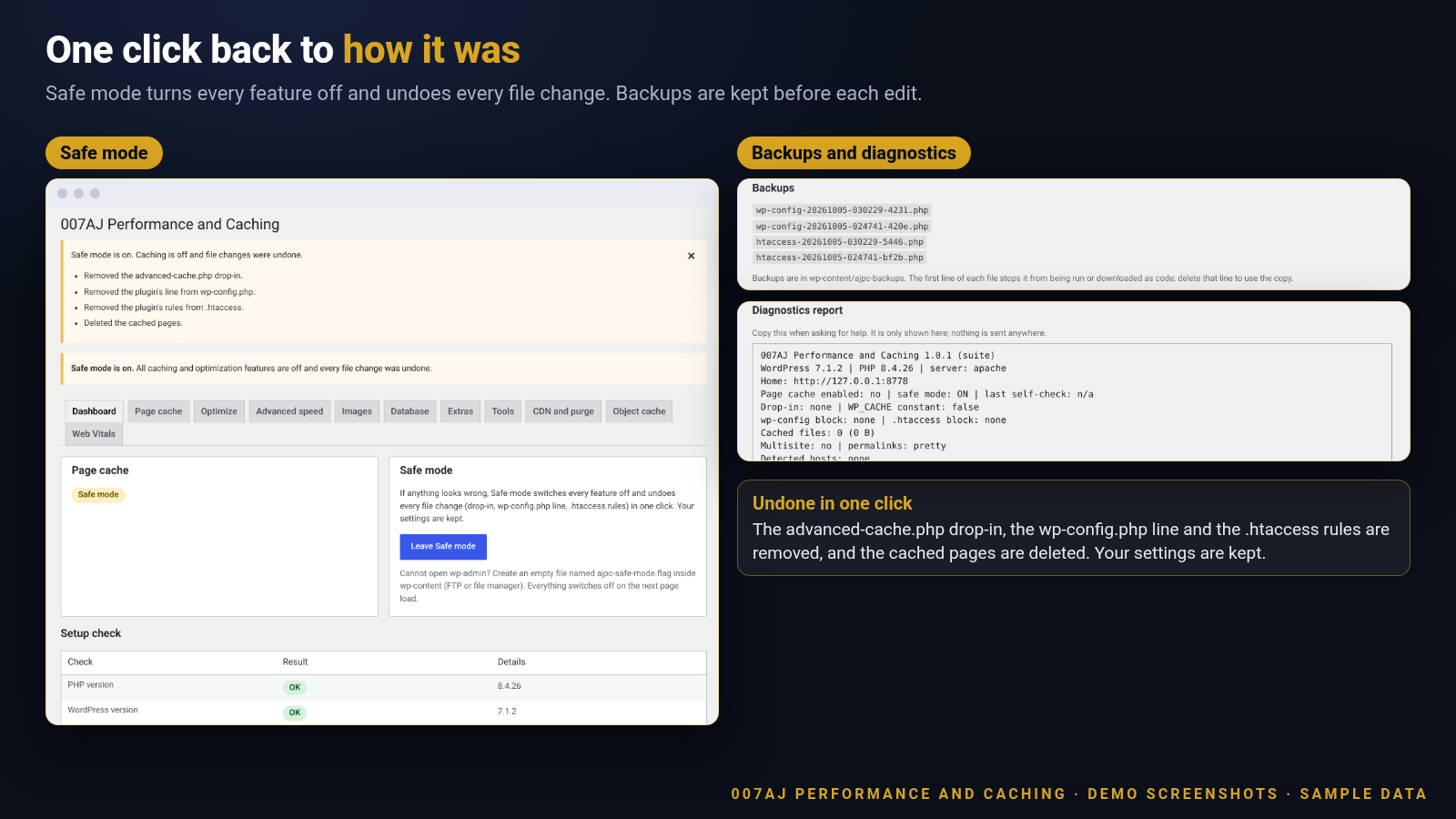 Safe mode, saved backups and “Undo last change”. In the demo, wp-config.php and .htaccess were identical to the originals after Safe mode. Demo install with sample data.
Host and conflict detection
The setup check recognises hosts and other caching, and stops before it can get in the way.
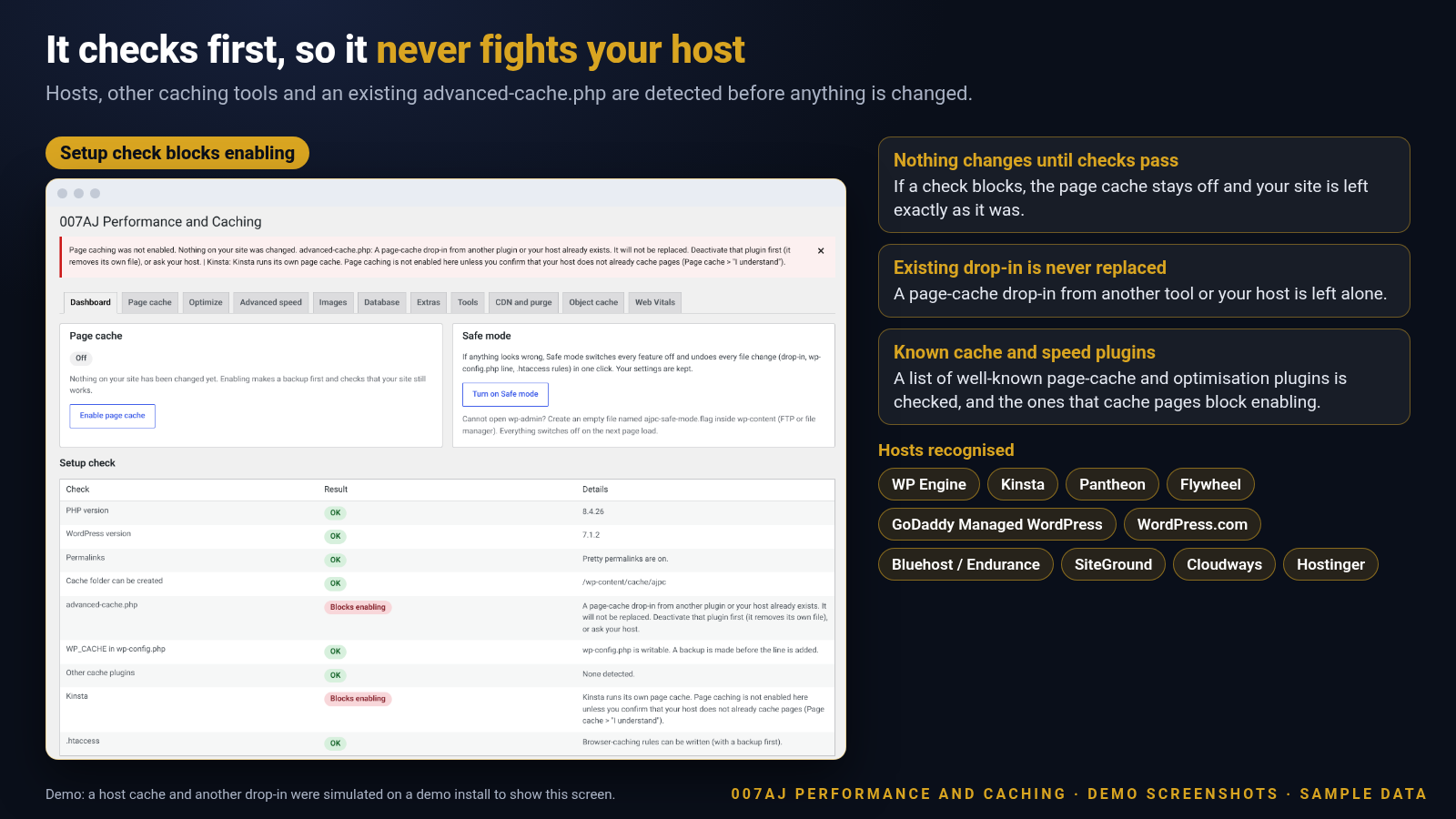 A host cache and another advanced-cache.php file were simulated on a demo install to show the warnings. Demo install with sample data.
Plus optional speed tools
All included. Each part stays off until you switch it on.
Cache preload
Warm the cache from your sitemap and navigation menus, one to thirty pages a minute. Requests go only to your own site, and the run waits while the server is busy. Off until you start it.
Browser caching and compression rules
On Apache and LiteSpeed, the plugin can add browser-caching and GZIP rules to .htaccess, with a backup first. On other servers a ready-made snippet is shown for you to copy.
Optimize options
Minify CSS, JavaScript and HTML, defer JavaScript, lazy-load images and iframes, remove version numbers from file links, and remove the emoji script and embed scripts. Every option starts off. Safe and Balanced presets, a “Turn all optimizations off” button and Undo are included.
Advanced speed options
Combine CSS and JavaScript, delay scripts until a visitor interacts or a timeout passes, reduce unused CSS, create critical CSS for each page type with a manual override, add preload, prefetch and preconnect hints, set font-display, and optionally host Google Fonts locally.
Image optimization
Compress JPEG and PNG images on your own server, keeping the originals so you can restore them. Create WebP and AVIF copies where the server supports them, run a bulk job with progress, pause and resume, and optimise from the Media Library. Nothing is sent to an outside service.
Database clean-up
Count first, then delete only what you tick: revisions, auto-drafts, trashed posts and comments, spam, expired transients and orphaned post and comment meta. Optionally run it daily or weekly. Deleted rows cannot be brought back, so make a backup first.
Extras
Control the Heartbeat, turn off XML-RPC pingbacks, remove the shortlink, RSD and generator tags, limit post revisions and show a dashboard widget.
CDN and cache purge
Rewrite file addresses to your CDN host. Optionally clear Cloudflare with your own API token, and clear the host cache on Kinsta, WP Engine, SiteGround, Cloudways and LiteSpeed, or send a generic HTTP PURGE request.
Object cache and Web Vitals
Optionally add a Redis or Memcached object-cache file for servers that have them. A first-party Web Vitals sampler is off by default and stores counts only.
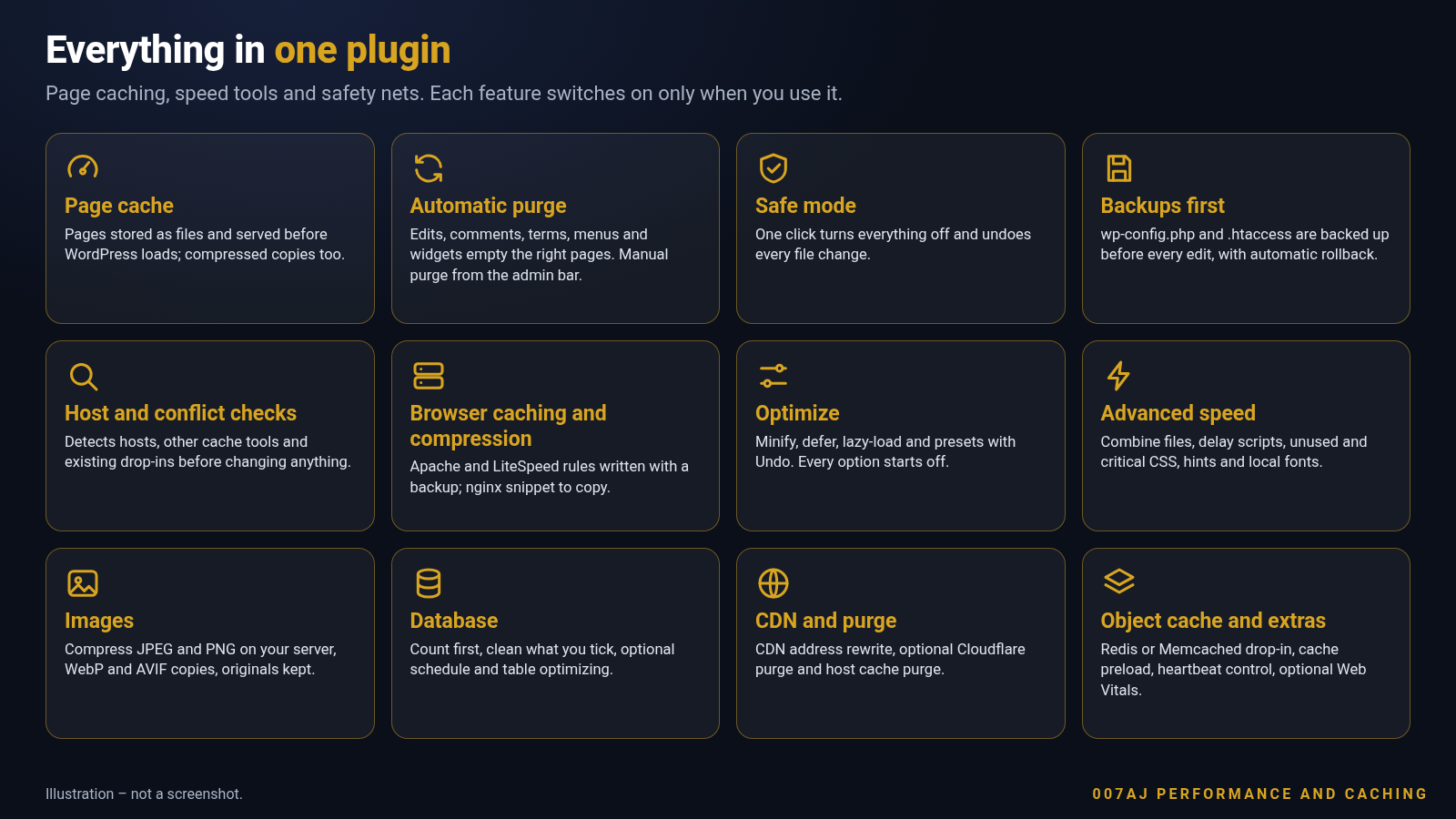 Illustration, not a screenshot.
Optimize and advanced speed
Choose a Safe or Balanced preset, or pick options one at a time. Undo is always at hand.
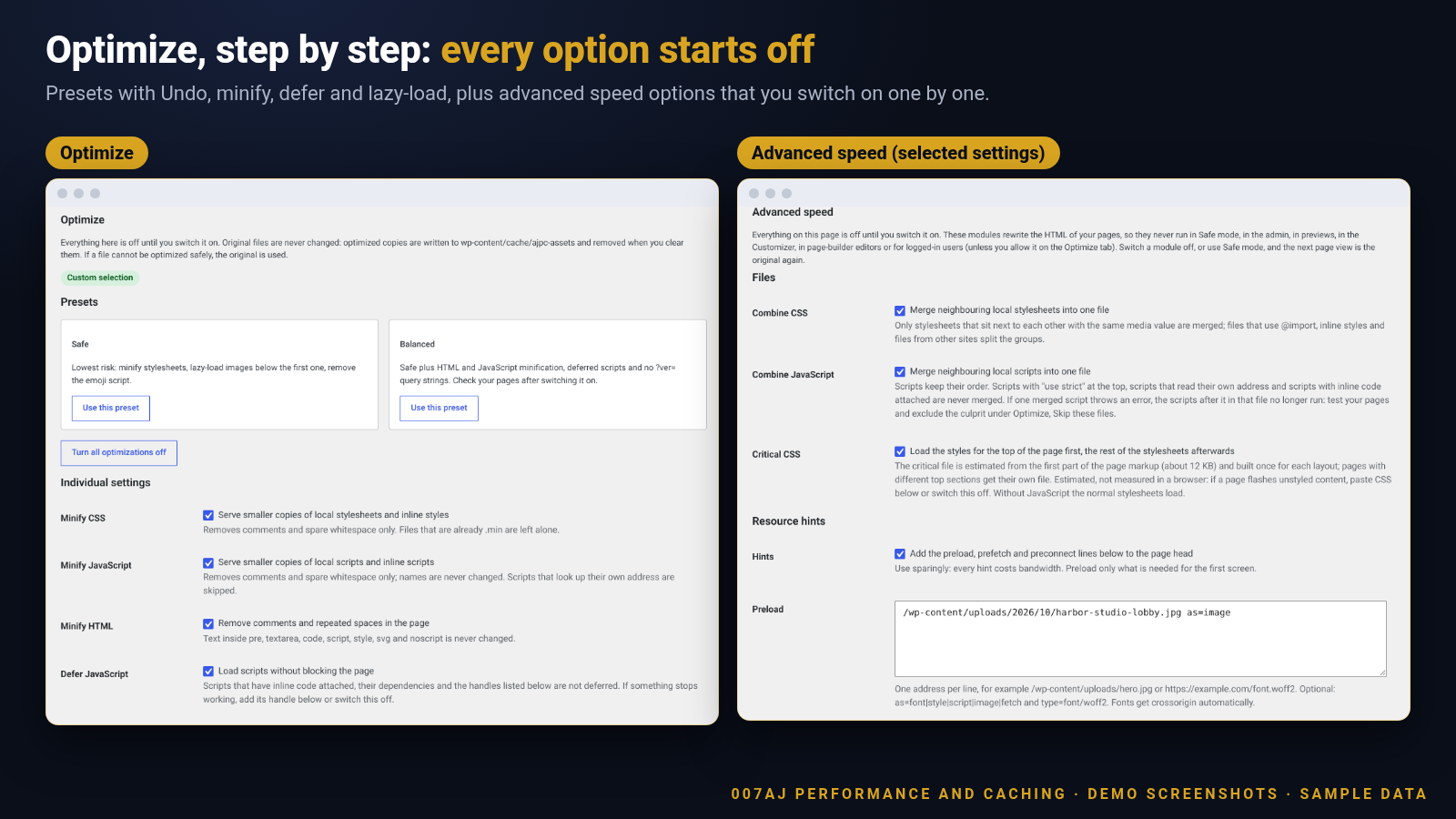 The Optimize presets and options, with selected Advanced speed settings stacked beside them. Demo install with sample data.
Image optimization
Compress on your own server, keep the originals, and create WebP and AVIF copies where the server supports them.
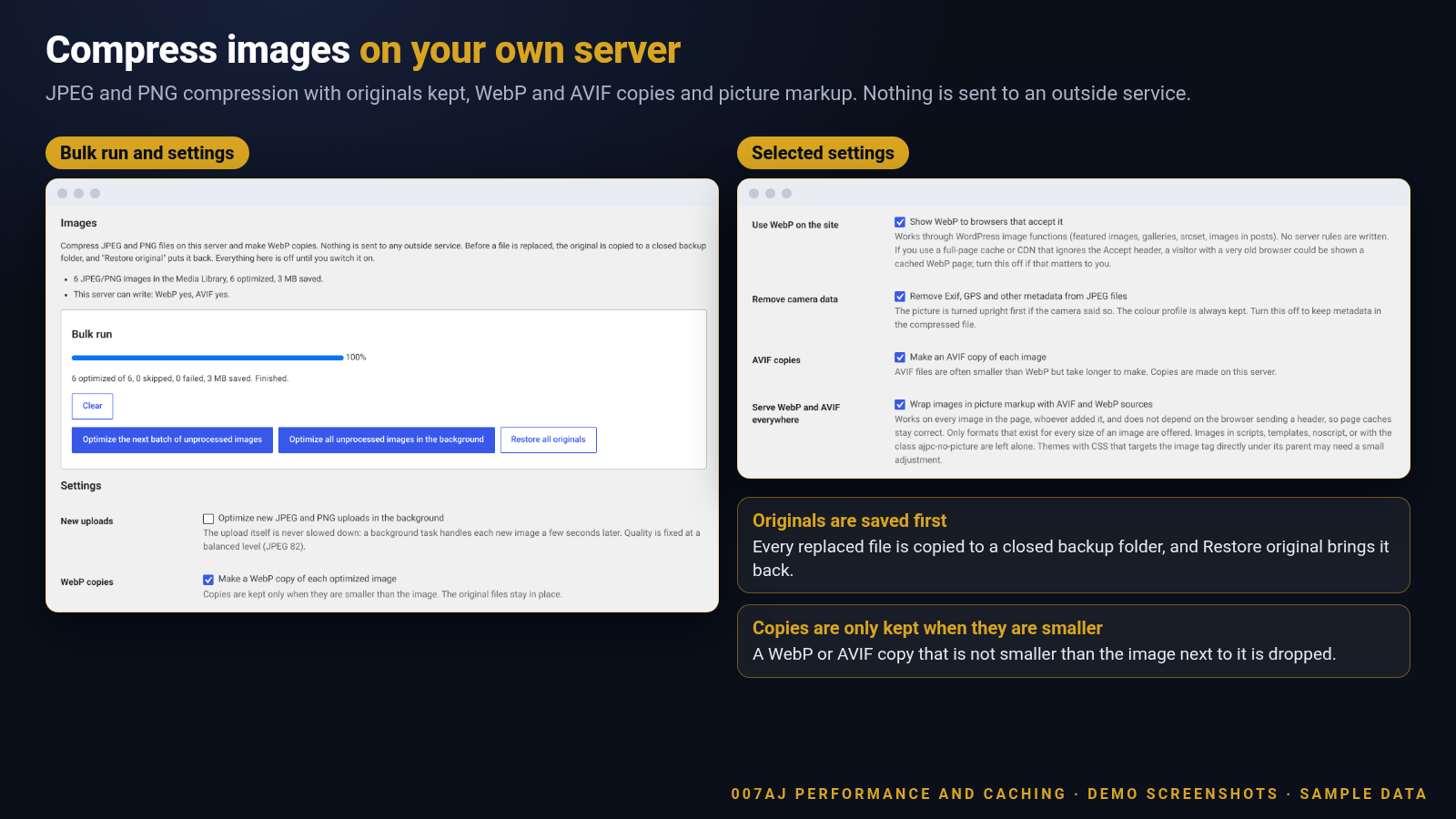 Images screen with a bulk run on generated sample images. Demo install with sample data.
Clean up the database, fill the cache
Count first and delete only what you tick. Warm the cache from your sitemap and menus at a gentle pace.
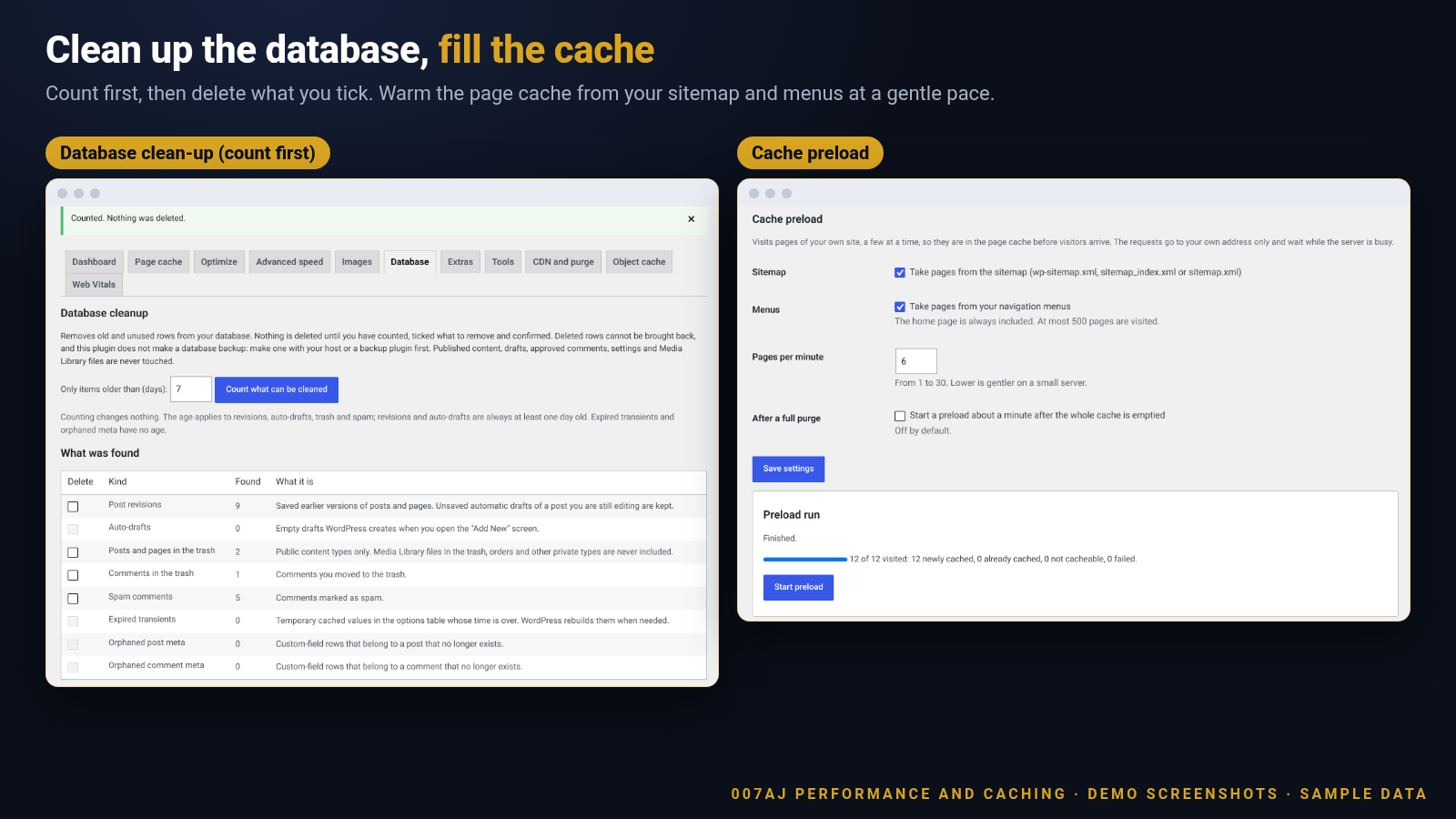 Database clean-up (count first) and cache preload. Demo install with sample data.
How it works
From install to a cached site in four steps.
1Run the setup check
Open the dashboard and read the checklist. It covers versions, permalinks, folders, your host and any other cache plugin.
2Turn on the page cache
Press the button. The plugin backs up wp-config.php and .htaccess, makes its changes and confirms with a self-check.
3Choose what else to switch on
Pick a preset in Optimize, or try images, the database clean-up and the preload one at a time. Everything starts off.
4Undo whenever you like
Disable the page cache, use “Undo last change”, or press Safe mode to switch everything off at once.
Made for any single WordPress site
Use it wherever pages are read more often than they change.
Blogs and magazinesBusiness and brochure sitesPortfoliosAgency client sitesOnline shopsMembership sitesDocumentation sitesLocal business sitesLanding pagesFully licensed version
Fully licensed version — use on your own sites. You get the complete plugin, with every feature described on this page.
Requirements
- WordPress 6.3 or newer (shown working on a current WordPress 7.1 install)
- PHP 7.4 or newer
- A single WordPress site (page caching is not available on multisite networks)
- Pretty permalinks are recommended, because pages with a query string are not cached
- Browser-caching and GZIP rules are written to .htaccess on Apache and LiteSpeed; on other servers a snippet is shown to copy
- WebP and AVIF copies are created only where the server supports them
- Redis or Memcached must already be available on your server before you use the object-cache option
- Cloudflare, Google Fonts hosting and host cache purging are optional, use your own account or your own host, and are only contacted if you turn them on
Frequently asked questions
What licence do I get?Each purchase is a fully licensed copy of the plugin for use on your own sites.
Will it change my files without asking?The page cache is switched on by you from the dashboard. Only then does it add its advanced-cache.php file, a line in wp-config.php and, on Apache and LiteSpeed, rules in .htaccess. A copy of wp-config.php and .htaccess is saved before each edit.
What if my site breaks?Press “Turn on Safe mode” on the dashboard. Every optimization switches off, the file changes are undone and the cached pages are cleared, while your settings are kept. If you cannot open wp-admin, create an empty file named ajpc-safe-mode.flag inside wp-content.
Which options are switched on automatically?Once you turn the page cache on, caching, automatic cache clearing and the status header are on. The optimization, advanced speed, image, database, CDN, object-cache and Web Vitals options all start off until you choose them.
Does it work with my host?It recognises WP Engine, Kinsta, Pantheon, Flywheel, GoDaddy Managed WordPress, WordPress.com, Bluehost, SiteGround, Cloudways and Hostinger. When a host already caches pages, page caching stays off unless you confirm that you want it.
What if I already use another cache plugin?The setup check looks for other cache and speed plugins and tells you about them. An advanced-cache.php file from another plugin is never replaced, so switch the other one off first.
Which pages are never cached?Logged-in visitors, form posts, pages with query strings, REST, admin and AJAX requests, feeds, search, 404 and preview pages, password-protected posts and shop cart and checkout pages.
Can I clear the cache myself?Yes. Use “Purge all pages” on the dashboard, or the admin-bar “Cache” menu to purge everything or only the page you are viewing. The cache is also cleared automatically when your content changes.
Does it work on multisite?No. Page caching is for single sites in this version, and the setup check says so.
Is the database clean-up safe?It counts first and deletes nothing until you tick what to remove and confirm. Deleted rows cannot be brought back and the plugin does not make a database backup, so make one with your host or a backup plugin first.
Does image optimization send my pictures anywhere?No. Compression runs on your own server, the originals are kept so you can restore them, and nothing is sent to an outside service.
Does the plugin contact other sites?Only when you choose features that need it: Google Fonts hosting downloads the font files, and Cloudflare purging calls Cloudflare with your own API token. The cache self-check, preload and image-rule test only visit your own site.
Can I remove all data when I delete the plugin?Yes. A setting lets you also delete all settings and backups when the plugin is deleted. It is off by default.
Is it translation-ready?Yes. Text is prepared for translation and a translation template is included.
Faster pages with a way back
Cache your pages, check your setup first and keep a backup of every file change, with Safe mode ready if you need it. Fully licensed version — use on your own sites.
007AJ
007AJ Performance and Caching by 007AJ. Screenshots are from a demo install with sample data; the graphic labelled “Illustration” is not a screenshot. Cloudflare, Google Fonts, Redis, Memcached, WP Engine, Kinsta, Pantheon, Flywheel, GoDaddy, WordPress.com, Bluehost, SiteGround, Cloudways, Hostinger and LiteSpeed are trademarks of their respective owners; this plugin is not affiliated with them.Requirements
WordPress 6.3 or newer, PHP 7.4 or newer, and a single WordPress site. Page caching is unavailable on multisite. Redis or Memcached must already be available for optional object caching. Image formats depend on server support.
Instructions
Upload the plugin ZIP through Plugins > Add New > Upload Plugin, or copy the plugin folder to /wp-content/plugins/. Activate it, open 007AJ Performance and Caching and read the Setup check. Enable the page cache only after reviewing the checks. Use Safe mode if anything looks wrong. Read the included English readme for optional settings, external services and recovery guidance.
| Author | 0007AJ |
|---|---|
| Category | Plugins / WordPress / Performance |
| Price | $29 |
| Extended License | $87 |
| First Release | Oct 6, 2026 |
| Last Update | Oct 6, 2026 |
| Supported cms | WordPress 6.3, WordPress 6.4, WordPress 6.5, WordPress 6.6, WordPress 6.7, WordPress 6.8, WordPress 6.9, WordPress 7.0, WordPress 7.1 |
| Files included | .php, .css, JavaScript .js |
Categories
Tags
External listing. code.market does not sell this product and does not process payment for it. Pricing, payment, delivery, licensing, refunds, and support are handled by the third-party merchant on its own website. We may earn an affiliate commission from a referral. Details.
Products of the Week.
Submit🥇

STOP GUESSING WHAT TO POST
AI that learns your brand voice and builds a month of consistent, on-brand social content: carousels, posts and hooks that sound like you, not like everyone else's AI.
SaaS · 3,102 views · 28 clicksSaaS · Week 45 · 3,102 views · 28 clicks
🥈

Conversational Backlinks for Busy Founders
Place Backlink Relevant Conversation for your domain across Forums and Conversations
Website · 40,498 views · 216 clicksWebsite · Week 45 · 40,498 views · 216 clicks
🥉

upvote.club
Free Social Media Engagement that Helps Boost Your Content. Upvote Club supports 19 social networks with 100+ engagement actions in one dashboard. Add links to your posts and get free engagement from real users.
SaaS · 38,585 views · 110 clicksSaaS · Week 45 · 38,585 views · 110 clicks
#4

Substack Posting API
Onboard your Agent to Substack. Write Publish on Substack via API
SaaS · 57,628 views · 197 clicksSaaS · Week 45 · 57,628 views · 197 clicks
#5

Seenshot App
Free, Fast, MacOS Screenshot app. Make Screenshot cmd+shift+2 and send it via link
Desktop App · 27,058 views · 119 clicksDesktop App · Week 45 · 27,058 views · 119 clicks
#6

Hand-Placed Backlinks $9.99 per link. Flat rate.
Buy hand-placed forum, Q-A and directory backlinks. Flat $9.99 per link, no subscriptions — you only pay for approved listings.
Website · 2,996 views · 18 clicksWebsite · Week 45 · 2,996 views · 18 clicks
#7

Free Invoice Generator - PDF Invoices in Your Browser, No Sign-Up
A free invoice maker for freelancers and small businesses: fill in the invoice, check the live preview, and download a PDF that looks exactly like it. Any currency, tax per item, three templates, no sign-up, and nothing leaves your device.
1,692 views · 16 clicksWeek 45 · 1,692 views · 16 clicks
#8

Merge PDF Files Free - Combine PDFs in Your Browser, No Upload
A free PDF merger for office workers, students, and freelancers: combine PDFs and images into one file in the browser, reorder files and pages, pick page ranges, keep bookmarks, and open password-protected PDFs. Nothing is uploaded, no sign-up, no watermark.
1,582 views · 13 clicksWeek 45 · 1,582 views · 13 clicks