The Largest Curatorial Library
With Ios Ui Kit

MapNavi - Maps & Navigation UI KIT for Sketch

MapNavi - Maps & Navigation UI KIT for Sketch

How To Use Sketch Files You just need to download some appropriate images from the image bank or given below links (www.shutterstock.com or www.pexels.com ). Just place the images into sketch file. You can also edit any text, Navigation Menu, color or any font file by double click and change the same. Make sure your image sizes are as per the mentioned sizes in the sketch file. You can also download the trial version of sketch from here. https://www.sketchapp.com/ Sketch Version 40+ Graphic Used Many thanks for these great images to: www.shutterstock.com Note: All images are just used for Preview Purpose Only. They are not part of the website template and NOT included in the final purchase files.

Created Mar 22, 2018 · 20 sales

Xiao Mobile UI Kit for Sketch

Xiao Mobile UI Kit for Sketch

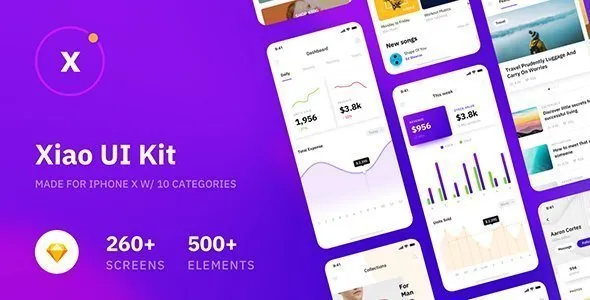
Xiao UI Kit contains 260+ Prebuilt iOS Light & Dark Screens in 10 Categories (Walkthrough, Signup & Login, Profile, Feeds, Articles, Social, Navigation, E-commerce, Media, Dashboard) Designed by Sketch, Adobe XD, Figma and Photoshop.Xiao UI Kit is neatly grouped, named and organized accordingly so its very easy to change any and all of the design. Xiao UI Kit is a beautiful, unique and trendy Mobile UI Kit. It will help you save tons of time building your products.

Created Dec 24, 2025

Kolica - eCommerce Flutter UI Kit

Kolica - eCommerce Flutter UI Kit

Kolica Store Flutter e-Commerce UI Kit is for both Android and IOS . The Template is fully clean, well structured, smooth animation, and user friendly. Creative and modern design with great UI/UX. Kolica UI kit can be easier for your application and super speed up your design workflow. We worked more than two hundred hours to create this minimal looking awesome Flutter UI Kit. You can easily and quickly develop an e-commerce application with this template.

Created Feb 2, 2021 · Updated Sep 21, 2021 · 15 sales

FoodRest - Food & Resto UI KIT for Sketch

FoodRest - Food & Resto UI KIT for Sketch

How To Use Sketch Files You just need to download some appropriate images from the image bank or given below links (www.shutterstock.com or www.pexels.com ). Just place the images into sketch file. You can also edit any text, Navigation Menu, color or any font file by double click and change the same. Make sure your image sizes are as per the mentioned sizes in the sketch file. You can also download the trial version of sketch from here. https://www.sketchapp.com/ Sketch Version 40+ Graphic Used Many thanks for these great images to: www.shutterstock.com Note: All images are just used for Preview Purpose Only. They are not part of the website template and NOT included in the final purchase files.

Created Mar 28, 2018 · 4 sales

Kenakata - eCommerce Mobile App UI Kit

Kenakata - eCommerce Mobile App UI Kit

Kenakata is a creative, modern, clean, professional and attractive eCommerce Mobile App UI Kit. Made with Adobe XD. All artboards/pages/screens and symbols clearly and logically labelled (related elements grouped into symbols, such as icons, blocks, buttons, links, etc.). All layers and/or group clearly and logically labeled. Two dedicated assets-icons files so that you can quickly and easily edit the assets used throughout the Adobe XD file in a centralized place. You’ll get 51 iPhone X screens.

Created Aug 24, 2020 · Updated Sep 15, 2020 · ★ 0.00 (1) · 79 sales

Top 16 Ios Ui Kit Uikit tools with live demo and interactive preview off all time