
Your AI coding budget can vanish before the month ends. You may have seen the message, "Your organization or enterprise has exceeded its Copilot budget. Contact your admin to resume usage." If so, you know the feeling: the month is not over, but the money is. One big mistake rarely causes this. Instead, a mix of seven common patterns usually drains the budget.
1. A shared pool lets one team drain your AI coding budget
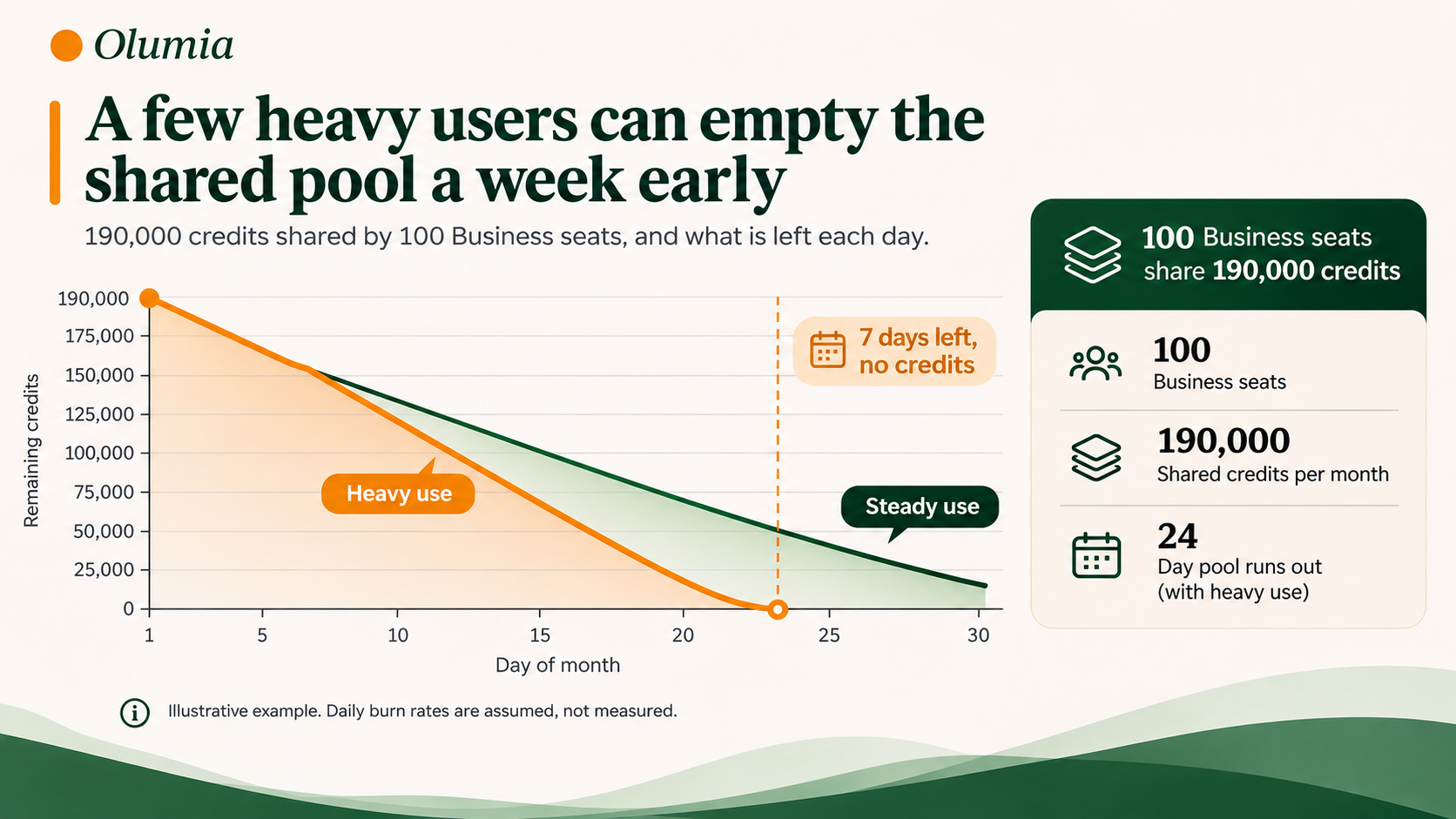
On GitHub Copilot Business and Enterprise plans, the included credits sit in one shared pool. GitHub pools them at the billing-entity level. For example, 100 Business seats hold 190,000 shared credits, not 1,900 each. However, a few heavy users can use what everyone else expected to have. In practice, one busy team can empty the whole pool early.
2. Unused allowance disappears each month
Included credits do not roll over. Instead, GitHub resets them at 00:00 UTC on the first day of each month. As a result, quiet months waste money, and busy months hit a cliff. Teams then rush to use credits at month end, or panic when the next month starts.
How to spot it: a flat first half of the month, then a steep second half.
3. Extra usage can stretch your AI coding budget by default
GitHub's documentation says paid usage beyond the allowance is on by default for Business and Enterprise. An administrator must turn it off in the AI controls settings. So if nobody changed it, work continues past the allowance and keeps billing.
How to spot it: the invoice exceeds the plan price, and nobody approved the difference.
4. Agents and long context multiply the cost of one task
Gartner's June 2026 release names three ways AI coding costs get out of hand: ungoverned autonomy in agent workflows, bloated context windows, and no structured feedback on cost. For instance, one agent task can read a large codebase and retry several times. As a result, it can cost far more than a simple suggestion.
How to spot it: a few sessions account for a large share of spend.
5. An expensive default model burns through your AI coding budget
When users choose their own model, every request goes to their pick. The most capable model is easy to leave selected. However, it also costs the most. Gartner's August 2026 release says an agentic reasoning model raises inference cost at least five times compared with a basic chatbot interaction.
How to spot it: check the model mix. If routine tasks run on the priciest model, you can route them elsewhere.
6. Budgets do not behave the way people assume
By default, GitHub says reaching a spending limit sends a notification but does not stop usage. Usage stops only when the "Stop usage when budget limit is reached" option is on for an enterprise or cost-centre limit. User-level budgets always stop. Because of this, many teams learn how their limits behave on the day it matters. If you hit the wall, read our notes on what the Copilot budget-exceeded message means and on credit limits versus budgets.
How to spot it: an alert arrives while spending continues, or people get blocked when nobody expected a stop.
7. Nobody owns the AI coding budget number
Gartner also notes that vendors often give little clarity on how they calculate and bill token use. That makes it hard for companies to forecast and control costs. Meanwhile, each vendor's usage data sits in its own admin page. So nobody sees the total, and nobody owns the forecast.
How to spot it: you cannot say what you will spend this month before the month ends.
A fifteen-minute check for your AI coding budget
First, find out whether extra usage is on, and who can change it.
Next, pull the top ten users by usage this month.
Then divide the remaining pool by the average daily burn. The result estimates the day the pool runs out.
After that, add a team-level budget if you only have a company-wide one.
Finally, name one owner for the monthly number.
Tools that read vendor usage data can automate that run-out estimate across vendors. Olumia.dev is one example, and there is a worked example in forecasting Copilot credit runway. A spreadsheet works too.