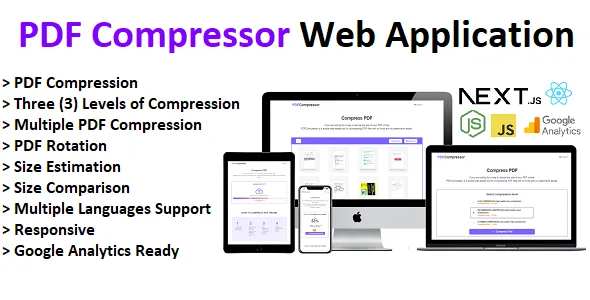
PDF Compressor - Compress and Rotate PDF - React Next.js Web Application
Description
DEMO might take some time to load for the first time because the app is hosted on a free tier.
PDFCompressor is a sharp, high-quality PDF compressor web application that help you reduce the size of your single or multiple PDFs online in a simple, easy and a faster way with no watermarks added and no registration needed. You can also rotate your PDFs files while compressing them. All of this while maintaining good PDF quality.
Add Multiple PDF Files & Rotate PDF Files

Three (3) Compression Levels & Size Estimations
Upload Progress Bar
Saved Percentage & Size Comparison Before & After Compression
PDF Compressor Features:
- Fast and Strong PDF Compression.
- Add and Delete PDF Files
- PDF Rotation.
- Multiple PDF files Compression, you can drag and drop as many files as you’d like into the toolbox.
- Three Levels of Compression.
- Size estimation for the compression will be displayed with each compression level and the resulting size as well as the compression rate in percentage will be displayed on the result page.
- Security guaranteed – Files will be deleted from server after one hour.
- Compatible All Browsers.
- Responsive.
- SEO Friendly.
- Google Analytics Ready.
- Multiple languages support.
- Maximum submitted size per file can be changed.
- About, Terms and Condition, Privacy and Contact Pages.
How to compress PDF file(s) using PDF Compressor?
- To start, upload your file to our PDF compressor.
- Add more files and rotate PDF documents if necessary. Then click Select Compression Level
- Select compression level and click on Compress PDF to start the compression
- Download the compressed PDF file to your computer.
What is the Language/Framework/Software Used for development?
- JavaScript.
- Nextjs framework.
- Ghostscript.
Available pages?
- Main page.
- About page.
- Privacy page.
- Terms and conditions page.
- Contact Page.
- 404 Error page.
System requirements
CPU with 4 to 8 cores and RAM with 2 to 16 GB. The compression in the backend is done using Ghostscript. Both the uploaded and compressed files are stored in the server and deleted within exactly 1 hour. No database is used.
About Ghostscript
Ghostscript is required for running the app both on local machine and on server
LOCAL MACHINE:
Depending on which operation system that you have, follow Ghostscript
installation steps in this blog post:
If you’re on windows you should change the ghostScript executable file name
from GSWIN64.exe or GSWIN32.exe to gs.exe (you can find the executable in the
folder where your ghostscript is installed on your machine)
SERVER:
You have to make sure that ghostscript is installed on your server also, you can
contact your hosting provider’s support and ask if it is installed or if it can be
installed
Hosting
Hosting service must :
- Be a Full stack hosting platform (Supports both backend and frontend applications).
- Supports Next.js Applications.
- Provide GhostScript Installed or supports its installation.
I Recommend:
- DigitalOcean
- Render.com
- Heroku
- Virtual Private Server with Docker (example : Contabo VPS https://contabo.com/)
I provide free installation service, please contact me if you need any help.
Q&A
Q: Can this application be installed in shared hosting via cPanel?

Three (3) Compression Levels & Size Estimations
Upload Progress Bar
Saved Percentage & Size Comparison Before & After Compression
PDF Compressor Features:
- Fast and Strong PDF Compression.
- Add and Delete PDF Files
- PDF Rotation.
- Multiple PDF files Compression, you can drag and drop as many files as you’d like into the toolbox.
- Three Levels of Compression.
- Size estimation for the compression will be displayed with each compression level and the resulting size as well as the compression rate in percentage will be displayed on the result page.
- Security guaranteed – Files will be deleted from server after one hour.
- Compatible All Browsers.
- Responsive.
- SEO Friendly.
- Google Analytics Ready.
- Multiple languages support.
- Maximum submitted size per file can be changed.
- About, Terms and Condition, Privacy and Contact Pages.
How to compress PDF file(s) using PDF Compressor?
- To start, upload your file to our PDF compressor.
- Add more files and rotate PDF documents if necessary. Then click Select Compression Level
- Select compression level and click on Compress PDF to start the compression
- Download the compressed PDF file to your computer.
What is the Language/Framework/Software Used for development?
- JavaScript.
- Nextjs framework.
- Ghostscript.
Available pages?
- Main page.
- About page.
- Privacy page.
- Terms and conditions page.
- Contact Page.
- 404 Error page.
System requirements
CPU with 4 to 8 cores and RAM with 2 to 16 GB. The compression in the backend is done using Ghostscript. Both the uploaded and compressed files are stored in the server and deleted within exactly 1 hour. No database is used.
About Ghostscript
Ghostscript is required for running the app both on local machine and on server
LOCAL MACHINE:
Depending on which operation system that you have, follow Ghostscript
installation steps in this blog post:
If you’re on windows you should change the ghostScript executable file name
from GSWIN64.exe or GSWIN32.exe to gs.exe (you can find the executable in the
folder where your ghostscript is installed on your machine)
SERVER:
You have to make sure that ghostscript is installed on your server also, you can
contact your hosting provider’s support and ask if it is installed or if it can be
installed
Hosting
Hosting service must :
- Be a Full stack hosting platform (Supports both backend and frontend applications).
- Supports Next.js Applications.
- Provide GhostScript Installed or supports its installation.
I Recommend:
- DigitalOcean
- Render.com
- Heroku
- Virtual Private Server with Docker (example : Contabo VPS https://contabo.com/)
I provide free installation service, please contact me if you need any help.
Q&A
Q: Can this application be installed in shared hosting via cPanel?


Saved Percentage & Size Comparison Before & After Compression
PDF Compressor Features:
- Fast and Strong PDF Compression.
- Add and Delete PDF Files
- PDF Rotation.
- Multiple PDF files Compression, you can drag and drop as many files as you’d like into the toolbox.
- Three Levels of Compression.
- Size estimation for the compression will be displayed with each compression level and the resulting size as well as the compression rate in percentage will be displayed on the result page.
- Security guaranteed – Files will be deleted from server after one hour.
- Compatible All Browsers.
- Responsive.
- SEO Friendly.
- Google Analytics Ready.
- Multiple languages support.
- Maximum submitted size per file can be changed.
- About, Terms and Condition, Privacy and Contact Pages.
How to compress PDF file(s) using PDF Compressor?
- To start, upload your file to our PDF compressor.
- Add more files and rotate PDF documents if necessary. Then click Select Compression Level
- Select compression level and click on Compress PDF to start the compression
- Download the compressed PDF file to your computer.
What is the Language/Framework/Software Used for development?
- JavaScript.
- Nextjs framework.
- Ghostscript.
Available pages?
- Main page.
- About page.
- Privacy page.
- Terms and conditions page.
- Contact Page.
- 404 Error page.
System requirements
CPU with 4 to 8 cores and RAM with 2 to 16 GB. The compression in the backend is done using Ghostscript. Both the uploaded and compressed files are stored in the server and deleted within exactly 1 hour. No database is used.
About Ghostscript
Ghostscript is required for running the app both on local machine and on server
LOCAL MACHINE:
Depending on which operation system that you have, follow Ghostscript
installation steps in this blog post:
If you’re on windows you should change the ghostScript executable file name
from GSWIN64.exe or GSWIN32.exe to gs.exe (you can find the executable in the
folder where your ghostscript is installed on your machine)
SERVER:
You have to make sure that ghostscript is installed on your server also, you can
contact your hosting provider’s support and ask if it is installed or if it can be
installed
Hosting
Hosting service must :
- Be a Full stack hosting platform (Supports both backend and frontend applications).
- Supports Next.js Applications.
- Provide GhostScript Installed or supports its installation.
I Recommend:
- DigitalOcean
- Render.com
- Heroku
- Virtual Private Server with Docker (example : Contabo VPS https://contabo.com/)
I provide free installation service, please contact me if you need any help.
Q&A
Q: Can this application be installed in shared hosting via cPanel?

A: Next.js apps can be installed on any hosting service that supports node.js but I do not recommend installing it via cPanel because it doesn’t have support for next.js applications, if you do, you will have to add a Nodejs custom server plus you need to make sure that GhostScript is installed to run the app. It is better that you deploy it on Next.js supported hosting services and check first if it provides GhostScript or if it can be installed.
Code maintenance
Source code is regularly maintained. After each update, it’s better to use the last published version of the project to guaranty code and features quality and optimization.External listing. code.market does not sell this product and does not process payment for it. Pricing, payment, delivery, licensing, refunds, and support are handled by the third-party merchant on its own website. We may earn an affiliate commission from a referral. Details.
Products of the Week.
Submit🥇

STOP GUESSING WHAT TO POST
AI that learns your brand voice and builds a month of consistent, on-brand social content: carousels, posts and hooks that sound like you, not like everyone else's AI.
SaaS · 4,310 views · 38 clicksSaaS · Week 45 · 4,310 views · 38 clicks
🥈

Conversational Backlinks for Busy Founders
Place Backlink Relevant Conversation for your domain across Forums and Conversations
Website · 42,043 views · 223 clicksWebsite · Week 45 · 42,043 views · 223 clicks
🥉

upvote.club
Free Social Media Engagement that Helps Boost Your Content. Upvote Club supports 19 social networks with 100+ engagement actions in one dashboard. Add links to your posts and get free engagement from real users.
SaaS · 40,088 views · 117 clicksSaaS · Week 45 · 40,088 views · 117 clicks
#4

Substack Posting API
Onboard your Agent to Substack. Write Publish on Substack via API
SaaS · 59,094 views · 198 clicksSaaS · Week 45 · 59,094 views · 198 clicks
#5

Seenshot App
Free, Fast, MacOS Screenshot app. Make Screenshot cmd+shift+2 and send it via link
Desktop App · 28,467 views · 122 clicksDesktop App · Week 45 · 28,467 views · 122 clicks
#6

Hand-Placed Backlinks $9.99 per link. Flat rate.
Buy hand-placed forum, Q-A and directory backlinks. Flat $9.99 per link, no subscriptions — you only pay for approved listings.
Website · 4,299 views · 19 clicksWebsite · Week 45 · 4,299 views · 19 clicks
#7

Free Invoice Generator - PDF Invoices in Your Browser, No Sign-Up
A free invoice maker for freelancers and small businesses: fill in the invoice, check the live preview, and download a PDF that looks exactly like it. Any currency, tax per item, three templates, no sign-up, and nothing leaves your device.
2,976 views · 17 clicksWeek 45 · 2,976 views · 17 clicks
#8

Merge PDF Files Free - Combine PDFs in Your Browser, No Upload
A free PDF merger for office workers, students, and freelancers: combine PDFs and images into one file in the browser, reorder files and pages, pick page ranges, keep bookmarks, and open password-protected PDFs. Nothing is uploaded, no sign-up, no watermark.
2,747 views · 13 clicksWeek 45 · 2,747 views · 13 clicks