jQuery Flying Popup
Description
Flying Popup plugin for jQuery – now also responsive
* Check also WordPress Flying Popups for managing popups in your WordPress site. * The recent version gives the possibility to make popups responsive. Just set the width in % (and/or height if needed), likewidth: '80%' and popup dimensions will be automatically adjusted to current screen size
LAST UPDATE: 16 March 2020
Allows to show floating HTML popups that follow page scroll/resize (also static HTML popups can be shown when desired). Popups can fly in from outside of the screen (from every direction).
In popup you can also show any kind of forms, play videos
NEW in 2.0 – ‘exit intent’ and follow cursor options
There is an option to show popup on ‘exit intent’ – user moves the cursor to the top, as to move away from current website.
The other new option is ‘follow cursor’ – which enables moving the popup in the place where mouse cursor is at the moment.
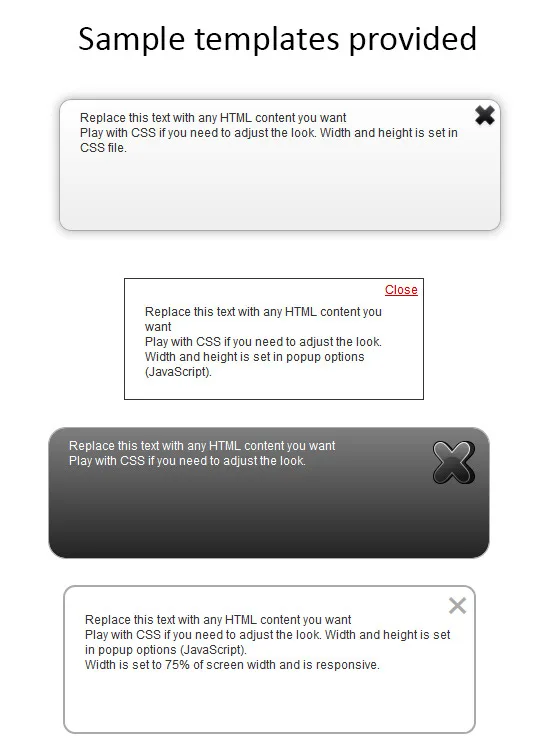
NEW in 1.7 – sample templates
There are 4 templates added to help you create popup.
 Available configuration:
- floating speed, reaction time
- fly-in direction
- fly-out direction
- show overlay
- show static popup
- enable selfclose
- set start time – also run on multiple pages
- disable popup with cookie
- the way popup appears/disappears
- disable popup on mobile devices
- onOpen and onClosed callbacks
- responsive popups, better handling on mobile devices
Updates:
16 March 2020 – version 2.0
- show popup on ‘exit intent’ option (user moves cursor to the top of the window)
- follow mouse cursor option
- refreshed mobile detection
6 October 2015 – version 1.8
- ‘width’ and ‘height’ can be set using % – which makes popup responsive to the screen width and/or height
- improvements on mobile
- new template added
- disable_on_desktop setting
27 July 2014 – version 1.7
- 3 templates added, to help creating popup
- disable_on_mobile setting
- ‘width’ and ‘height’ settings added
- onOpen and onClosed callbacks
23 August 2013 – version 1.6
- popup_timeout_hours – ability to set cookie expiration date by hours too
- better support for HTML content with events attached
5 March 2013 – version 1.5
- works now with jQuery 1.9 branch
- align popup to bottom (when top=’100%’)
- better working on mobile devices
29 December 2011 – version 1.4
- multipages_timer setting – ability to show the popup after specified time on any page of your website
- popup can now disappear in various ways (hide, fade out, slide up) – when fly-out is disabled
6 October 2011 – version 1.3
- added fly-out of the screen (with specifying direction) after popup close
- confirm closing the popup option
26 September 2011 – version 1.2
- callback function
- align popup to right (when left=’100%’)
13 May 2011 – version 1.1
- added ‘cookie_views’ setting. Determine how many times the site can be viewed (refreshed) until popup will appear again
- added ‘left’ setting. Gives the ability to set the popup position from the left side of the screen (for centered=false)
- ‘top’ and ‘left’ can be now set using percent i.e. ‘30%’
Categories
Tags
External listing. code.market does not sell this product and does not process payment for it. Pricing, payment, delivery, licensing, refunds, and support are handled by the third-party merchant on its own website. We may earn an affiliate commission from a referral. Details.
Products of the Week.
Submit🥇

STOP GUESSING WHAT TO POST
AI that learns your brand voice and builds a month of consistent, on-brand social content: carousels, posts and hooks that sound like you, not like everyone else's AI.
SaaS · 4,282 views · 38 clicksSaaS · Week 45 · 4,282 views · 38 clicks
🥈

Conversational Backlinks for Busy Founders
Place Backlink Relevant Conversation for your domain across Forums and Conversations
Website · 41,992 views · 223 clicksWebsite · Week 45 · 41,992 views · 223 clicks
🥉

upvote.club
Free Social Media Engagement that Helps Boost Your Content. Upvote Club supports 19 social networks with 100+ engagement actions in one dashboard. Add links to your posts and get free engagement from real users.
SaaS · 40,034 views · 117 clicksSaaS · Week 45 · 40,034 views · 117 clicks
#4

Substack Posting API
Onboard your Agent to Substack. Write Publish on Substack via API
SaaS · 59,044 views · 198 clicksSaaS · Week 45 · 59,044 views · 198 clicks
#5

Seenshot App
Free, Fast, MacOS Screenshot app. Make Screenshot cmd+shift+2 and send it via link
Desktop App · 28,416 views · 122 clicksDesktop App · Week 45 · 28,416 views · 122 clicks
#6

Hand-Placed Backlinks $9.99 per link. Flat rate.
Buy hand-placed forum, Q-A and directory backlinks. Flat $9.99 per link, no subscriptions — you only pay for approved listings.
Website · 4,252 views · 19 clicksWebsite · Week 45 · 4,252 views · 19 clicks
#7

Free Invoice Generator - PDF Invoices in Your Browser, No Sign-Up
A free invoice maker for freelancers and small businesses: fill in the invoice, check the live preview, and download a PDF that looks exactly like it. Any currency, tax per item, three templates, no sign-up, and nothing leaves your device.
2,930 views · 17 clicksWeek 45 · 2,930 views · 17 clicks
#8

Merge PDF Files Free - Combine PDFs in Your Browser, No Upload
A free PDF merger for office workers, students, and freelancers: combine PDFs and images into one file in the browser, reorder files and pages, pick page ranges, keep bookmarks, and open password-protected PDFs. Nothing is uploaded, no sign-up, no watermark.
2,706 views · 13 clicksWeek 45 · 2,706 views · 13 clicks