GameIslandRPG
Description
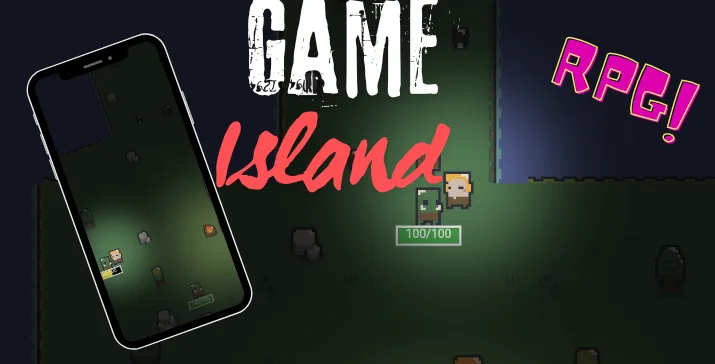
The game, named “Game Island,” is an exciting adventure set in a fantasy world where players take on the role of a hero fighting orcs, discovering various decorations, and collecting mushrooms that restore health. Here is a description of the individual elements of the game:
Main Features and Characters
Hero (GameHero)
-
The player controls the hero character using a joystick and action buttons.
-
The hero can move left and right and attack enemies (orcs).
-
The hero has different animations for movement, attacks, and taking damage.
-
The character can restore health by collecting mushrooms.
Orcs (Orc)
-
Orcs are the main enemies in the game.
-
They have animations for movement, attacks, taking damage, and death.
-
The player gains experience points by defeating orcs, which allows them to level up.
Decorations and Interactive Objects
Chess
-
Chess is an interactive decoration that changes its appearance when the hero approaches.
-
Upon being touched by the hero, the chess can generate mushrooms.
Mushrooms
-
Mushrooms are collectible items that restore health to the hero.
-
They have a movement animation that makes them appear in random places.
Lamps (Lamp)
-
Lamps are decorations that emit light, adding atmosphere to the game world.
-
They emit pulsating light in an orange color, creating atmospheric visual effects.
User Interface
Player Interface
-
The user interface shows the current health status, experience level, and hero’s level.
-
The health and experience bars are dynamically updated during the game.
-
The hero gains experience points by defeating orcs, allowing them to level up.
Other Features
-
Sounds and Music: The game includes sound effects, such as the sound of hitting, which is played during the hero’s attacks.
-
Lighting: The game uses dynamic lighting, adding depth and realism to the game world.
-
Dialogues: Characters in the game can interact by displaying dialogues, adding narrative context to the gameplay.
Summary
“Game Island” is an engaging adventure game that offers dynamic combat, interactive environmental elements, and a character development system. Players will need to defeat numerous orcs, collect mushrooms to restore health, and uncover the secrets hidden in the beautifully designed game world. With diverse animations, sound effects, and lighting, the game provides an immersive experience that will attract both younger and older players.
4o
Categories
Tags
Products of the Week.
Submit🥇

STOP GUESSING WHAT TO POST
AI that learns your brand voice and builds a month of consistent, on-brand social content: carousels, posts and hooks that sound like you, not like everyone else's AI.
SaaS · 3,582 views · 33 clicksSaaS · Week 45 · 3,582 views · 33 clicks
🥈

Conversational Backlinks for Busy Founders
Place Backlink Relevant Conversation for your domain across Forums and Conversations
Website · 41,103 views · 222 clicksWebsite · Week 45 · 41,103 views · 222 clicks
🥉

upvote.club
Free Social Media Engagement that Helps Boost Your Content. Upvote Club supports 19 social networks with 100+ engagement actions in one dashboard. Add links to your posts and get free engagement from real users.
SaaS · 39,162 views · 113 clicksSaaS · Week 45 · 39,162 views · 113 clicks
#4

Substack Posting API
Onboard your Agent to Substack. Write Publish on Substack via API
SaaS · 58,197 views · 198 clicksSaaS · Week 45 · 58,197 views · 198 clicks
#5

Seenshot App
Free, Fast, MacOS Screenshot app. Make Screenshot cmd+shift+2 and send it via link
Desktop App · 27,588 views · 120 clicksDesktop App · Week 45 · 27,588 views · 120 clicks
#6

Hand-Placed Backlinks $9.99 per link. Flat rate.
Buy hand-placed forum, Q-A and directory backlinks. Flat $9.99 per link, no subscriptions — you only pay for approved listings.
Website · 3,473 views · 18 clicksWebsite · Week 45 · 3,473 views · 18 clicks
#7

Free Invoice Generator - PDF Invoices in Your Browser, No Sign-Up
A free invoice maker for freelancers and small businesses: fill in the invoice, check the live preview, and download a PDF that looks exactly like it. Any currency, tax per item, three templates, no sign-up, and nothing leaves your device.
2,164 views · 16 clicksWeek 45 · 2,164 views · 16 clicks
#8

Merge PDF Files Free - Combine PDFs in Your Browser, No Upload
A free PDF merger for office workers, students, and freelancers: combine PDFs and images into one file in the browser, reorder files and pages, pick page ranges, keep bookmarks, and open password-protected PDFs. Nothing is uploaded, no sign-up, no watermark.
2,005 views · 13 clicksWeek 45 · 2,005 views · 13 clicks