WooMail - WooCommerce Email Customizer
Description
WooMail – WooCommerce Email Customizer Allows You To Customize An Email Template In Order To Professionally Resonate With Your Brand… Under 7 Minutes (Oh, no coding language is required)
I dread it as much as you do. I’m talking about the laborious time of customizing email templates… Creating email designs from scratch, the amount of coding knowledge required, the poor design…

That undoubtedly takes a lot of my time. And I bet it would take you too (if you aren’t a skilled programmer with years of experience).
And if I manage somehow to create the whole email template, after spending a few hours on it, I still feel limited in terms of design.
But like any other struggle in this world, there must be a solution to this annoying and time-consuming problem.Truly, there is…
You can hire a professional email marketing expert and you can pay some huge $$$ in order to assemble a simple campaign…
I’m not saying this isn’t worth it, in fact, it is worth it! But why should you spend so much money on an email marketing expert when you can use WooMail – WooCommerce Email Customizer.
Beautiful email design…
Easy to handle…
No coding skills required…
Potential of increasing sales by 12% by including automated product recommendations…
And most importantly, you can save a significant amount of time!
Those are some of the cool features you can expect from this WooCommerce email customizer when you start using it!
Instead of spending hundreds, even thousands, of dollars on email marketing experts, you can merely use an email customizer tool. It saves you time. It saves you money. You even don’t need a basic understanding of coding knowledge.
On the other hand, this tool allows you to assemble a professional email from scratch under a couple of minutes (7 to be exact), that makes your shop look authoritative.
See, you can surely hire a professional copywriter to assemble your email body… and truth be told, your email merely can’t drive sales if it has a bad copy (it’s widely popular truth)...
Yet, the copy goes only halfway.
In order to make outstanding and professional emails that literally make your customers say “wow,” email design is the other part of the equation.
Imagine this:
You receive 2 emails right now in your inbox. One is with a decent design but the other one features an outstanding look and great copy. I don’t know about you but it seems like a no-brainer for me to go with the decent one.
Check this out: the average person receives 84 emails PER DAY. And if you think that you have a chance to stand out without a professional design, this couldn’t be further from the truth.
Yes, you can still make sales… but, who doesn’t want to make more sales? I guess no one. (At least I don’t know such guys).
And you can easily make more sales by creating a beautiful design, and including a few more features WooMail brings to the table…
But how can you do that?
I’ll show you in a few. Bare with me…
Do you want to test it?
Before buying you can test any feature of our plugin. Demo URL : emailcustomizer.com/demo Username: Demo Password: Demo321


What Is WooMail?
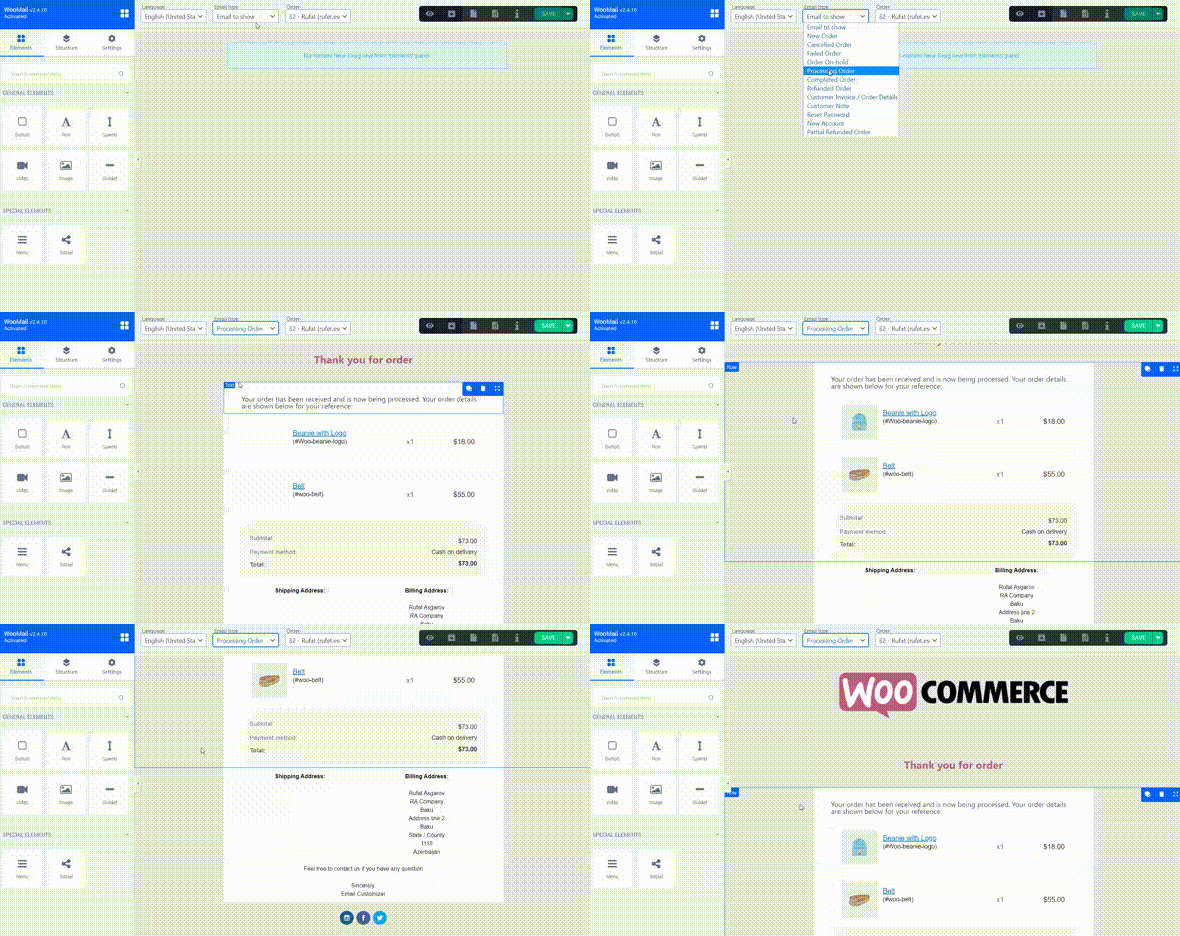
As you already know, WooMail represents an email customizable tool that allows you to build your desired email with a drag & drop feature.
Luckily, the WooMail – WooCommerce Email Customization tool provides you with +10 email templates/blocks. Simply pick a template that resonates with your brand and you’re good to go.
That’s how simple it is. No need to know laborious codes in order to assemble a beautiful email design. Simply click, hold, drag, and drop. And that’s the magic when it comes to creating professional email designs.
Once you’re finished, you can save your current email template and use it for future projects for greater convenience.
And here’s what this email customization tool can help you with:
- Customizing the styling, colors, header & footer format, add custom links, link to your social networks.
- Moreover, you can even make text edits. All this helps you craft a professionally-looking email that makes the reader say “why not? I would like to try out this product.”
- Easily make and preview changes at a moment’s notice.
- Preview & send/resend emails (New Order, Invoice, etc) from existing WooCommerce Orders.
- Automated product recommendation section. (the secret of driving more sales is actually because of this feature)
Here are some of the email scenarios you can beautifully design with the help of our plugin:
- New order
- Canceled order
- Failed order
- Order On-hold
- Processing order
- Completed order
- Refunded order
- Customer invoice
- New Account
- Reset Password
- Customer Note
- Partially Refunded Order
And to make your emails even more compelling and eye-catching, you can now include dynamic information using shortcodes. Oh, and it also supports multi language.
Why Do You Need It?
Product Recommendations
The uniqueness of the WooMail – WooCommerce Email Customizer stems from its “product recommendations” feature. It’s actually a new section we recently included, and we hear a lot of great stories from our users for it (like a 12% increase in sales). Simply put: it shows the reader other recommended products he can refer to based on the items he has bought so far.
It’s unbelievably true how much does this feature helps. You see, most other email customizing tools out there simply offer email design. And yes, that’s great, it helps you stand out from your competitors.
But if you would like to really dominate and make more sales, you can’t go wrong with this one.
You merely enable the feature and it includes automated product recommendations (no effort is needed from your side to manage it). What happens? We’ve tested that with a significant amount of our current users.
Everyone is super satisfied because customers start coming back to the shop and 1 out of 5 buys another product. Cool, eh?
You can easily create a professional design for your emails in two simple steps. (in a matter of under 7 minutes)- You can choose from 11 available professionally designed templates and start working on your current email.
- Customize. Preview. Test. Publish.
These straightforward steps allow you to finish your customization in under a few minutes and actually create outstanding emails that professionally resonate with your shop authority.
Specifically Made For WooCommerce StoresAll email templates/blocks are specifically designed for WooCommerce stores. Thus the tool provides you with all the necessary features you need in order to create your WooCommerce emails actually look compelling.
Unlike other email customizers, this one not only allows you to change the design of the email but the body copy too.
Once you have the design ready in under a few minutes, put the compelling text you had a copywriter to write you in order to make a finished look an email ready to drive some sales.
Design
Oh, yes, the design is GOLD.
But you don’t know how to create an attractive design…
Or you perhaps have an idea, yet, it takes to much time in order to assemble a decent design…
I know that feeling. I’ve been in your shoes… There’s merely nothing more annoying than spending time on activities that don’t drive direct sales.
Instead of crafting email designs, you can think of profitable campaigns that can help you scale your business.
And that’s why the WooMail – WooCommerce Email Customizer provides you with 11 predefined email templates and 5 predefined blocks. These allow you to instantly design your email frame in just a few minutes.
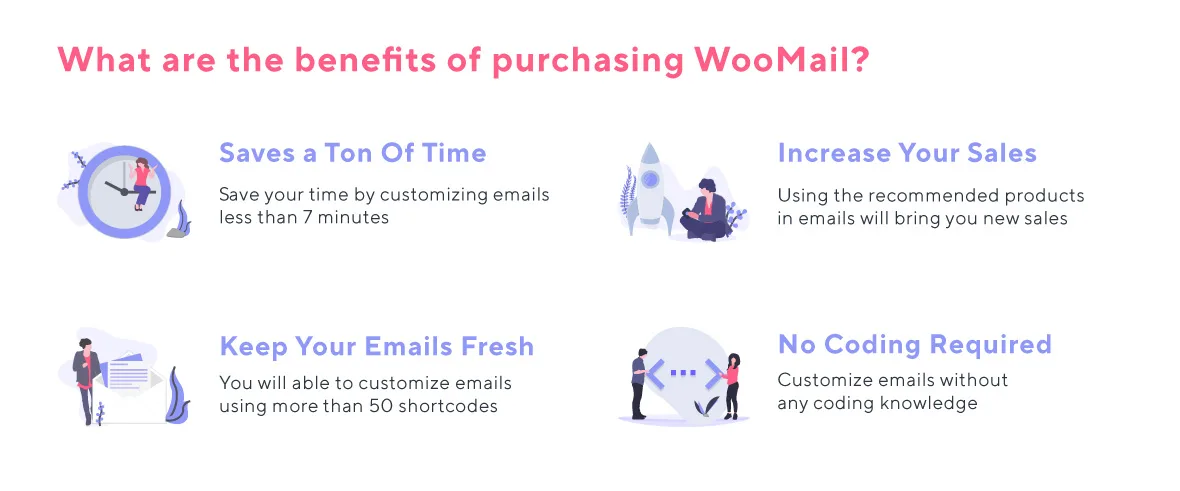
Keep your emails fresh
Everything regarding the WooMail tool is completely automated. One of the cool things, why WooMail stands out, is because it provides you with fresh new emails, allowing you to skip the manual customization part of the header, footer, etc.
Saves a Ton Of Time
7 minutes. Even under 7 minutes. That’s what it takes WooMail to create a whole email sequence of beautifully designed emails.
Rather than spending approximately 30 to 40 minutes, like your competitors do, on customizing each email, you’ll design your whole email campaign automated in merely a couple of minutes.
Ready to launch off, and start making some profits. And now, with the product recommendations features, you actually have a chance by boosting your sales by 12%.
Core Features
Template Manager
Over 10 predefined templates and blocks, ensuring you work quickly and effortlessly
Draft templatesYou can create your own template and save it for future usage
Copy templatesCopy existing email templates instead of creating from scratch, and save your time
Import / Export
It gives you the opportunity to create your email templates in your development environment then upload them to a live website. Just a few steps:
- Customize it in development environment
- Export email template or all of them
- Import them to production
You can use this feature as a BackUp manager, before upgrading your website just take backup of your emails, and restore them any time.
Testing Customized Emails
Send emailThe easiest way of testing the email template, just you need to write your email address
Note: WooMail uses the wp_mail function for sending emails. If you want to test your email template, you need correct configure your wp_mail With the help of some plugins, you can do it very easily. For example, the WP Mail SMTP plugin.
Preview modeThis feature helps you test your email without sending any email. If you want to see the final version of your template
Manual TestingStill, you are looking the other way for testing? This feature is for you, download the email template as an HTML and test it any browser or send it manually to any email address.
Dynamic Content
The most complete shortcodes collection with more than 50 elements. You can build and customize your emails with several available options. Different styles are considered in all shortcodes makes it easy edit and customize them in visual mode
Custom Shortcode(backend)Basically, it allows developers to add their code inside a function and then register that function with WordPress as a shortcode, so for creating the dynamic custom shortcode, you need basic knowledge of PHP.
All Features
- WooMail – WooCommerce Email Customizer is actually unbelievably easy to operate with. No coding skills are required. In fact, I’ve tested it with my 11-year-old son. After giving him a 4-min short guide, he managed to create his own design under 7 minutes .
- As you already know, when customizing an email, you are limited in terms of design – in most cases. I’m proud to tell you that the WooMail tool comes without any limits.
- Shortcodes will help you for using dynamical information about your product, order or website.
- An essential feature: testing/preview mode. Once you’ve created your email template, you can test it or preview before going live.
- Over 10 predefined templates and blocks, ensuring you work quickly and effortlessly.
- 6 different email designs for products of the order.
- Multi-Language.
- Unlimited Custom Shortcode.
- Settings for show sku, show images, image sizes.
- RTL Support.
- Replace Email – turn on/off email rendering. If you have a live website, just create your email template test it and then activate the new emails.
Compatible Plugins
- Flexible WooCommerce Checkout Field Editor
- WooCommerce Checkout Field Editor
- Flexible Checkout Fields for WooCommerce
- WooCommerce Sequential Order Numbers Pro
- WooCommerce Instamojo
- Woo Order Note template
- WoodMart – Responsive WooCommerce WordPress Theme
- Order Delivery Date for WooCommerce
- WooCommerce Shipping Tracking
- Motors – Automotive, Car Dealership, Car Rental, Auto, Classified Ads, Listing WordPress Theme
- WooCommerce Subscriptions
- WooCommerce Customer Manager
- Checkout Field Editor(Free/PRO) By ThemeHigh
- WPML
- WooCommerce Order Status Manager
Do you have any suggestion?
Do not hesitate let us know. We will add it in our Roadmap , then start implement that feature to the plugin.
Requirements
You will need the following sofwares to use this plugin.
- PHP version 5.6 or greater
- WordPress 4.1 or higher
- WooCommerce 2.5 or higher
Frequently Asked Questions
- FAQ
- How to Install
- How to Test Email Template?
- How to use Predefined Email Templates and Blocks
- How to Copy Email Template
- Supported Shortcode List
- How to Customize WooCommerce Emails
- Compatible Plugins
- How to create dynamic custom shortcode
Changelog
Version 3.0.34 | 21.10.2020
- Integrated : WooCommerce coupons plugin, more information :
- Fixed : Minor issues

--------------------

Version 3.0.31 | 21.09.2020
- Added : ec_woo_order_payment_url_2 shortcode for using payment URL with button element.
- Integrated : Order Delivery Date for WooCommerce
- Fixed : custom CSS saving problem
- Fixed : Hiding thumbnail images
- Fixed : Minor issues

--------------------

Version 3.0.12 | 01.07.2020
- Added : show_product_link settings, Now can control product link
- Added new shortcode : ec_woo_custom_field for getting any custom fields example: .
Note: need to use the only single quote.
- Updated : translation file
- Fixed : ec_woo_user_name problem
- Fixed : new_account problem
- Fixed : Minor issues

--------------------

Version 3.0.8 | 24.06.2020
- Added : using custom images in social icons
- Added new shortcodes: order_remaining_refund_amount_formatted, order_currency , order_currency_symbol ,order_total_refunded_amount_formatted
- Fixed : Lost password problem
- Fixed : Minor issues

--------------------

Version 3.0.2 | 07.06.2020

- Fixed : WooCommerce Subscription integration problems
- Fixed : Minor issues

--------------------

Version 3.0 | 23.05.2020

- Integrated : Checkout Fields PRO (ThemeHigh)
- Added : ec_woo_items_7
- Fixed : Activation problem
- Fixed : Bank details problem
- Fixed : Minor issues

--------------------

Version 2.4 | 06.10.2019

- Integrated : WPML
- Integrated : Checkout Field Editor (Checkout Manager) for WooCommerce
- Fixed : Flexible Checkout Fields for WooCommerce(By WP Desk)
- Fixed : date shortcodes will use wp settings date format
- Fixed : Responsive problems in ec_woo_items_6
- Fixed : Minor issues

--------------------

  Version 2.3 | 17.07.2019

  - Added : Custom Code from backend feature. You can create your own shortcode from the backend
  - Integrated : Woo Customer Manager plugin, shortcode: ec_woo_customer_number
  - Fixed : Outlook issues.
  - Fixed : Responsive problems.
  - Fixed : Save button problem in builder UI
  - Fixed : Minor issues

  NOTE: For fixing outlook problems and responsive problems need to resave previously saved emails

--------------------

Version 2.2.11 | 26.05.2019
- Added : New shortcodes for Woo Subscription. ec_woo_wcs_id,ec_woo_wcs_price,etc. please check shortcode list for seeing all list.
- Added : Settings for hide 'custom shortcode' page from wordpress menu
- Added : Export/import all templates at once
- Added : Settings for showing information which are added from other plugins.
- Fixed : Image size problem in emails
- Fixed : Templates extra spaces problem
- Fixed : Shortcode 'ec_woo_order_link' problem
- Fixed : Templates table headers regarding mobile preview
- Fixed : Email notification in outlook was showed javascript:void text
- Fixed : All predefined templates problems
- Fixed : When showing downloadable products, bullets was showed in emails. now fixed.
- Fixed : Minor issues

--------------------

Version 2.2.10 | 25.04.2019
- Fixed : email responsive problem
- Fixed : builder UI problems

--------------------

Version 2.2.9 | 09.04.2019
- Added : new shortcode ec_woo_related_items. show your recommend items in your email and increase your sales.
- Added : integration 'WooCommerce Subscription'
- Fixed : RTL UI problems
- Fixed : Minor issues

--------------------

Version 2.2.8 | 25.03.2019
- Added : new shortcode ec_woo_order_shipping_total, show shipping information with fees
- Added : integration 'Motors' theme
- Added : 4 new shortcodes related 'Motors' theme: ec_woo_order_pickup_date,ec_woo_order_pickup_location,ec_woo_drop_date,ec_woo_drop_location
- Added : 2 new shortcodes ec_woo_user_account_url_2 ,ec_woo_user_password_reset_url_2 with custom text
- Fixed : json parse problems in the UI side
- Fixed : bugs in loading bank information
- Fixed : builder UI RTL support

--------------------

Version 2.2.7 | 11.03.2019
- Fixed : issues with WooCommerce 3.5.x version

--------------------

Version 2.2.5 | 08.03.2019
- Added : One of the valuable customer (@fenrirlin) prepaid 'Traditional Chinese' and 'Simplified Chinese' translations
- Added : new shortcodes for customer notes last message and last month -   ,
- Added : enable/disable for any email type.
- Fixed : improvement builder UI
- Fixed : shipping tracking info plugin integration
- Fixed : minor issues

--------------------
Version 2.1.8 | 29.01.2019
- Added : New shortcodes:  and
- Added : Dynamic date format for all date shortcodes . You need to add type='date' to shortcode, then define your format. Ex:  more info:
- Fixed : Email builder UI bugs, reset password and new account email type problems
--------------------

Version 2.1 | 16.01.2019
- Integrated : Woocommerce shipping tracking
- Added : showing product version, if it is not activating now possible activate it again.
- Added : internal log system
- Added : short codes for bank information
- Added : short codes will generate automatically,
so if you are using plugin which we integrated it you will see all available short codes
- Added : partial refund order email type supported
- Added : short code for showing order refund, order totals, etc. information

--------------------

Version 2.0 | 22.12.2018
- Integrated : Order delivery date plugin lite version
- Added : Line height option added to TinyMCE editor
- Fixed : Flexible checkout fields problems
- Fixed : Unicode problem when using different languages
- Fixed : After collapse/expand left menu, canvas background color changed default
- Fixed : Send Test Email feature. ( You should configure wp_mail correctly )
- Fixed : Convert URL problem in TinyMCE editor
- Fixed : Outlook issues
- Fixed : Minor bugs

--------------------

Version 1.9 | 20.11.2018
- Added : Linkable product names
- Added : Compatible with Woodmart WordPress Theme
- Added : Auto Update feature
- Added : URL to shortcode - ec_woo_view_order_url , previously showed just text
- Fixed : Unicode problem when sending emails
- Fixed : Image size problem
- Fixed : Email preview, Responsive image problems, Bugs in outlook, minor bugs

--------------------

Version 1.8 | 04.11.2018
- Fixed : responsive image problem in small devices
- Fixed : small issues when using RTL
- Fixed : when using the long product name, it went to the second line.
- Fixed : Minor bugs

--------------------

Version 1.7 | 01.11.2018
- Added : now compatible with 'Woo Order Note template'
- Added : RTL Support
- Fixed : https problem in preview URL
- Updated : Social icons loaded from user's website , not from the CDN
- Fixed : Minor bugs

---------------------

Version 1.6 | 22.10.2018
- Added : Replace Email turn on/off feature
- Added : Email Preview functionality
- Added : Added time for the created date column in the 'My templates' tab.
- Added : now compatible with 'Instamojo'
- Fixed : Minor bugs
- Fixed : Left panel switcher button
- Fixed : Mozilla browser bugs
- Fixed : bugs in woo 2.6 version

---------------------

Version 1.5 | 03.10.2018
- Added : 'Flexible Woocommerce Checkout Field Editor' compatible
- Added : 'WooCommerce Sequential Order Numbers Pro compatible
- Fixed : Minor bugs

---------------------

Version 1.4 | 26.09.2018
- Added : Support 'Flexible Checkout Fields for WooCommerce' plugin
- Fixed : Send Test email bugs fixed
- Fixed : Removed other plugins admin notices from builder interface
- Fixed : CSS improvement in the builder interface
- Fixed : Minor bugs

---------------------

Version 1.3 | 11.09.2018
- Added : 'Customer Note' email type
- Added : New selectors for adding custom CSS
- Fixed : Custom CSS bugs
- Fixed : Minor bugs

---------------------

Version 1.2 | 11.09.2018
- Added : Custom CSS option.

---------------------

Version 1.1 | 10.09.2018
- Added : Support custom fields ( 'WooCommerce Checkout Field Editor' )
- Added : 'Reset Password' & 'New Account' email types
- Added : New Short codes ( ec_woo_user_id, ec_woo_user_activation_link , ec_woo_user_password_reset_url , ec_woo_user_account_url , ec_woo_user_password )
- Added : SKU settings
- Added : Unlimited custom code. The users can create unlimited custom code
- Fixed : Minor bugs

---------------------

Version 1.0.3 | 25.08.2018
- Fixed : Minor bugs

---------------------
Version 1.0.2 | 23.08.2018
- Fixed : showing the 'Please wait' message and nothing happen. Now fixed.

---------------------
Version 1.0.1 | 14.08.2018
- Fixed methods which have conflicts with other plugins
- Added .po file for translate

---------------------

Version 1.0 | 27.07.2018
- Initial Release
Categories
Tags
External listing. code.market does not sell this product and does not process payment for it. Pricing, payment, delivery, licensing, refunds, and support are handled by the third-party merchant on its own website. We may earn an affiliate commission from a referral. Details.
Products of the Week.
Submit🥇

STOP GUESSING WHAT TO POST
AI that learns your brand voice and builds a month of consistent, on-brand social content: carousels, posts and hooks that sound like you, not like everyone else's AI.
SaaS · 4,282 views · 38 clicksSaaS · Week 45 · 4,282 views · 38 clicks
🥈

Conversational Backlinks for Busy Founders
Place Backlink Relevant Conversation for your domain across Forums and Conversations
Website · 41,992 views · 223 clicksWebsite · Week 45 · 41,992 views · 223 clicks
🥉

upvote.club
Free Social Media Engagement that Helps Boost Your Content. Upvote Club supports 19 social networks with 100+ engagement actions in one dashboard. Add links to your posts and get free engagement from real users.
SaaS · 40,034 views · 117 clicksSaaS · Week 45 · 40,034 views · 117 clicks
#4

Substack Posting API
Onboard your Agent to Substack. Write Publish on Substack via API
SaaS · 59,044 views · 198 clicksSaaS · Week 45 · 59,044 views · 198 clicks
#5

Seenshot App
Free, Fast, MacOS Screenshot app. Make Screenshot cmd+shift+2 and send it via link
Desktop App · 28,416 views · 122 clicksDesktop App · Week 45 · 28,416 views · 122 clicks
#6

Hand-Placed Backlinks $9.99 per link. Flat rate.
Buy hand-placed forum, Q-A and directory backlinks. Flat $9.99 per link, no subscriptions — you only pay for approved listings.
Website · 4,252 views · 19 clicksWebsite · Week 45 · 4,252 views · 19 clicks
#7

Free Invoice Generator - PDF Invoices in Your Browser, No Sign-Up
A free invoice maker for freelancers and small businesses: fill in the invoice, check the live preview, and download a PDF that looks exactly like it. Any currency, tax per item, three templates, no sign-up, and nothing leaves your device.
2,930 views · 17 clicksWeek 45 · 2,930 views · 17 clicks
#8

Merge PDF Files Free - Combine PDFs in Your Browser, No Upload
A free PDF merger for office workers, students, and freelancers: combine PDFs and images into one file in the browser, reorder files and pages, pick page ranges, keep bookmarks, and open password-protected PDFs. Nothing is uploaded, no sign-up, no watermark.
2,706 views · 13 clicksWeek 45 · 2,706 views · 13 clicks