
Next.js SaaS Web Template by FTStore
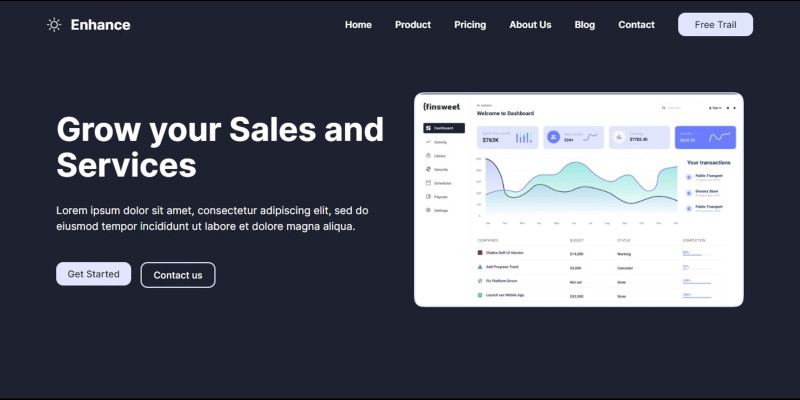
Description
Unlock the future of SaaS development with our Next.js Web Template. Seamlessly blending modern design and responsiveness, this feature-rich template empowers developers to create cutting-edge web applications. Tailor-made for efficiency, it incorporates the power of Next.js, ensuring optimal performance and scalability. The template boasts a clean and customizable codebase, making it a versatile solution for a variety of SaaS projects. Explore its comprehensive documentation and dedicated customer support, ensuring a hassle-free development journey. Elevate your projects with innovation – choose the Next.js SaaS Web Template for unparalleled web development experiences.
Features
Next.js SaaS Web Template Features:
- Modern Design:
- Sleek, contemporary layout for a visually appealing user interface.
- Responsive Layout:
- Ensures optimal user experience on all devices, from desktops to mobiles.
- Next.js Integration:
- Harness the power of Next.js for efficient server-side rendering and seamless navigation.
- TypeScript Compatibility:
- Leveraging TypeScript for enhanced code scalability and reliability.
- Tailwind CSS Styling:
- Easy customization with the flexibility of Tailwind CSS.
- Feature-Rich Components:
- Includes a variety of components to enhance functionality and user interaction.
- Clean & Customizable Codebase:
- Well-organized and customizable code for easy adaptation to specific project needs.
- Comprehensive Documentation:
- In-depth guides to facilitate a smooth setup and customization process.
- Dedicated Customer Support:
- Responsive assistance to ensure a positive user experience.
- Free Lifetime Updates:
- Stay current with continuous improvements and feature enhancements.
Elevate your SaaS projects with this powerful and versatile Next.js web template.
Requirements
Technical Requirements for Next.js SaaS Web Template:
- Node.js:
- Ensure Node.js is installed on your development environment for Next.js functionality.
- Text Editor:
- Use a preferred text editor such as Visual Studio Code, Sublime Text, or Atom.
- Package Manager:
- Have a package manager like npm or Yarn to manage project dependencies.
- Web Browser:
- Compatible with modern web browsers such as Chrome, Firefox, Safari, or Edge.
- Internet Connection:
- Required for initial download, updates, and accessing online resources.
- Basic Web Development Knowledge:
- Familiarity with HTML, CSS, JavaScript, React and NextJS for effective customization.
- TypeScript Understanding (Optional):
- To take full advantage of TypeScript features, basic knowledge is beneficial.
- Tailwind CSS (Optional):
- For advanced styling and customization using Tailwind CSS.
- Git (Optional):
- Recommended for version control and collaborative development.
- Operating System:
- Compatible with Windows, macOS, or Linux operating systems.
Ensure your system meets these requirements to leverage the full potential of the Next.js SaaS Web Template. For any questions or assistance, feel free to reach out to our dedicated customer support.
Instructions
Step-by-Step Guide to Using the Next.js SaaS Web Template:
1. Download the Template: - After purchasing, download the template files from your Codester account.
2. Extract Files: - Unzip the downloaded file to access the template's contents.
3. Install Node.js: - Ensure Node.js is installed on your machine. Visit [nodejs.org](https://nodejs.org/) for installation instructions.
4. Install Dependencies: - Open a terminal in the template directory and run `npm install` or `yarn` to install project dependencies.
5. Customize Configuration: - Update configuration files, such as `config.js`, with your project-specific settings.
6. Modify Content: - Edit the template's HTML, CSS, and JavaScript files to tailor the design to your project requirements.
7. TypeScript (Optional): - If using TypeScript, modify `.tsx` files and update types as needed.
8. Tailwind CSS (Optional): - Customize styling using Tailwind CSS classes. Refer to Tailwind documentation for guidance.
9. Run the Application: - Execute `npm run dev` or `yarn dev` to start the development server.
10. Preview in Browser: - Open your browser and navigate to `http://localhost:3000` to preview your application.
11. Testing: - Thoroughly test your application to ensure all features and functionalities work as expected.
12. Documentation Review: - Refer to the provided documentation for additional guidance on customization and best practices.
13. Deploy Your Application: - When satisfied with your changes, deploy your Next.js SaaS application to your preferred hosting platform.
14. Receive Updates: - Stay informed about template updates and enhancements by checking for announcements or visiting our Codester profile.
Feel empowered to build outstanding SaaS projects with our Next.js template. For any questions or support, reach out to our dedicated customer support team. Happy coding!.
| Author | FTStore |
|---|---|
| Category | Themes / HTML / Admin Templates |
| Price | $19 |
| Extended License | $57 |
| Likes | 10 |
| First Release | Jan 9, 2024 |
| Last Update | Jan 9, 2024 |
| Files included | .css, .html, JavaScript .js |
Categories
Tags
External listing. code.market does not sell this product and does not process payment for it. Pricing, payment, delivery, licensing, refunds, and support are handled by the third-party merchant on its own website. We may earn an affiliate commission from a referral. Details.
Products of the Week.
Submit🥇

STOP GUESSING WHAT TO POST
AI that learns your brand voice and builds a month of consistent, on-brand social content: carousels, posts and hooks that sound like you, not like everyone else's AI.
SaaS · 4,271 views · 38 clicksSaaS · Week 45 · 4,271 views · 38 clicks
🥈

Conversational Backlinks for Busy Founders
Place Backlink Relevant Conversation for your domain across Forums and Conversations
Website · 41,978 views · 223 clicksWebsite · Week 45 · 41,978 views · 223 clicks
🥉

upvote.club
Free Social Media Engagement that Helps Boost Your Content. Upvote Club supports 19 social networks with 100+ engagement actions in one dashboard. Add links to your posts and get free engagement from real users.
SaaS · 40,019 views · 117 clicksSaaS · Week 45 · 40,019 views · 117 clicks
#4

Substack Posting API
Onboard your Agent to Substack. Write Publish on Substack via API
SaaS · 59,030 views · 198 clicksSaaS · Week 45 · 59,030 views · 198 clicks
#5

Seenshot App
Free, Fast, MacOS Screenshot app. Make Screenshot cmd+shift+2 and send it via link
Desktop App · 28,400 views · 122 clicksDesktop App · Week 45 · 28,400 views · 122 clicks
#6

Hand-Placed Backlinks $9.99 per link. Flat rate.
Buy hand-placed forum, Q-A and directory backlinks. Flat $9.99 per link, no subscriptions — you only pay for approved listings.
Website · 4,241 views · 19 clicksWebsite · Week 45 · 4,241 views · 19 clicks
#7

Free Invoice Generator - PDF Invoices in Your Browser, No Sign-Up
A free invoice maker for freelancers and small businesses: fill in the invoice, check the live preview, and download a PDF that looks exactly like it. Any currency, tax per item, three templates, no sign-up, and nothing leaves your device.
2,922 views · 17 clicksWeek 45 · 2,922 views · 17 clicks
#8

Merge PDF Files Free - Combine PDFs in Your Browser, No Upload
A free PDF merger for office workers, students, and freelancers: combine PDFs and images into one file in the browser, reorder files and pages, pick page ranges, keep bookmarks, and open password-protected PDFs. Nothing is uploaded, no sign-up, no watermark.
2,698 views · 13 clicksWeek 45 · 2,698 views · 13 clicks